How can I enable my Ubigi eSIM profile on my iPad when I want to use it again?
If you need to reactivate your Ubigi eSIM profile on your iPhone/iPad in order to use it again:
1 – First, go to Settings and deactivate « Wi-Fi » option:
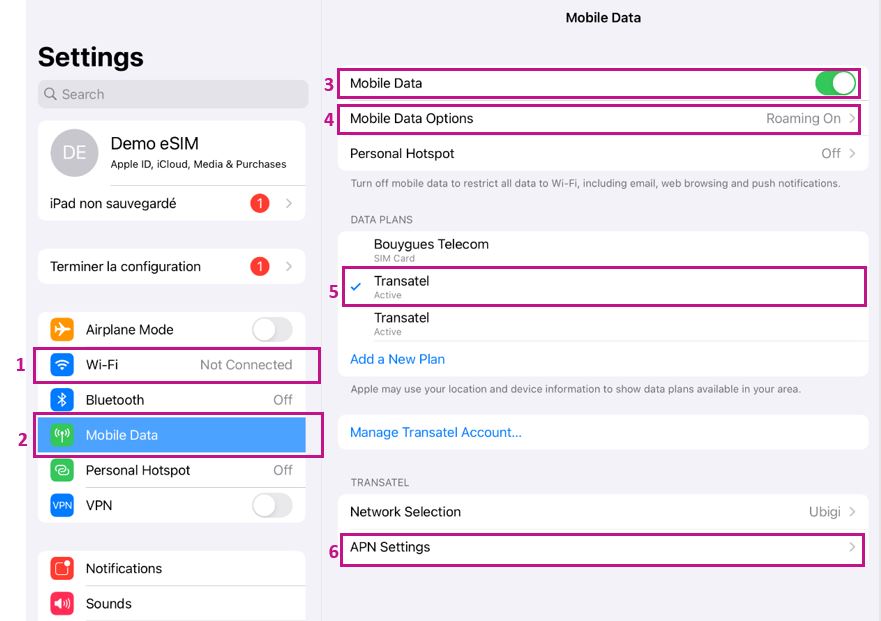
2 – Then, go to the « Mobile Data » section
3 – Activate the « Mobile data » option
4 – Enter « Mobile data options » and activate « Data roaming »
5 – Then, in the « Data plans » section, select Ubigi (the eSIM profile you want to use) Note: the Ubigi eSIM profil can be displayed under different names: – « Transatel » (as Ubigi is a Transatel-NTT service) – or «secondary » (if you did not yet rename the eSIM profile)
Important: the « data plan » selected will be the one through which your data connection (cellular) will be used/deducted.
5 – Enter the « APN Settings » section > enter mbb in the field « APN» under « Mobile data » (other fields must stay empty)
You can now connect to the Internet with your Ubigi eSIM profile.
You haven’t found the answers to your questions in Assistance or FAQ?
Great
Based on 28267 reviews on
Verified
Verified review
This user has been identified as a buyer
It is a very convenient app
It is a very convenient app. to use I love it and easy to install.
Kevin Duhaney, 09 Nov 2025
Verified
Verified review
This user has been identified as a buyer
So convenient
So convenient. Wonderful service. Thank you so much !
customer, 09 Nov 2025
Verified
Verified review
This user has been identified as a buyer
This service is amazing
This service is amazing. My signal has been great everywhere in Japan! 100% worth it.
Dulce Madrazo Zimbeck, 09 Nov 2025
Verified
Verified review
This user has been identified as a buyer
Easy access, easy operation !
Raimond, 09 Nov 2025
Verified
Verified review
This user has been identified as a buyer
Easy to activate
Easy to activate. Good signal in Japan. No issue during my Japan trip.
JCP , 09 Nov 2025
Verified
Verified review
This user has been identified as a buyer
Works smothly.
No troubles what so ever, easy to install.
customer, 09 Nov 2025
Verified
Verified review
This user has been identified as a buyer
Very easy to activate my eSim
Very easy to activate my eSim. Highly recommended.
customer, 09 Nov 2025
Verified
Verified review
This user has been identified as a buyer
good service
good service, no troubles
J-traveller, 09 Nov 2025
Verified
Verified review
This user has been identified as a buyer
It was really hard to connect once we…
It was really hard to connect once we got to the destination. It said it would happen “automatically”, however it did not happen until we got to the hotel making the travel from the airport difficult. Once it did connect there were no issues.
customer, 08 Nov 2025
Verified
Verified review
This user has been identified as a buyer
So far so good
buying an esim was easy enough, we'll see how it works once I arrive at my destination
customer, 08 Nov 2025
Verified
Verified review
This user has been identified as a buyer
I was able to activate my SIM card the…
I was able to activate my SIM card the earliest after arriving in Japan. I usually have a hard time getting connected with other carriers so I will recommend Ubigi to all my friends.
customer, 08 Nov 2025
Verified
Verified review
This user has been identified as a buyer
Price / quality ratio really great
Chantal Donzé, 08 Nov 2025
Verified
Verified review
This user has been identified as a buyer
Your plans are really expensive
Your plans are really expensive, you should lower the prices
customer, 08 Nov 2025
Verified
Verified review
This user has been identified as a buyer
Great value
Very easy to get the eSIM, worked great, the app showed how much was spent. Also, a nice bonus was the -20% code for a friend, so my friend could get the same eSIM for a cheaper price.
Riin, 08 Nov 2025
Verified
Verified review
This user has been identified as a buyer
Easy to used and good coverage
Mario, 08 Nov 2025
Thank you
Your message has been sent. We’ll get back to you shortly.
Thank you
We have taken into account your subscription to the newsletter
How to check if a device is ready for eSIM?
Check eSIM compatibility
Smartphones & Cellular Tablets:
Dial (*#06#). If an EID number shows, your device supports eSIM!
Laptops (Windows 10/11):
Open your flyout (bottom-right corner). If Cellular settings are visible, your laptop supports eSIM!
Check Carrier Unlock
On iOS:
Go to Settings > General > About, scroll to Carrier Lock. If it says "No SIM restrictions", your device is unlocked!
On Android:
Go to Settings > Network & Internet > Mobile Network, turn off Auto network selection. If you see multiple available networks, your device is unlocked! If only one appears, or you get an error, it may be locked.
You already have an eSIM in your cart.
Each order can only include one eSIM data plan.
Current plan: •
If you choose to add a new one, the current plan will be removed. What would you like to do?

