I have multiple Ubigi eSIM profiles. Can I manage them all under one Ubigi account?
No, each Ubigi eSIM profile requires its own Ubigi account linked to a unique email address.
How it works ? Every Ubigi eSIM profile is tied to a single device and a single account: 1 eSIM = 1 Ubigi account = 1 device This ensures that each eSIM’s data plan, usage, and billing are managed separately.
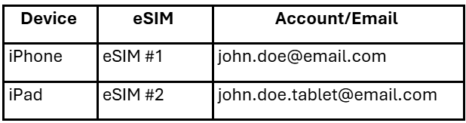
If you have multiple devices : If you need an Ubigi eSIM for another device (for example, a tablet or a second phone): You’ll need to create a new Ubigi account using a different email address. Each device will then manage its own eSIM plan separately. Example:
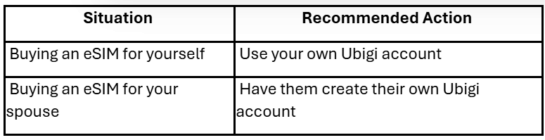
If you’re buying a plan for someone else If you want to purchase an eSIM for another person (e.g., your spouse/partner or family member,, a friend): – They must create their own Ubigi account with their own email address. – If you buy the eSIM under your account, you cannot transfer that plan later to another account. Example:
Why this is important: This setup protects your privacy and ensures that: – Your data plans are properly synchronized to the correct device. – Plan management (activation, top-up, billing) stays secure and easy to track.
Contact
You haven’t found the answers to your questions in Assistance or FAQ?
Verified review
This user has been identified as a buyer
Awesome for Tokyo, 0 issues
Worked so well the moment we landed in Japan. Had absolutely 0 issues, super fast wifi connection no matter where we went
Customer, 09 Jul 2026
Verified
Verified review
This user has been identified as a buyer
Good connection everywere
Good connection everywere
customer in Moldavia, 09 Jul 2026
Verified
Verified review
This user has been identified as a buyer
A competitively priced eSIM that does the job.
Ubigi eSIM. I am always a little cautious when using a new eSIM that I’v not tried before. Would it live up to the promise? I have to say so far so good. Excellent connection in Switzerland with good data download on my iPhone 15. The Ubigi app works well and it shows the rate of data usage. The price is good and very competitive. Very happy to recommend
Kevin Billson, 09 Jul 2026
Verified
Verified review
This user has been identified as a buyer
100%
So far, just perfect!
PATRICK MONDELAERS, 09 Jul 2026
Verified
Verified review
This user has been identified as a buyer
The booking was very simple
The booking was very simple, it all worked effortlessly.
Danko, 09 Jul 2026
Verified
Verified review
This user has been identified as a buyer
It was seamless.
It was seamless.
customer, 09 Jul 2026
Verified
Verified review
This user has been identified as a buyer
Easy and great price!
Easy to use, great price, and good internet. I have traveled from around the globe and it has made it a lot easier to travel, would recommend!
Miko_R, 09 Jul 2026
Verified
Verified review
This user has been identified as a buyer
A great choice for Japan
I used this in Japan and got seamless 5G service; I was very satisfied.
Emrah K., 09 Jul 2026
Verified
Verified review
This user has been identified as a buyer
Super rapide pour se connecter
Super rapide pour se connecter
Wonderful girl, 09 Jul 2026
Verified
Verified review
This user has been identified as a buyer
Good signal, app not great
The app was often not working and had maintenance so couldn't check how much I had left. But had good signal.
customer, 09 Jul 2026
Verified
Verified review
This user has been identified as a buyer
Saved money and stayed connected!
The connection was comparable to the connection of the country and the price great. I would have paid a fortune in roaming fees had I not utilized Ubigi. Glad my brother told me about it.
Nathalie, 09 Jul 2026
Verified
Verified review
This user has been identified as a buyer
Most of the time it worked pretty well
Most of the time it worked pretty well; I had unlimited data for both Norway and Sweden, for one month each. However, I didn't have internet for two days in Norway and one day in Sweden, even though the signal was very strong.
Thomas S., 09 Jul 2026
Verified
Verified review
This user has been identified as a buyer
It was so easy to use and had no issues…
It was so easy to use and had no issues at all.
I will definitely us either again. Mahalo
customer, 09 Jul 2026
Verified
Verified review
This user has been identified as a buyer
Easy to install and Workshop very good.
Easy to install and Workshop very good.
customer, 09 Jul 2026
Verified
Verified review
This user has been identified as a buyer
Would recommend
Relatively easy to install when following the instructions.
I used an unlimited plan just to be sure to have enough for my work trip.
The connection was generally very good but I will deduct one star because sometimes it stopped working.
customer, 09 Jul 2026
Thank you
Your message has been sent. We’ll get back to you shortly.
Thank you
We have taken into account your subscription to the newsletter
How to check eSIM compatibility
Smartphones / Tablets:
Dial *#06#. → If an EID number appears, your device is eSIM-compatible.
Windows 10 / 11:
Press Windows+I. Go to “Network & Internet” → If you see "Cellular", your PC is eSIM-compatible.
How to check carrier unlocking
iPhone / iPad:
Go to Settings > General > About. Scroll to Carrier Lock. → If you see “No SIM restrictions”, your device is unlocked.
Android:
Go to Settings > Network & Internet > Mobile network. Disable Automatic network selection. → If multiple networks appear, your device is unlocked.
You already have an eSIM in your cart.
Each order can only include one eSIM data plan.
If you choose to add a new one, the current plan will be removed. What would you like to do?





 How to check eSIM compatibility
 How to check carrier unlocking