Skip to content
← Back to questions
How to set the APN for Ubigi eSIM?

Normally you should be able to connect without filling in the APN (Access Point Name), but in some cases you might have to enter it manually.

On iOS
– Go to Settings, then Mobile Data
– In “Data Plans”, select your Ubigi profile and turn it on if it is not yet the case
– When the profile is on, go to “Mobile Data Network”
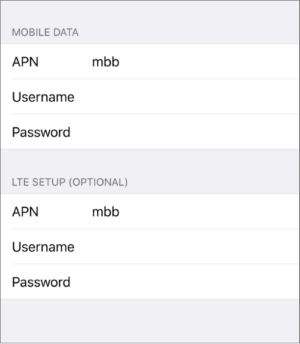
– Then, just type “mbb” in the all 4 APN fields: Mobile Data, LTE setup, MMS and Personal Hotspot


On Android
– In Mobile network, scroll to the bottom and select Access Point Names


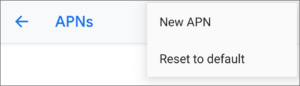
– Click on New APN

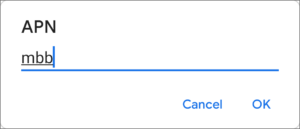
– In the field APN, just type the 3 letters mbb then save:

– Now select the APN you just created


On Windows 10 (NB: instructions for Windows 11 below):
– Go to Settings > Networks & Internet, and select Mobile (or Cellular in some Windows versions).
– Click on “Advanced Options” or “Mobile operator settings”, then select “Add an APN”
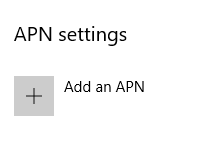
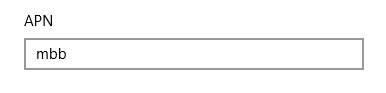
– In the APN field, just type “mbb”
– In the APN type drop-down list, select “Internet and Attach APN”
– Click on Save
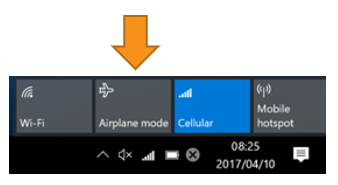
– Switch to Airplane mode for a few seconds in the network bar, then activate cellular again:

On Windows 11:
– Go to Settings > Networks & Internet, and select Mobile (or Cellular in some Windows versions).
– Click on “Advanced Options” or “Mobile operator settings”, then select “Add an APN”

– In the APN field, just type “mbb”

– Click on Save
– This new APN will appear in the list “Internet APN” just under the button “Add APN”. Just click on it and make sure it appears as “applied”
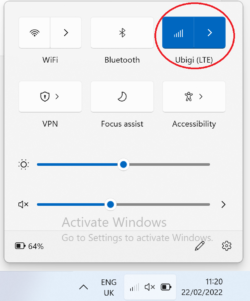
– To refresh the cellular connection, turn off Cellular mode for a few seconds in the network bar, then activate it again:



Was this article helpful?
YesNo

Looking for something specific?

Other frequently asked questions:

Why is my Ubigi connection not working?

Will data latency be impacted by the IP location feature?

For which countries is the IP location feature available?

In which countries is the IP location feature supported?

IP location feature: Do I need to install an additional app to benefit from this feature?

Is the IP location feature free?

IP location feature: which devices are supported?

What is the difference between a Country of Residence IP address and a Regional IP address?

I am stuck on the "FINAL STEP" page, and the message "Waiting for Ubigi cellular connectivity" has been displayed for several minutes. How can I resolve this?

I restored my data on my (new) iPhone, but my eSIM profile does not work. What to do?

I am about to travel. How do I manage my Ubigi eSIM profile on my device ?

Resolve an issue with Ubigi eSIM profile on Android device

Resolve an issue with Ubigi eSIM profile on iPhone

iMessage does not work with my Ubigi eSIM profile. What to do ?

How do I know if my Ubigi eSIM profile is activated on my iPhone/iPad?

How to get and install a Ubigi eSIM profile on iPhone?

How to get and install a Ubigi eSIM profile on an Android device?

How to get and install a Ubigi eSIM profile on iPad?

How to get and install a new Ubigi eSIM profile on my Windows 10 or Windows 11 laptop or tablet?

How do I activate my Ubigi services with my Windows 10 or Windows 11 device equipped with a Ubigi physical SIM card?

How do I activate my Ubigi services with my Windows 10 or Windows 11 laptop or tablet equipped with a Ubigi eSIM?

How can I buy a data plan from the Ubigi application on iPhone or iPad?

How can I check if my Ubigi eSIM profile is installed on my iPad?

How do I know if my Ubigi eSIM profile is activated and ready to use on my Android device?

How can I check if my Ubigi eSIM profile is installed on my iPhone?

My Ubigi eSIM profile is installed and active on my iPhone/iPad but I don't have any network displayed, what can I do?

My eSIM Ubigi profile is installed and active on my iPhone/iPad, the network is displayed but I don't have access to the Internet, what should I do?

Mobile data is applied to the Ubigi eSIM profile on my iPhone/iPad but I can't access the internet, what can I do?

How do I know if my Ubigi profile is installed on my Android device?

My Ubigi eSIM profile is installed and active on my Android device but I don’t have any network displayed, what can I do?

I can not connect with my Ubigi eSIM

My Ubigi eSIM profile is installed and active on my Android device, the network is displayed but I don’t have access to the Internet, what should I do?

Mobile data is applied to the Ubigi eSIM profile on my Android device, but impossible to access the internet, what can I do?

Can I make phone calls with Ubigi eSIM data plans?

How do I know if my Ubigi eSIM profile is activated on my Windows 10 or Windows 11 device?

How do I check the APN configuration of my Ubigi eSIM on Windows 10 or Windows 11?

Which mobile devices support Ubigi eSIM?

My Ubigi eSIM profile is activated on my Windows 10 or Windows 11 device but I do not have a network, what should I do?

What is a one-off and a recurring Ubigi data plans?

How to use Ubigi with a dual SIM device?

How to use tethering with an iPhone/iPad to share the Ubigi connectivity?

How to use tethering with a Windows 10 or Windows 11 device to share the Ubigi connectivity?

How to use tethering with an Android device to share the Ubigi connectivity?

I did not use my Ubigi data plan, can I get a refund?

My device does not show "Ubigi" as carrier name, is it normal?

How can I find the ICCID of my Ubigi eSIM?

The Ubigi antenna pictogram is not displayed in Japan, why?

How to reset my password for my Ubigi eSIM account?

How can I create my Ubigi account on iPad?

How can I create my Ubigi account on an Android device?

How can I create my Ubigi account on a Windows 10 or Windows 11 device?

How can I create my Ubigi account on iPhone?

How can I change my Ubigi password?

How can I check the remaining balance of my Ubigi eSIM?

How to delete my Ubigi account?

How can I buy a data plan from the Ubigi application on an Android device?

How can I buy a data plan from the Ubigi application by using a Windows 10 or Windows 11 device?

Do I need Wi-Fi to purchase a Ubigi data plan?

I paid for a Ubigi data plan but it does not appear in my account, what should I do?

I purchased the wrong data plan and did not use it, how can I change it?

How to get an invoice for my Ubigi data plan purchase?

I do not get the “eSIM – Mobile Data in my device” button on my iPad to install my Ubigi profile. Why and what should I do?

How to reinstall the Ubigi eSIM profile I deleted on my Windows 10 or Windows 11 device?

I have a new Android device. How can I reinstall my Ubigi eSIM profile on it?

Does my Ubigi eSIM profile have a validity period and will expire one day?

I have a new Windows10 device. How can I reinstall my Ubigi eSIM profile on it?

How can I enable my Ubigi eSIM on my iPhone when I want to use it again?

I lost my device. How can I block my Ubigi eSIM account?

How can I disable my Ubigi eSIM on my iPhone when I travel or when I do not use it?

I have multiple  Ubigi eSIM profiles. Can I manage them all under one Ubigi account?

How can I enable my Ubigi eSIM profile on my iPad when I want to use it again?

How can I disable my Ubigi eSIM profile on my iPad when I travel or when I do not use it?

How can I disable my Ubigi eSIM on my Android device when I travel or when I do not use it?

How can I enable my Ubigi eSIM on my Android device when I want to use it again?

How to delete a Ubigi eSIM profile on iPhone/iPad?

How to delete a Ubigi eSIM profile on an Android device?

How to delete a Ubigi eSIM profile on a Windows 10 or Windows 11 device ?

How can I find PIN, PIN2 or PUK codes for my Ubigi eSIM?

Ubigi connection is not working. Should I disable any active DNS or VPN on my device?

Great Trustpilot stars Trustpilot
Trustpilot stars
Based on 28315 reviews on Trustpilot
5 stars Verified
Verified review
This user has been identified as a buyer
Good
Over all experience is perfect
Cha B C, 10 Nov 2025
5 stars Verified
Verified review
This user has been identified as a buyer
Excellent
I would try again
customer, 10 Nov 2025
5 stars Verified
Verified review
This user has been identified as a buyer
Very easy to set up and activate
Very easy to set up and activate. Strongly recommend.
Rachel Yeung, 10 Nov 2025
5 stars Verified
Verified review
This user has been identified as a buyer
I am on a long holiday trip
I am on a long holiday trip, and signed up for an Ubigi esim. Two weeks in now and everything is going smoothly. I am very happy with Ubigi.
Consumer, 10 Nov 2025
5 stars Verified
Verified review
This user has been identified as a buyer
Esim worked well
Esim worked well. Had no issues using it.
Sandra Pintocustomer, 10 Nov 2025
5 stars Verified
Verified review
This user has been identified as a buyer
I always use Ubigi for all my…
I always use Ubigi for all my travels….love ittttt
ShivKiz, 09 Nov 2025
5 stars Verified
Verified review
This user has been identified as a buyer
Very Good
Very Good! Very nice
customer, 09 Nov 2025
5 stars Verified
Verified review
This user has been identified as a buyer
Easy to set up
Easy to set up. High speed internet almost available immediately upon arrival in Haneda Airport. No issues throughout the trip in Kanazawa, Nikko, Tokyo, Kyoto, Nara or Kawaguchiko. Great service and connection.
Sam, 09 Nov 2025
5 stars Verified
Verified review
This user has been identified as a buyer
Efficient service
Asia plan allows services in multiple countries is good. Switching is prompt and convenient.
customer, 09 Nov 2025
5 stars Verified
Verified review
This user has been identified as a buyer
Ubigi was extremely easy to use and…
Ubigi was extremely easy to use and their product has performed as advertised
Richard, 09 Nov 2025
5 stars Verified
Verified review
This user has been identified as a buyer
Easy to use
Easy to use, really
customer, 09 Nov 2025
4 stars Verified
Verified review
This user has been identified as a buyer
Ease of subscription and selection of…
Ease of subscription and selection of the appropriate plans. However, I sent an email regarding poor LTE connectivity and not 5G service in Singapore. The automated response received did not address the question asked.
Saif Attar, 09 Nov 2025
5 stars Verified
Verified review
This user has been identified as a buyer
Continues network coverage
customer Mohammad, 09 Nov 2025
5 stars Verified
Verified review
This user has been identified as a buyer
No issues at all and very easy and…
No issues at all and very easy and straightforward to use.
customer, 09 Nov 2025
5 stars Verified
Verified review
This user has been identified as a buyer
Reliable, Affordable and Convenient
Reliable, affordable and convinient. Prices in USD kinda hurts as a Canadian but tots worth.
Anita Blackman, 09 Nov 2025

Your message has been sent.
We’ll get back to you shortly.

We have taken into account your subscription to the newsletter