Skip to content
← Back to questions
How can I check the remaining balance of my Ubigi eSIM?

In order to check your balance, you just need to connect to your Ubigi account.

* If you are using an iOS or Android device:

– from the application :
Download it from the Playstore

Download it from the Appstore

– from ubigi.me

The remaining credit is displayed on the home page and you can check it at any time even if your credit is exhausted.

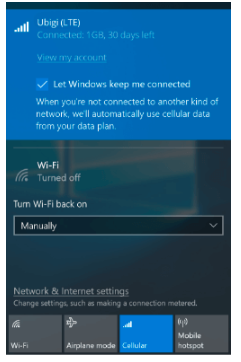
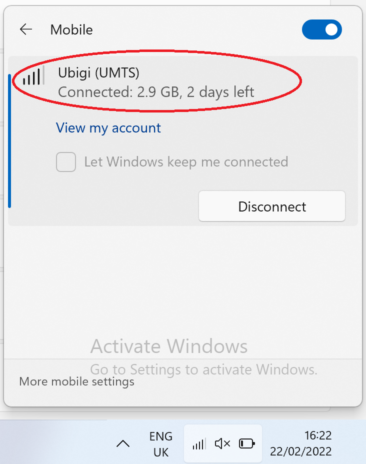
* If you are using a Windows 10 or Windows 11 device:

You can check the remaining credit by clicking on the network bar (it will appear at the top of it).

Windows 10:

Windows 11:

Looking for something specific?

Other frequently asked questions:

Will data latency be impacted by the IP location feature?

Why is my Ubigi connection not working?

For which countries is the IP location feature available?

In which countries is the IP location feature supported?

IP location feature: Do I need to install an additional app to benefit from this feature?

What is the difference between a Country of Residence IP address and a Regional IP address?

Is the IP location feature free?

IP location feature: which devices are supported?

Can I make phone calls with Ubigi eSIM data plans?

I am stuck on the "FINAL STEP" page, and the message "Waiting for Ubigi cellular connectivity" has been displayed for several minutes. How can I resolve this?

I restored my data on my (new) iPhone, but my eSIM profile does not work. What to do?

I am about to travel. How do I manage my Ubigi eSIM profile on my device ?

Resolve an issue with Ubigi eSIM profile on Android device

Resolve an issue with Ubigi eSIM profile on iPhone

iMessage does not work with my Ubigi eSIM profile. What to do ?

How do I know if my Ubigi eSIM profile is activated on my iPhone/iPad?

How to get and install a Ubigi eSIM profile on iPhone?

How to get and install a Ubigi eSIM profile on an Android device?

How to get and install a Ubigi eSIM profile on iPad?

How to get and install a new Ubigi eSIM profile on my Windows 10 or Windows 11 laptop or tablet?

How do I activate my Ubigi services with my Windows 10 or Windows 11 device equipped with a Ubigi physical SIM card?

How do I activate my Ubigi services with my Windows 10 or Windows 11 laptop or tablet equipped with a Ubigi eSIM?

How can I buy a data plan from the Ubigi application on iPhone or iPad?

How can I check if my Ubigi eSIM profile is installed on my iPad?

How do I know if my Ubigi eSIM profile is activated and ready to use on my Android device?

How can I check if my Ubigi eSIM profile is installed on my iPhone?

My Ubigi eSIM profile is installed and active on my iPhone/iPad but I don't have any network displayed, what can I do?

My eSIM Ubigi profile is installed and active on my iPhone/iPad, the network is displayed but I don't have access to the Internet, what should I do?

Mobile data is applied to the Ubigi eSIM profile on my iPhone/iPad but I can't access the internet, what can I do?

How do I know if my Ubigi profile is installed on my Android device?

My Ubigi eSIM profile is installed and active on my Android device but I don’t have any network displayed, what can I do?

I can not connect with my Ubigi eSIM

My Ubigi eSIM profile is installed and active on my Android device, the network is displayed but I don’t have access to the Internet, what should I do?

Mobile data is applied to the Ubigi eSIM profile on my Android device, but impossible to access the internet, what can I do?

Which mobile devices support Ubigi eSIM?

How do I know if my Ubigi eSIM profile is activated on my Windows 10 or Windows 11 device?

What is a one-off and a recurring Ubigi data plans?

How do I check the APN configuration of my Ubigi eSIM on Windows 10 or Windows 11?

My Ubigi eSIM profile is activated on my Windows 10 or Windows 11 device but I do not have a network, what should I do?

What is the best way to contact Ubigi support?

How to use Ubigi with a dual SIM device?

How to use tethering with a Windows 10 or Windows 11 device to share the Ubigi connectivity?

How to use tethering with an iPhone/iPad to share the Ubigi connectivity?

How to use tethering with an Android device to share the Ubigi connectivity?

I did not use my Ubigi data plan, can I get a refund?

My device does not show "Ubigi" as carrier name, is it normal?

How can I find the ICCID of my Ubigi eSIM?

The Ubigi antenna pictogram is not displayed in Japan, why?

How to set the APN for Ubigi eSIM?

How to reset my password for my Ubigi eSIM account?

How can I create my Ubigi account on iPad?

How can I create my Ubigi account on a Windows 10 or Windows 11 device?

How can I create my Ubigi account on an Android device?

How can I create my Ubigi account on iPhone?

How can I change my Ubigi password?

How to delete my Ubigi account?

How can I buy a data plan from the Ubigi application on an Android device?

How can I buy a data plan from the Ubigi application by using a Windows 10 or Windows 11 device?

Do I need Wi-Fi to purchase a Ubigi data plan?

I paid for a Ubigi data plan but it does not appear in my account, what should I do?

I purchased the wrong data plan and did not use it, how can I change it?

How to get an invoice for my Ubigi data plan purchase?

I do not get the “eSIM – Mobile Data in my device” button on my iPad to install my Ubigi profile. Why and what should I do?

How to reinstall the Ubigi eSIM profile I deleted on my Windows 10 or Windows 11 device?

Does my Ubigi eSIM profile have a validity period and will expire one day?

I have a new Windows10 device. How can I reinstall my Ubigi eSIM profile on it?

How can I enable my Ubigi eSIM on my iPhone when I want to use it again?

I lost my device. How can I block my Ubigi eSIM account?

How can I disable my Ubigi eSIM on my iPhone when I travel or when I do not use it?

I have multiple  Ubigi eSIM profiles. Can I manage them all under one Ubigi account?

How can I enable my Ubigi eSIM profile on my iPad when I want to use it again?

How can I disable my Ubigi eSIM profile on my iPad when I travel or when I do not use it?

How can I disable my Ubigi eSIM on my Android device when I travel or when I do not use it?

How can I enable my Ubigi eSIM on my Android device when I want to use it again?

How to delete a Ubigi eSIM profile on iPhone/iPad?

How to delete a Ubigi eSIM profile on an Android device?

How to delete a Ubigi eSIM profile on a Windows 10 or Windows 11 device ?

How can I find PIN, PIN2 or PUK codes for my Ubigi eSIM?

Ubigi connection is not working. Should I disable any active DNS or VPN on my device?

Great Trustpilot stars Trustpilot
Trustpilot stars
Based on 42295 reviews on Trustpilot
5 stars Verified
Verified review
This user has been identified as a buyer
The connection is always good and the…
The connection is always good and the speed is incredible, easy to hire.
Mario Vallejo, 28 Jul 2026
4 stars Verified
Verified review
This user has been identified as a buyer
Very good internet most of the time
Very good internet most of the time, sometimes had to re-connect.
PP, 28 Jul 2026
4 stars Verified
Verified review
This user has been identified as a buyer
eSIM did not work out of the box
eSIM did not work out of the box, had to manually set the APN like it's 2004
customer, 28 Jul 2026
5 stars Verified
Verified review
This user has been identified as a buyer
Japan Family Trip
⭐⭐⭐⭐⭐ Ubigi worked very well during my trip to Japan. I always had a strong and reliable signal, and the internet worked everywhere I went. It was easy to set up and made my trip much more convenient. Highly recommended for anyone traveling to Japan!
Aengy Restrepo, 28 Jul 2026
4 stars Verified
Verified review
This user has been identified as a buyer
Not 5G in al Japan but very consistente…
Not 5G in al Japan but very consistente service
customer, 28 Jul 2026
5 stars Verified
Verified review
This user has been identified as a buyer
Great for communication while abroad
MIRIAM CHISEMBE, 28 Jul 2026
5 stars Verified
Verified review
This user has been identified as a buyer
Love this
Love this. We use this everytime we go on holiday x
Ideala, 28 Jul 2026
5 stars Verified
Verified review
This user has been identified as a buyer
I was pleasantly surprised with the…
I was pleasantly surprised with the service from Ubigi eSIM, I’ve always gone with my phone provider for roaming but found them to be very expensive this time as I was travelling to Canada and USA. A friend had recommended Ubigi so thought I’d give it a go, great value and a lot cheaper than my provider. The service coverage was great and had unlimited data too!
Caroline, 28 Jul 2026
5 stars Verified
Verified review
This user has been identified as a buyer
Went with Ubigi after a bit of Internet…
Went with Ubigi after a bit of Internet comparison for a trip to Seoul and Ishigaki in Japan. I had no problems with the set up other than navigating some changes on my phone (in SIM Manager). The esim came online as soon as I had changed my settings in Seoul and I had no issues and good data throughout four days in South Korea including navigation maps. Ishigaki is a long way from the main Japanese islands but again no issues with connection even on local ferries. I will use Ubigi again.
Paul Jackson, 28 Jul 2026
5 stars Verified
Verified review
This user has been identified as a buyer
Great service
Great service, easy to connect to abroad & enough data at fair price.
customer, 28 Jul 2026
5 stars Verified
Verified review
This user has been identified as a buyer
Works very good.
Works very good.
Dutch customer, 28 Jul 2026
5 stars Verified
Verified review
This user has been identified as a buyer
Easy access to the mobile data abroad
Marcin, 28 Jul 2026
5 stars Verified
Verified review
This user has been identified as a buyer
Ibigi was so much cheaper than my home…
Ibigi was so much cheaper than my home carriers roaming service. It saved me a ton of money, especially traveling with a family of 4 who all want data access. We got each person the 10gb for 30 days plan and it was plenty for a 2 week trip. Just try to use Wi-Fi when you're in the hotel or at a restaurant, and save your mobile data for navigation, Uber, etc.
customer, 28 Jul 2026
5 stars Verified
Verified review
This user has been identified as a buyer
So far no issue of any connection
So far no issue of any connection. Recommended for few of my friends and they really enjoyed that too. Well done UBIGI. Keep your network strong forever.
MOHAMED BASIR B SAMAT, 28 Jul 2026
5 stars Verified
Verified review
This user has been identified as a buyer
Quick and easy to navigate for…
Quick and easy to navigate for installation and use
Liz, 28 Jul 2026

Your message has been sent.
We’ll get back to you shortly.

We have taken into account your subscription to the newsletter

