How do I know if my Ubigi eSIM profile is installed on my Android device?
Note: if you have a physical SIM already inserted, then it appears clearly in the ‘SIM card’ section.
To check if your Ubigi eSIM profile is activated and ready for use on your Android device, go to :
– Settings:
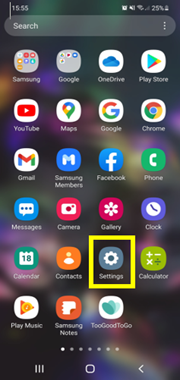
– Then select Connections:
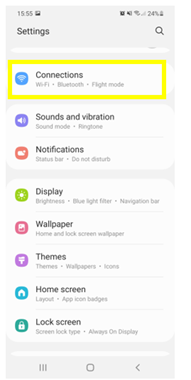
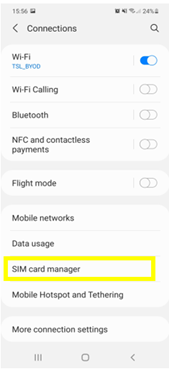
– Then, choose SIM card manager: – Finally, in the “e-SIM” section, if an eSIM profile (Ubigi) is installed, then it will appear as follows :
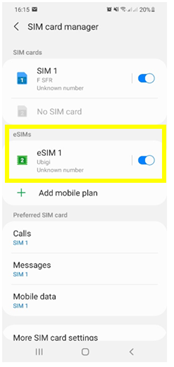
Also, as soon as your eSIM profile is activated, a double network signal appears at the top of your screen: – a network signal representing your main SIM (on the left) – a second network signal representing your eSIM profile (right)


Contact
You haven’t found the answers to your questions in Assistance or FAQ?
Great
Based on 39170 reviews on
Verified
Verified review
This user has been identified as a buyer
Very good connection everywhere.
customer, 09 Jun 2026
Verified
Verified review
This user has been identified as a buyer
Easy to use and convenient.
customer, 09 Jun 2026
Verified
Verified review
This user has been identified as a buyer
So far so good
So far so good - transition between countries was flawless.
customer, 09 Jun 2026
Verified
Verified review
This user has been identified as a buyer
Easy to use
Easy to use. Was functioning well during my stay in Paris.
Boumahdi Amine, 09 Jun 2026
Verified
Verified review
This user has been identified as a buyer
Great product!
Great product!! Highly recommend!
customer, 09 Jun 2026
Verified
Verified review
This user has been identified as a buyer
Easy to set up and use.
AJP, 09 Jun 2026
Verified
Verified review
This user has been identified as a buyer
Excellent and works so well in Europe.
Excellent and works so well in Italy. Would def get again for Europe as we are in several countries
customerRuth, 09 Jun 2026
Verified
Verified review
This user has been identified as a buyer
Very easy and convenient !
Very easy and convenient.
Sg, 09 Jun 2026
Verified
Verified review
This user has been identified as a buyer
Everything is good
Everything is good
Aeda Kuleni, 09 Jun 2026
Verified
Verified review
This user has been identified as a buyer
It’s worked ever since I arrived in…
It’s worked ever since I arrived in Japan after initially it was hard to set up.
Pamela Bradley, 09 Jun 2026
Verified
Verified review
This user has been identified as a buyer
Easy to purchase and use
Easy to purchase and use. Decent prices.
customer, 09 Jun 2026
Verified
Verified review
This user has been identified as a buyer
I used Ubigi in my trip to Japan…
I used Ubigi in my trip to Japan (Tokyo+Kyoto). At first internet worked really well but at the end of the trip it started to get slow and for a short period of time it didn’t work at all. There was a taifun in Japan at the time we visited and although it didn’t effect us directly otherwise it may have had an effect on internet connection.
customer, 09 Jun 2026
Verified
Verified review
This user has been identified as a buyer
Excellent
Excellent, I never knew about this u til my daughter told me, it really is good,
Andy Elliott, 09 Jun 2026
Verified
Verified review
This user has been identified as a buyer
All fine
Simple end all ok
Piergiorgio Pane, 09 Jun 2026
Verified
Verified review
This user has been identified as a buyer
Good Experience
Good Experience
Muhammad Usman Tahir, 09 Jun 2026
Thank you
Your message has been sent. We’ll get back to you shortly.
Thank you
We have taken into account your subscription to the newsletter
How to check eSIM compatibility
Smartphones / Tablets:
Dial *#06#. → If an EID number appears, your device is eSIM-compatible.
Windows 10 / 11:
Press Windows+I. Go to “Network & Internet” → If you see "Cellular", your PC is eSIM-compatible.
How to check carrier unlocking
iPhone / iPad:
Go to Settings > General > About. Scroll to Carrier Lock. → If you see “No SIM restrictions”, your device is unlocked.
Android:
Go to Settings > Network & Internet > Mobile network. Disable Automatic network selection. → If multiple networks appear, your device is unlocked.
You already have an eSIM in your cart.
Each order can only include one eSIM data plan.
If you choose to add a new one, the current plan will be removed. What would you like to do?

