How can I disable my Ubigi eSIM profile on my Android device when I travel or when I’m not using it?
If you need to temporarily deactivate your Ubigi eSIM profile on your Android device when you travel or when you’re not using it, follow these steps:
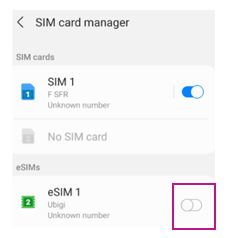
1 – On your device, go to Settings > Connections > SIM Card Manager :
2 – Locate the Ubigi eSIM profile (note: if you haven’t renamed it, it may appear as “Secondary”), then tap the toggle switch next to it to disable it. The switch will turn gray once it is deactivated.
Your Ubigi eSIM profile is now deactivated.
You simply reactivate/deactivateyour eSIM profile at any time by following the same steps. You can also watch the video below for a visual guide.
We recommend that you do not delete your Ubigi eSIM profile when you travel or when you’re not using it, as you can simply deactivate it as described above and reactivate it whenever needed.
Contact
You haven’t found the answers to your questions in Assistance or FAQ?
You haven’t found the answers to your questions in Assistance or FAQ?
Great
Based on 32272 reviews on
Verified
Verified review
This user has been identified as a buyer
Excellent coverage
Excellent coverage. A little confusing to activate on arrival in the country but apart from that, excellent eSim and access
Sharmila , 04 Mar 2026
Verified
Verified review
This user has been identified as a buyer
EasyJet to use
EasyJet to use
hans , 04 Mar 2026
Verified
Verified review
This user has been identified as a buyer
No problem observed
No problem observed
Mariacustomer, 04 Mar 2026
Verified
Verified review
This user has been identified as a buyer
easy to buy the eSIM and install from the app
easy to buy the eSIM and install from the app
customer, 03 Mar 2026
Verified
Verified review
This user has been identified as a buyer
Ubigi gives faster data and easy to…
Ubigi gives faster data and easy to purchase data.
Ms. K, 03 Mar 2026
Verified
Verified review
This user has been identified as a buyer
Data and all was fine
Data and all was fine , just didn’t realize I couldn’t call out
customer, 03 Mar 2026
Verified
Verified review
This user has been identified as a buyer
Very easy to use but watch out for time out
Very easy to use, only issue was it stopped exactly on day 7 without warning, before I had downloaded my boarding pass--it should provide at least some reminders of when the cut off will be.
Erin , 03 Mar 2026
Verified
Verified review
This user has been identified as a buyer
Price and the speed 5g are excellent
Price and the speed 5g are excellent. Really loved the provider without any disconnect or some issue. From landing 🛬 in airport it was active and going on. Really recommend this provider. 5* rates
Abdul Raheem, 03 Mar 2026
Verified
Verified review
This user has been identified as a buyer
Great signal in caleta de fuste
Great signal in caleta de fuste
John, 03 Mar 2026
Verified
Verified review
This user has been identified as a buyer
Unbelievable great service and…
Unbelievable great service and reliability thanks so much
customer, 03 Mar 2026
Verified
Verified review
This user has been identified as a buyer
Very easy to use
Very easy to use, reliable and not very expensive.
VV, 03 Mar 2026
Verified
Verified review
This user has been identified as a buyer
Easy to add the esim
Easy to add the eSIM and formats nice to the iPhone
customer, 03 Mar 2026
Verified
Verified review
This user has been identified as a buyer
Good access
Sometimes i had difficulty in accessing internet but overall it was fine and working.
Kemal, 03 Mar 2026
Verified
Verified review
This user has been identified as a buyer
it does the job
it does the job. I used it in a trip to India and it worked well enough.
Alex B, 03 Mar 2026
Verified
Verified review
This user has been identified as a buyer
lack of widget showing data comsumption…
lack of widget showing data comsumption and network carrier info (phone showing only "Ubigi")
Didier, 03 Mar 2026
Thank you
Your message has been sent. We’ll get back to you shortly.
Thank you
We have taken into account your subscription to the newsletter
How to check eSIM compatibility
Smartphones / Tablets:
Dial *#06#. → If an EID number appears, your device is eSIM-compatible.
Windows 10 / 11:
Press Windows+I. Go to “Network & Internet” → If you see "Cellular", your PC is eSIM-compatible.
How to check carrier unlocking
iPhone / iPad:
Go to Settings > General > About. Scroll to Carrier Lock. → If you see “No SIM restrictions”, your device is unlocked.
Android:
Go to Settings > Network & Internet > Mobile network. Disable Automatic network selection. → If multiple networks appear, your device is unlocked.
You already have an eSIM in your cart.
Each order can only include one eSIM data plan.
If you choose to add a new one, the current plan will be removed. What would you like to do?





 How to check eSIM compatibility
 How to check carrier unlocking