How do I know if my Ubigi eSIM profile is activated and ready to use on my Android device?
Note: if you have a physical SIM already inserted in your device, then it will appear clearly in the ‘SIM card’ section.
To check if your Ubigi eSIM profile is activated and ready for use on your Android device, go to :
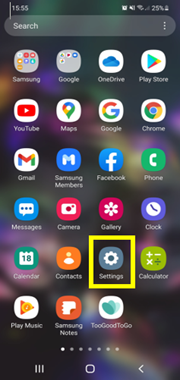
– Settings:
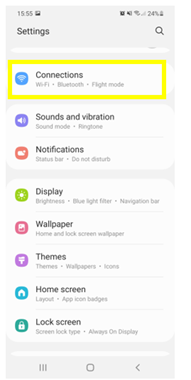
– Then, select Connections:
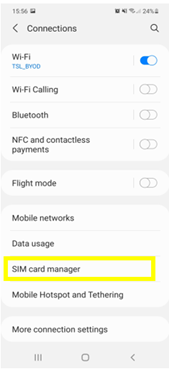
– Then choose SIM card manager:
– In the “e-SIM” section, if an eSIM profile (Ubigi) is installed, then it will appear as follows :
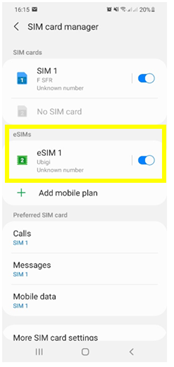
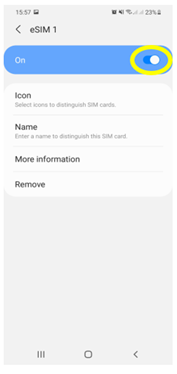
– When you select the installed eSIM profile, you can activate and deactivate it at any time:
Also, as soon as your Ubigi eSIM profile is activated, a double network signal will appear at the top of your screen: – a network signal representing your main SIM card (on the left) – a second network signal representing your eSIM profile (right)


Contact
You haven’t found the answers to your questions in Assistance or FAQ?
Great
Based on 39675 reviews on
Verified
Verified review
This user has been identified as a buyer
Excellent
Excellent and easy to use
MT, 17 Jun 2026
Verified
Verified review
This user has been identified as a buyer
Ubigi is very affordable and works…
Ubigi is very affordable and works perfectly as soon as you land in your country of destination. Will definitely recommend to anyone who travels over sea.
Barbara, 17 Jun 2026
Verified
Verified review
This user has been identified as a buyer
Ease of use.
Ease of use.
Andrew, 17 Jun 2026
Verified
Verified review
This user has been identified as a buyer
Easy to install and worked well.
Cheya Dawn Wilson Holmes, 17 Jun 2026
Verified
Verified review
This user has been identified as a buyer
Very easy to use
Very easy to use. Install & set up very simple and just activated it when i landed. No problems, never lost signal for the week i had in Tokyo.
Highly recommend
Alexander James Denis, 17 Jun 2026
Verified
Verified review
This user has been identified as a buyer
Thank you for your services
customer, 17 Jun 2026
Verified
Verified review
This user has been identified as a buyer
Reliable and Easy to Use
Overall, my experience with Ubigi was great. The network connection was reliable for most of my trip, with fast and stable data that easily handled maps, browsing, and messaging on the go. There were just a few spots where the signal got weak, but I suspect that was more of an isolated location issue than a problem with the service itself. Setup was smooth and hassle-free, and I'd happily use Ubigi again on future travels. Recommended!
makoy, 17 Jun 2026
Verified
Verified review
This user has been identified as a buyer
No problems with connection.
customer, 17 Jun 2026
Verified
Verified review
This user has been identified as a buyer
Was soo easy and perfekt all the 13…
Was soo easy and perfekt all the 13 days without ANY !! Problem in Japan 🇯🇵🙏😃
Next year again ‼️💖
Nina, 17 Jun 2026
Verified
Verified review
This user has been identified as a buyer
it was great
it was great. i was able to access the maps in japan without it being slow.
customer, 17 Jun 2026
Verified
Verified review
This user has been identified as a buyer
Perfect for travelling
Easy, quick and works perfectly. Loved it and will use it again
Angeles, 17 Jun 2026
Verified
Verified review
This user has been identified as a buyer
very easy to use
very easy to use, activated in a min after I landed japan and connected to the airport wifi. Fast and great reception everywhere I went in Tokyo. Highly recommened.
LL, 17 Jun 2026
Verified
Verified review
This user has been identified as a buyer
Ubigi worked perfectly during my trip
Ubigi worked perfectly during my trip. Easy setup, strong signal, fast data, and affordable pricing. Highly recommended for international travel.
customer, 16 Jun 2026
Verified
Verified review
This user has been identified as a buyer
Easy to install
Easy to install, worked perfectly
customer, 16 Jun 2026
Verified
Verified review
This user has been identified as a buyer
Easy to load but unclear if I an…
Easy to load but unclear if I an receive texts or make calls on my line without roaming feed
Estela Boudreau, 16 Jun 2026
Thank you
Your message has been sent. We’ll get back to you shortly.
Thank you
We have taken into account your subscription to the newsletter
How to check eSIM compatibility
Smartphones / Tablets:
Dial *#06#. → If an EID number appears, your device is eSIM-compatible.
Windows 10 / 11:
Press Windows+I. Go to “Network & Internet” → If you see "Cellular", your PC is eSIM-compatible.
How to check carrier unlocking
iPhone / iPad:
Go to Settings > General > About. Scroll to Carrier Lock. → If you see “No SIM restrictions”, your device is unlocked.
Android:
Go to Settings > Network & Internet > Mobile network. Disable Automatic network selection. → If multiple networks appear, your device is unlocked.
You already have an eSIM in your cart.
Each order can only include one eSIM data plan.
If you choose to add a new one, the current plan will be removed. What would you like to do?

