How can I disable my Ubigi eSIM profile on my Android device when I travel or when I’m not using it?
If you need to temporarily deactivate your Ubigi eSIM profile on your Android device when you travel or when you’re not using it, follow these steps:
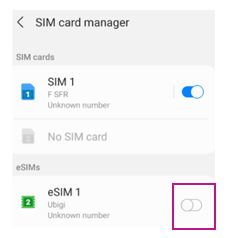
1 – On your device, go to Settings > Connections > SIM Card Manager :
2 – Locate the Ubigi eSIM profile (note: if you haven’t renamed it, it may appear as “Secondary”), then tap the toggle switch next to it to disable it. The switch will turn gray once it is deactivated.
Your Ubigi eSIM profile is now deactivated.
You simply reactivate/deactivateyour eSIM profile at any time by following the same steps. You can also watch the video below for a visual guide.
We recommend that you do not delete your Ubigi eSIM profile when you travel or when you’re not using it, as you can simply deactivate it as described above and reactivate it whenever needed.
Contact
You haven’t found the answers to your questions in Assistance or FAQ?




 How to check eSIM compatibility
 How to check carrier unlocking