Skip to content
← Back to questions
How can I purchase a data plan from the Ubigi application on a Windows 10 or Windows 11 device?

You can now purchase a data plan by 1) Connecting to your account from Ubigi.me or 2) By accessing your account from the network bar:

1/ From Ubigi.me by using a browser:
– Open a browser on your Windows 10 or Windows 11 device and go to Ubigi.me
– Enter your login and password to connect to your account
– Once connected, go to the Top-up tab and select the data plan you want to purchase
– Follow the instructions on screen to complete your purchase

2/ From the network bar of your Windows 10 or Windows 11 device:
>>
You can watch the last section of our video tutorial, section “Managing your Ubigi account on Windows 10 or Windows 11” from time lap 1:20 to 1:49
>> Or follow the instructions below:

If you are using Ubigi services on your laptop/tablet equipped with a Ubigi eSIM/SIM card, first make sure that you are connected to the cellular/mobile data network with your device:

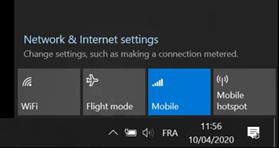
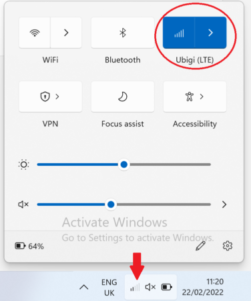
– First, deactivate WiFi option and activate “Mobile” (or “Cellular”) option in the networks bar to connect to the mobile data network with your device:

Windows 10:


Windows 11:

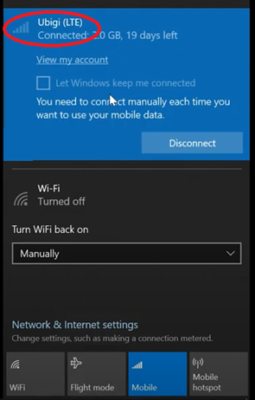
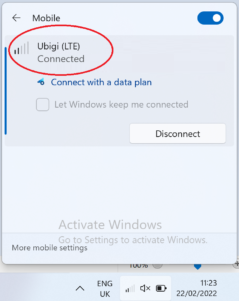
– Click on the Connect button that will appear, and you will see Ubigi appear as “Connected” at the top of the network bar (even if you have no credit left on your account):

Windows 10:

Windows 11:

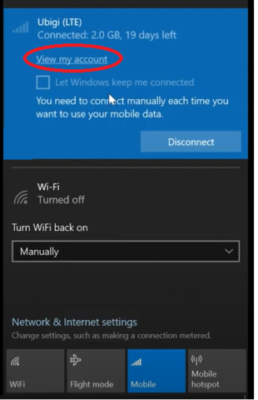
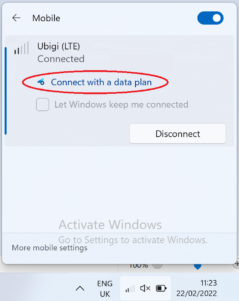
– Display your network bar and click on “View my account” or “connect with a data plan” at the top:

Windows 10:

Windows 11:

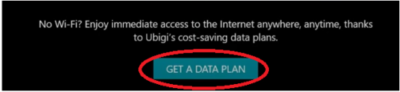
– Then on the displayed page, click on “Get a data plan”:

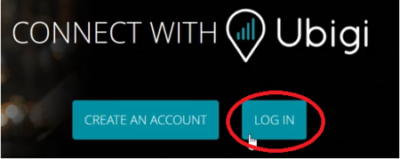
– Then, click on “Log in”:

– You will be automatically redirected to your Ubigi account
– Go to the Top-up tab and select the data plan you want to purchase
– Follow the instructions on screen to complete your purchase


Looking for something specific?

Other frequently asked questions:

Will data latency be impacted by the IP location feature?

Why is my Ubigi connection not working?

For which countries is the IP location feature available?

In which countries is the IP location feature supported?

IP location feature: Do I need to install an additional app to benefit from this feature?

What is the difference between a Country of Residence IP address and a Regional IP address?

Is the IP location feature free?

IP location feature: which devices are supported?

Can I make phone calls with Ubigi eSIM data plans?

I am stuck on the "FINAL STEP" page, and the message "Waiting for Ubigi cellular connectivity" has been displayed for several minutes. How can I resolve this?

I restored my data on my (new) iPhone, but my eSIM profile does not work. What to do?

I am about to travel. How do I manage my Ubigi eSIM profile on my device ?

Resolve an issue with Ubigi eSIM profile on Android device

Resolve an issue with Ubigi eSIM profile on iPhone

iMessage does not work with my Ubigi eSIM profile. What to do ?

How do I know if my Ubigi eSIM profile is activated on my iPhone/iPad?

How to get and install a Ubigi eSIM profile on iPhone?

How to get and install a Ubigi eSIM profile on an Android device?

How to get and install a Ubigi eSIM profile on iPad?

How to get and install a new Ubigi eSIM profile on my Windows 10 or Windows 11 laptop or tablet?

How do I activate my Ubigi services with my Windows 10 or Windows 11 device equipped with a Ubigi physical SIM card?

How do I activate my Ubigi services with my Windows 10 or Windows 11 laptop or tablet equipped with a Ubigi eSIM?

How can I buy a data plan from the Ubigi application on iPhone or iPad?

How can I check if my Ubigi eSIM profile is installed on my iPad?

How do I know if my Ubigi eSIM profile is activated and ready to use on my Android device?

How can I check if my Ubigi eSIM profile is installed on my iPhone?

My Ubigi eSIM profile is installed and active on my iPhone/iPad but I don't have any network displayed, what can I do?

My eSIM Ubigi profile is installed and active on my iPhone/iPad, the network is displayed but I don't have access to the Internet, what should I do?

Mobile data is applied to the Ubigi eSIM profile on my iPhone/iPad but I can't access the internet, what can I do?

How do I know if my Ubigi profile is installed on my Android device?

My Ubigi eSIM profile is installed and active on my Android device but I don’t have any network displayed, what can I do?

I can not connect with my Ubigi eSIM

My Ubigi eSIM profile is installed and active on my Android device, the network is displayed but I don’t have access to the Internet, what should I do?

Mobile data is applied to the Ubigi eSIM profile on my Android device, but impossible to access the internet, what can I do?

Which mobile devices support Ubigi eSIM?

How do I know if my Ubigi eSIM profile is activated on my Windows 10 or Windows 11 device?

How do I check the APN configuration of my Ubigi eSIM on Windows 10 or Windows 11?

What is a one-off and a recurring Ubigi data plans?

My Ubigi eSIM profile is activated on my Windows 10 or Windows 11 device but I do not have a network, what should I do?

What is the best way to contact Ubigi support?

How to use Ubigi with a dual SIM device?

How to use tethering with a Windows 10 or Windows 11 device to share the Ubigi connectivity?

How to use tethering with an iPhone/iPad to share the Ubigi connectivity?

How to use tethering with an Android device to share the Ubigi connectivity?

I did not use my Ubigi data plan, can I get a refund?

My device does not show "Ubigi" as carrier name, is it normal?

How can I find the ICCID of my Ubigi eSIM?

How to set the APN for Ubigi eSIM?

The Ubigi antenna pictogram is not displayed in Japan, why?

How to reset my password for my Ubigi eSIM account?

How can I create my Ubigi account on iPad?

How can I create my Ubigi account on an Android device?

How can I create my Ubigi account on a Windows 10 or Windows 11 device?

How can I create my Ubigi account on iPhone?

How can I change my Ubigi password?

How can I check the remaining balance of my Ubigi eSIM?

How to delete my Ubigi account?

How can I buy a data plan from the Ubigi application on an Android device?

Do I need Wi-Fi to purchase a Ubigi data plan?

I paid for a Ubigi data plan but it does not appear in my account, what should I do?

I purchased the wrong data plan and did not use it, how can I change it?

How to get an invoice for my Ubigi data plan purchase?

I do not get the “eSIM – Mobile Data in my device” button on my iPad to install my Ubigi profile. Why and what should I do?

How to reinstall the Ubigi eSIM profile I deleted on my Windows 10 or Windows 11 device?

Does my Ubigi eSIM profile have a validity period and will expire one day?

I have a new Windows10 device. How can I reinstall my Ubigi eSIM profile on it?

How can I enable my Ubigi eSIM on my iPhone when I want to use it again?

I lost my device. How can I block my Ubigi eSIM account?

How can I disable my Ubigi eSIM on my iPhone when I travel or when I do not use it?

I have multiple  Ubigi eSIM profiles. Can I manage them all under one Ubigi account?

How can I enable my Ubigi eSIM profile on my iPad when I want to use it again?

How can I disable my Ubigi eSIM profile on my iPad when I travel or when I do not use it?

How can I disable my Ubigi eSIM on my Android device when I travel or when I do not use it?

How can I enable my Ubigi eSIM on my Android device when I want to use it again?

How to delete a Ubigi eSIM profile on iPhone/iPad?

How to delete a Ubigi eSIM profile on an Android device?

How to delete a Ubigi eSIM profile on a Windows 10 or Windows 11 device ?

How can I find PIN, PIN2 or PUK codes for my Ubigi eSIM?

Ubigi connection is not working. Should I disable any active DNS or VPN on my device?

Great Trustpilot stars Trustpilot
Trustpilot stars
Based on 39492 reviews on Trustpilot
5 stars Verified
Verified review
This user has been identified as a buyer
Great to use ubigi abroad
freckled, 14 Jun 2026
5 stars Verified
Verified review
This user has been identified as a buyer
Nice customer support
Good network. Nice customer support!
Amy Lau, 14 Jun 2026
5 stars Verified
Verified review
This user has been identified as a buyer
Seamless connect
Seamless connect
customer, 14 Jun 2026
5 stars Verified
Verified review
This user has been identified as a buyer
Cheap and easy to install and activate
Cheap, quick and very easy to install and activate. Good the app for manaring too. Unique black spot is the connectivity and navigation speed in many areas of Uzbekistan, but I don't know wether due to the SIM or the network
Giovanni Di Baldo, 14 Jun 2026
5 stars Verified
Verified review
This user has been identified as a buyer
Works even better that I expected
Works even better that I expected. Well done
customer, 14 Jun 2026
5 stars Verified
Verified review
This user has been identified as a buyer
Reliable and user friendly!
A. Yee, 14 Jun 2026
5 stars Verified
Verified review
This user has been identified as a buyer
Simple and easy to book and get it work…
Simple and easy to book and get it work .
Martina, 14 Jun 2026
5 stars Verified
Verified review
This user has been identified as a buyer
Easy installing
Easy installing, using and topping up
Johan Teunkens, 14 Jun 2026
5 stars Verified
Verified review
This user has been identified as a buyer
Works great
Works great! Have not had any problems at all using it and much cheaper then AT&T international pass.
customer, 14 Jun 2026
5 stars Verified
Verified review
This user has been identified as a buyer
At first
At first, my connection was slow and unstable. However, after half a day, it started working well, and the speed is excellent
customer, 14 Jun 2026
5 stars Verified
Verified review
This user has been identified as a buyer
Worked for USA bought unlocked pixel 7
Worked for USA bought unlocked pixel 7. Good service. The automated eSIM installation was convinient.
customer, 14 Jun 2026
5 stars Verified
Verified review
This user has been identified as a buyer
Excellent and affordable esim service
Excellent and affordable esim service. Highly recommended for coverage, convenience and affordability.
Melody Johnson, 14 Jun 2026
4 stars Verified
Verified review
This user has been identified as a buyer
Ubigi vs Holafly
I have changed from Holafly to Ubigi because Holafly restricts hotspot to 1GB per day. I have to say Ubigi works well. Connection is slightly less stable than homafly (sometimes I have to go out and in flight mode to restore it), but I was generally able to do Whatsapp calls and surf. The annoying thing is that it does not show the connection bars properly (actually it shows all bars empty even though is connected) this is the reason for the 4 stars.
Nicolò, 14 Jun 2026
5 stars Verified
Verified review
This user has been identified as a buyer
Good service
Good service
Cora, 14 Jun 2026
5 stars Verified
Verified review
This user has been identified as a buyer
Price was right
Price was right! Good instructions. Everything worked.
customer, 14 Jun 2026

Your message has been sent.
We’ll get back to you shortly.

We have taken into account your subscription to the newsletter
