Skip to content
← Back to questions
How do I know if my Ubigi eSIM profile is activated and ready to use on my Android device?

Note: if you have a physical SIM already inserted in your device, then it will appear clearly in the ‘SIM card’ section.

To check if your Ubigi eSIM profile is activated and ready for use on your Android device, go to :

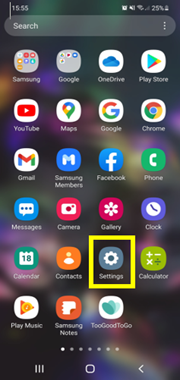
– Settings:

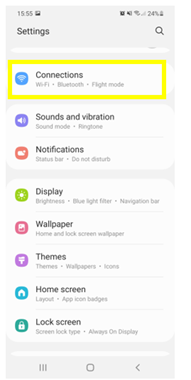
– Then, select Connections:

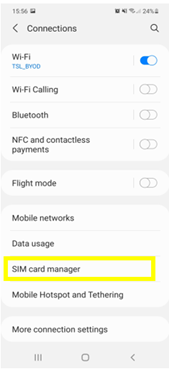
– Then choose SIM card manager:

– In the “e-SIM” section, if an eSIM profile (Ubigi) is installed, then it will appear as follows :
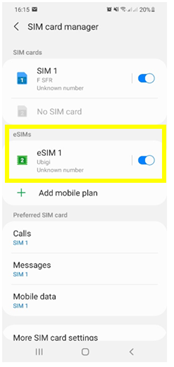

– When you select the installed eSIM profile, you can activate and deactivate it at any time:
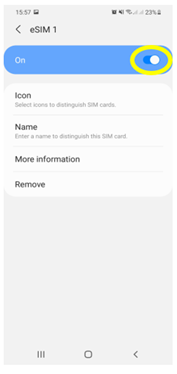

Also, as soon as your Ubigi eSIM profile is activated, a double network signal will appear at the top of your screen:

– a network signal representing your main SIM card (on the left)
– a second network signal representing your eSIM profile (right)


Looking for something specific?

Cross

Other frequently asked questions:

Will data latency be impacted by the IP location feature?

Why is my Ubigi connection not working?

For which countries is the IP location feature available?

In which countries is the IP location feature supported?

IP location feature: Do I need to install an additional app to benefit from this feature?

What is the difference between a Country of Residence IP address and a Regional IP address?

Is the IP location feature free?

IP location feature: which devices are supported?

Can I make phone calls with Ubigi eSIM data plans?

I am stuck on the "FINAL STEP" page, and the message "Waiting for Ubigi cellular connectivity" has been displayed for several minutes. How can I resolve this?

I restored my data on my (new) iPhone, but my eSIM profile does not work. What to do?

I am about to travel. How do I manage my Ubigi eSIM profile on my device ?

Resolve an issue with Ubigi eSIM profile on Android device

Resolve an issue with Ubigi eSIM profile on iPhone

iMessage does not work with my Ubigi eSIM profile. What to do ?

How do I know if my Ubigi eSIM profile is activated on my iPhone/iPad?

How to get and install a Ubigi eSIM profile on iPhone?

How to get and install a Ubigi eSIM profile on an Android device?

How to get and install a Ubigi eSIM profile on iPad?

How to get and install a new Ubigi eSIM profile on my Windows 10 or Windows 11 laptop or tablet?

How do I activate my Ubigi services with my Windows 10 or Windows 11 device equipped with a Ubigi physical SIM card?

How do I activate my Ubigi services with my Windows 10 or Windows 11 laptop or tablet equipped with a Ubigi eSIM?

How can I buy a data plan from the Ubigi application on iPhone or iPad?

How can I check if my Ubigi eSIM profile is installed on my iPad?

How can I check if my Ubigi eSIM profile is installed on my iPhone?

My Ubigi eSIM profile is installed and active on my iPhone/iPad but I don't have any network displayed, what can I do?

My eSIM Ubigi profile is installed and active on my iPhone/iPad, the network is displayed but I don't have access to the Internet, what should I do?

Mobile data is applied to the Ubigi eSIM profile on my iPhone/iPad but I can't access the internet, what can I do?

How do I know if my Ubigi profile is installed on my Android device?

My Ubigi eSIM profile is installed and active on my Android device but I don’t have any network displayed, what can I do?

I can not connect with my Ubigi eSIM

My Ubigi eSIM profile is installed and active on my Android device, the network is displayed but I don’t have access to the Internet, what should I do?

Mobile data is applied to the Ubigi eSIM profile on my Android device, but impossible to access the internet, what can I do?

Which mobile devices support Ubigi eSIM?

What is a one-off and a recurring Ubigi data plans?

How do I know if my Ubigi eSIM profile is activated on my Windows 10 or Windows 11 device?

How do I check the APN configuration of my Ubigi eSIM on Windows 10 or Windows 11?

My Ubigi eSIM profile is activated on my Windows 10 or Windows 11 device but I do not have a network, what should I do?

What is the best way to contact Ubigi support?

How to use Ubigi with a dual SIM device?

How to use tethering with a Windows 10 or Windows 11 device to share the Ubigi connectivity?

How to use tethering with an Android device to share the Ubigi connectivity?

How to use tethering with an iPhone/iPad to share the Ubigi connectivity?

I did not use my Ubigi data plan, can I get a refund?

My device does not show "Ubigi" as carrier name, is it normal?

How can I find the ICCID of my Ubigi eSIM?

The Ubigi antenna pictogram is not displayed in Japan, why?

How to set the APN for Ubigi eSIM?

How to reset my password for my Ubigi eSIM account?

How can I create my Ubigi account on iPad?

How can I create my Ubigi account on a Windows 10 or Windows 11 device?

How can I create my Ubigi account on an Android device?

How can I create my Ubigi account on iPhone?

How can I change my Ubigi password?

How can I check the remaining balance of my Ubigi eSIM?

How to delete my Ubigi account?

How can I buy a data plan from the Ubigi application on an Android device?

How can I buy a data plan from the Ubigi application by using a Windows 10 or Windows 11 device?

Do I need Wi-Fi to purchase a Ubigi data plan?

I paid for a Ubigi data plan but it does not appear in my account, what should I do?

I purchased the wrong data plan and did not use it, how can I change it?

How to get an invoice for my Ubigi data plan purchase?

I do not get the “eSIM – Mobile Data in my device” button on my iPad to install my Ubigi profile. Why and what should I do?

How to reinstall the Ubigi eSIM profile I deleted on my Windows 10 or Windows 11 device?

Does my Ubigi eSIM profile have a validity period and will expire one day?

I have a new Windows10 device. How can I reinstall my Ubigi eSIM profile on it?

How can I enable my Ubigi eSIM on my iPhone when I want to use it again?

I lost my device. How can I block my Ubigi eSIM account?

How can I disable my Ubigi eSIM on my iPhone when I travel or when I do not use it?

I have multiple  Ubigi eSIM profiles. Can I manage them all under one Ubigi account?

How can I enable my Ubigi eSIM profile on my iPad when I want to use it again?

How can I disable my Ubigi eSIM profile on my iPad when I travel or when I do not use it?

How can I disable my Ubigi eSIM on my Android device when I travel or when I do not use it?

How can I enable my Ubigi eSIM on my Android device when I want to use it again?

How to delete a Ubigi eSIM profile on an Android device?

How to delete a Ubigi eSIM profile on iPhone/iPad?

How to delete a Ubigi eSIM profile on a Windows 10 or Windows 11 device ?

How can I find PIN, PIN2 or PUK codes for my Ubigi eSIM?

Ubigi connection is not working. Should I disable any active DNS or VPN on my device?

Great Trustpilot stars Trustpilot
Trustpilot stars
Based on 49333 reviews on Trustpilot
5 stars Verified
Verified review
This user has been identified as a buyer
Very easy to setup and provided good…
Very easy to setup and provided good coverage throughout Italy.
customer, 23 Oct 2026
5 stars Verified
Verified review
This user has been identified as a buyer
more than perfect
it is by far more than perfect !
customer, 23 Oct 2026
5 stars Verified
Verified review
This user has been identified as a buyer
Simple easy good value
Simple easy good value wish id discovered it sooner
Matt, 23 Oct 2026
5 stars Verified
Verified review
This user has been identified as a buyer
Ubigi eSIM provided a flawless data…
Ubigi eSIM provided a flawless data connection during my 11-day trip to Japan, with the 10 GB plan proving to be the perfect amount - I had 2.5 GB remaining. I experienced zero connectivity issues or coverage drops as I traveled through Tokyo, Mt. Fuji, Kyoto, Osaka, and Hiroshima. Setting it up was incredibly easy, and fast, reliable network made navigating every city completely seamless.
Marie McGuire, 23 Oct 2026
5 stars Verified
Verified review
This user has been identified as a buyer
Hassle free
Hassle free, works well, clear information
Jörg, 23 Oct 2026
4 stars Verified
Verified review
This user has been identified as a buyer
My texts won't go thru
customer, 23 Oct 2026
5 stars Verified
Verified review
This user has been identified as a buyer
Moto trip to Morocco
Excellent eSIM! Ubigi worked perfectly throughout my trip, with fast, reliable internet and easy setup. Highly recommended for stress-free travel!
Dennis, 22 Oct 2026
5 stars Verified
Verified review
This user has been identified as a buyer
Great service
Great connection and good internet speed. Very happy with the service!
Ellie , 22 Oct 2026
5 stars Verified
Verified review
This user has been identified as a buyer
Amazing Service!
This was fantastic! All of my friends on the trip were using their cell providers international networks and had no signal almost the entire time. I had all that signal I could use and it tethered with my computer it was fantastic! I used it in Italy and Germany. Thank you!
Audrey Monson, 22 Oct 2026
5 stars Verified
Verified review
This user has been identified as a buyer
Very good experience with ubigi
customer, 22 Oct 2026
4 stars Verified
Verified review
This user has been identified as a buyer
It worked right away
It worked right away. I hope future uses won’t ba a bummer like some eSim’s.
Tony, 22 Oct 2026
5 stars Verified
Verified review
This user has been identified as a buyer
One of the lowest cost providers for eSIM’s, particularly for travel
This is the first time using this company Ubigi. On previous trips we would always order a pocket Wi-Fi but this year we decided to do what everybody else does and use an eSIM, supposedly it’s a lot more secure than a pocket Wi-Fi and it’s actually less expensive than one as well. Pre-purchase I had a lot of questions and they were all answered by the Ubigi team through E-Mail. All my questions were always answered and if it wasn’t answered to my satisfaction, I would send another email and they would reply back and further clarify things. So I purchased one eSIM so far installed it on my phone this was very simple at least with my iPhone 15 if you download the app and use the app to do it. I have not used the eSIM yet because our travels to Japan are upcoming. If there’s any issues beyond a more than positive experience while using the eSIM in Japan, I will be sure and update this review but so far I’m very happy with my interactions and purchase with Ubigi.
Bob, 22 Oct 2026
5 stars Verified
Verified review
This user has been identified as a buyer
Ubigi's promise that the service would…
Ubigi's promise that the service would connect immediately upon arrival at my destination came through without any fuss.
customer, 22 Oct 2026
5 stars Verified
Verified review
This user has been identified as a buyer
My wife and I had a great experience…
My wife and I had a great experience using Ubigi for our visit to Japan. The eSIM connected seamlessly for the most part with just one little moment of panic when we entered the country. We quickly realized it was operator error and once connected, it worked everywhere perfectly.
GL, 22 Oct 2026
5 stars Verified
Verified review
This user has been identified as a buyer
Easy to install and great coverage
Rafael Silveira, 22 Oct 2026
cross

Your message has been sent.
We’ll get back to you shortly.

cross

We have taken into account your subscription to the newsletter

cross
