How can I disable my Ubigi eSIM profile on my Android device when I travel or when I’m not using it?
If you need to temporarily deactivate your Ubigi eSIM profile on your Android device when you travel or when you’re not using it, follow these steps:
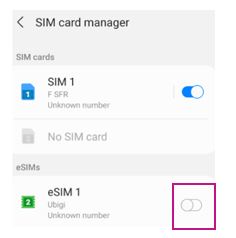
1 – On your device, go to Settings > Connections > SIM Card Manager :
2 – Locate the Ubigi eSIM profile (note: if you haven’t renamed it, it may appear as “Secondary”), then tap the toggle switch next to it to disable it. The switch will turn gray once it is deactivated.
Your Ubigi eSIM profile is now deactivated.
You simply reactivate/deactivateyour eSIM profile at any time by following the same steps. You can also watch the video below for a visual guide.
We recommend that you do not delete your Ubigi eSIM profile when you travel or when you’re not using it, as you can simply deactivate it as described above and reactivate it whenever needed.
Contact
You haven’t found the answers to your questions in Assistance or FAQ?
You haven’t found the answers to your questions in Assistance or FAQ?
Great
Based on 50717 reviews on
Verified
Verified review
This user has been identified as a buyer
Fast and reliable
Easy to install, never lost the signal, reliable, good price.
SYLVIE FRECHETTE, 04 Nov 2026
Verified
Verified review
This user has been identified as a buyer
GREAT experience
I have had a GREAT experience so far. No connection issues. This is the first time I have used an eSim.
C.G, 04 Nov 2026
Verified
Verified review
This user has been identified as a buyer
eSIM for Japan trip
Easy to apply for and download and it self uploads and turns on in your destination and off back at your home country
Aoidin Oluwalogbon, 04 Nov 2026
Verified
Verified review
This user has been identified as a buyer
Very easy and effective to use.
Very easy and effective to use.
Allan, 04 Nov 2026
Verified
Verified review
This user has been identified as a buyer
Not too expensive and good
Not too expensive, but not high performing all the time. Much cheaper than using my provider though so definitely do it again.
Mr Walter Beek, 04 Nov 2026
Verified
Verified review
This user has been identified as a buyer
Good I love it
Good I love it
Ronar, 04 Nov 2026
Verified
Verified review
This user has been identified as a buyer
Exactly as described easy to use and set up
The Ubigi esim worked exactly as described, easy to use and set up and excellent coverage across Japan. The website and app were very useful and contained some interesting related content.
Spanner, 04 Nov 2026
Verified
Verified review
This user has been identified as a buyer
China & Tibet
Ubigi offered a good range of eSIM options for my recent trip and once purchased the chosen eSIM was simple to install activate and provided all the data cover required throughout the trip
SIMON JONES, 04 Nov 2026
Verified
Verified review
This user has been identified as a buyer
Easy to install and use.
Easy to install and use.
customer, 04 Nov 2026
Verified
Verified review
This user has been identified as a buyer
excellent usage and connection
excellent usage and connection
customer, 04 Nov 2026
Verified
Verified review
This user has been identified as a buyer
There was no service in Serbia despite…
There was no service in Serbia despite Serbia being in the Europe package.
Otherwise ubigi has worked well.
Ray, 04 Nov 2026
Verified
Verified review
This user has been identified as a buyer
I was impressed by the service .
I was impressed by the service .
customer, 04 Nov 2026
Verified
Verified review
This user has been identified as a buyer
excellent service...
excellent service...
jorge m, 04 Nov 2026
Verified
Verified review
This user has been identified as a buyer
Excellent setup and activation
Excellent setup and activation, no issues
Martine Hamman, 04 Nov 2026
Verified
Verified review
This user has been identified as a buyer
Excellent service
Excellent service
customer, 04 Nov 2026
Thank you
Your message has been sent. We’ll get back to you shortly.
Thank you
We have taken into account your subscription to the newsletter
How to check eSIM compatibility
Smartphones / Tablets:
Dial *#06#. → If an EID number appears, your device is eSIM-compatible.
Windows 10 / 11:
Press Windows+I. Go to “Network & Internet” → If you see "Cellular", your PC is eSIM-compatible.
How to check carrier unlocking
iPhone / iPad:
Go to Settings > General > About. Scroll to Carrier Lock. → If you see “No SIM restrictions”, your device is unlocked.
Android:
Go to Settings > Network & Internet > Mobile network. Disable Automatic network selection. → If multiple networks appear, your device is unlocked.



 How to check eSIM compatibility
 How to check carrier unlocking