After that, if you still have no access to Internet, you need to check if the Access Point Name (APN) is properly configured on your device. To do that on your iPhone/iPad, go to :
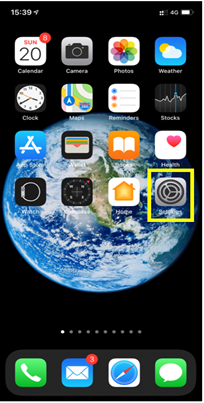
– Settings:
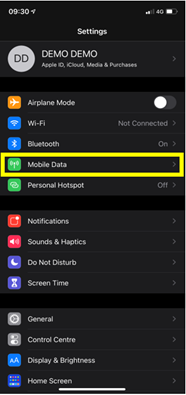
– Then select Mobile Data:
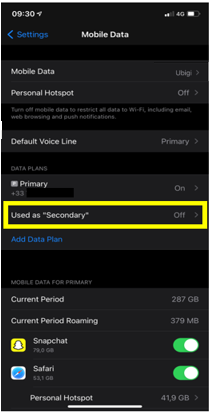
– Then, in Cellular Plan, select the Ubigi eSIM (“secondary” plan):
– After that, select Mobile data network:
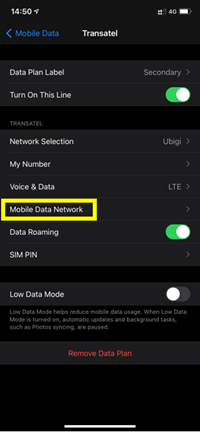
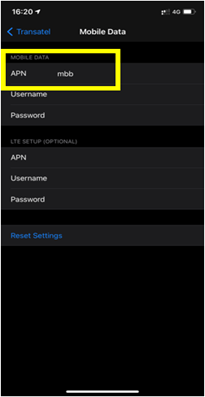
– Finally, in the APN field, make sure that mbb is specified (if not, type it in the field):
You can now connect to the Internet through the connectivity of your Ubigi eSIM.

Contact
You haven’t found the answers to your questions in Assistance or FAQ?
Great
Based on 41742 reviews on
Verified
Verified review
This user has been identified as a buyer
Easy to use once I worked out changing…
Easy to use once I worked out changing settings on Samsung
John Litster, 20 Jul 2026
Verified
Verified review
This user has been identified as a buyer
Very fast
Very fast, professional
David M, 20 Jul 2026
Verified
Verified review
This user has been identified as a buyer
Easy
Work perfectly
Alexis Velasco, 20 Jul 2026
Verified
Verified review
This user has been identified as a buyer
Very easy to connect and coverage is…
Very easy to connect and coverage is good
Michelle, 20 Jul 2026
Verified
Verified review
This user has been identified as a buyer
Japan ubigi- no problems, great coverage
Used ubigi sim whilst travelling for 2 weeks in Japan. Never lost signal and esim was so easy to install and use on my phone. Used data only and did a lot of travel on trains and shinkansen, data coverage was always great. I'll get ubigi again when I'm in Japan next.
L Wizzle, 20 Jul 2026
Verified
Verified review
This user has been identified as a buyer
the speed is not there but it gets the job done
I always had access to the internet and never lost connectivity but the speed (especially for upload) is not great at all. I was sending pictures of my trip to my friends and family and it took minutes to send...
customer, 20 Jul 2026
Verified
Verified review
This user has been identified as a buyer
Easy to use and very practical
Angèle, 20 Jul 2026
Verified
Verified review
This user has been identified as a buyer
eSIM cut in automatically as promised…
eSIM cut in automatically as promised upon arrival in the USA
Malcolm Chalmers, 19 Jul 2026
Verified
Verified review
This user has been identified as a buyer
Very easy to install and seamless to use
Penelope Cranmer, 19 Jul 2026
Verified
Verified review
This user has been identified as a buyer
Easy for a senior to order
Easy for a senior to order, manage and use.
customer, 19 Jul 2026
Verified
Verified review
This user has been identified as a buyer
Works great
Works great
customer, 19 Jul 2026
Verified
Verified review
This user has been identified as a buyer
the automatic eSIM
the automatic activation is very helpful for us seniors, we don’t have to worry where to activate the esim. Thank you
Eva Chan, 19 Jul 2026
Verified
Verified review
This user has been identified as a buyer
Easy to sign up and was great to have…
Easy to sign up and was great to have cellular wherever I went on my trip.
Iris, 19 Jul 2026
Verified
Verified review
This user has been identified as a buyer
Amazing App
Amazing App, i found my favorit esim Provider
customer, 19 Jul 2026
Verified
Verified review
This user has been identified as a buyer
Easy
Easy, works perfectly
Chris, 19 Jul 2026
Thank you
Your message has been sent. We’ll get back to you shortly.
Thank you
We have taken into account your subscription to the newsletter
How to check eSIM compatibility
Smartphones / Tablets:
Dial *#06#. → If an EID number appears, your device is eSIM-compatible.
Windows 10 / 11:
Press Windows+I. Go to “Network & Internet” → If you see "Cellular", your PC is eSIM-compatible.
How to check carrier unlocking
iPhone / iPad:
Go to Settings > General > About. Scroll to Carrier Lock. → If you see “No SIM restrictions”, your device is unlocked.
Android:
Go to Settings > Network & Internet > Mobile network. Disable Automatic network selection. → If multiple networks appear, your device is unlocked.
You already have an eSIM in your cart.
Each order can only include one eSIM data plan.
If you choose to add a new one, the current plan will be removed. What would you like to do?

