After that, if you still have no access to Internet, you need to check if the Access Point Name (APN) is properly configured on your device. To do that on your iPhone/iPad, go to :
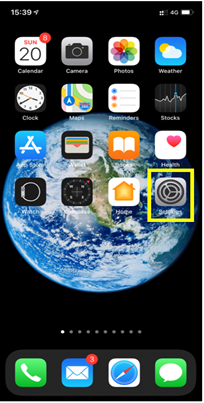
– Settings:
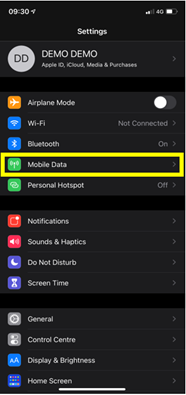
– Then select Mobile Data:
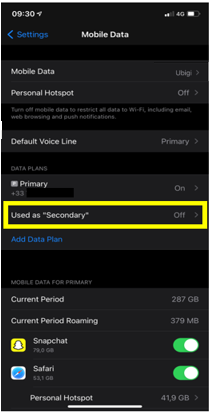
– Then, in Cellular Plan, select the Ubigi eSIM (“secondary” plan):
– After that, select Mobile data network:
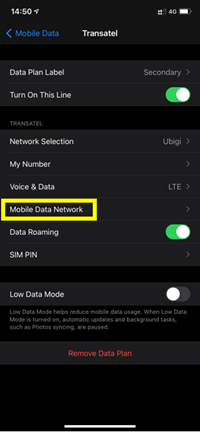
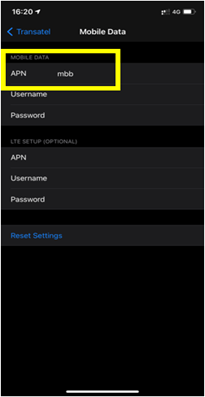
– Finally, in the APN field, make sure that mbb is specified (if not, type it in the field):
You can now connect to the Internet through the connectivity of your Ubigi eSIM.

Contact
You haven’t found the answers to your questions in Assistance or FAQ?
Great
Based on 37447 reviews on
Verified
Verified review
This user has been identified as a buyer
Easy to set up
Easy to set up, good pricing options, worked as stated. Set up, once you are in region, instantly connected! Very simple.
John, 20 May 2026
Verified
Verified review
This user has been identified as a buyer
Worked very well in Japan
Worked very well in Japan. Able to use it seamlessly while moving around cities.
customer, 20 May 2026
Verified
Verified review
This user has been identified as a buyer
It works perfectly!
It works perfectly!
Użytkownik, 20 May 2026
Verified
Verified review
This user has been identified as a buyer
Simple to get the eSIM
Simple to get the eSIM. Customer service at the ready.
Peter S, 20 May 2026
Verified
Verified review
This user has been identified as a buyer
Simple service.
Easy to install and use. Perfect signal reception everywhere I went also great value with unlimited data in Japan for 7 days at £22! ( May 2026) promotional codes are available for various discounts. The app makes future downloads Easy should you need another plan.
Stuart Majewski, 20 May 2026
Verified
Verified review
This user has been identified as a buyer
It was good hotel
It was good hotel
customer, 20 May 2026
Verified
Verified review
This user has been identified as a buyer
It worked well and easy to use
customer, 20 May 2026
Verified
Verified review
This user has been identified as a buyer
It s vers good
No problème in asia
client lambda, 20 May 2026
Verified
Verified review
This user has been identified as a buyer
Great use Ubigi for all my overseas…
Great use Ubigi for all my overseas travel
Michelle Wilson, 20 May 2026
Verified
Verified review
This user has been identified as a buyer
Smooth transition to the network
customer, 20 May 2026
Verified
Verified review
This user has been identified as a buyer
So far an excellent service and fast…
So far an excellent service and fast connection. I would recommend Ubigi to friends and others.
Guven Aydin, 20 May 2026
Verified
Verified review
This user has been identified as a buyer
Net work is coming full & it’s ok to…
Net work is coming full & it’s ok to get Ubigi it’s excellent result.
customer, 20 May 2026
Verified
Verified review
This user has been identified as a buyer
Very stable
Very stable! Good Connection
David Barth, 20 May 2026
Verified
Verified review
This user has been identified as a buyer
Quick and Easy
It was very easy to install and quick to activate. It was super simple to add additional data.
Asha Hooda, 20 May 2026
Verified
Verified review
This user has been identified as a buyer
Easy As
Quick and easy to use even for a senior like me. Connections etc is no problem
KezKelly, 20 May 2026
Thank you
Your message has been sent. We’ll get back to you shortly.
Thank you
We have taken into account your subscription to the newsletter
How to check eSIM compatibility
Smartphones / Tablets:
Dial *#06#. → If an EID number appears, your device is eSIM-compatible.
Windows 10 / 11:
Press Windows+I. Go to “Network & Internet” → If you see "Cellular", your PC is eSIM-compatible.
How to check carrier unlocking
iPhone / iPad:
Go to Settings > General > About. Scroll to Carrier Lock. → If you see “No SIM restrictions”, your device is unlocked.
Android:
Go to Settings > Network & Internet > Mobile network. Disable Automatic network selection. → If multiple networks appear, your device is unlocked.
You already have an eSIM in your cart.
Each order can only include one eSIM data plan.
If you choose to add a new one, the current plan will be removed. What would you like to do?

