Skip to content
← Back to questions
How to use the tethering (data sharing) with an iPhone/iPad to share the Ubigi connectivity?

In order to share the Ubigi cellular data connection from your iPhone or iPad with another device, please follow the instructions below:

1/ First, make sure that your iPhone/iPad is connected to the Ubigi cellular network (to do that, go to Settings/Cellular networks/Cellular networks again/select your eSIM profile).

2/ Then go to :
– Settings
– Personal hotspot (*)
– Tap the slider next to activate the option in [1]
– You will also see a Wi-Fi password appear in [2]
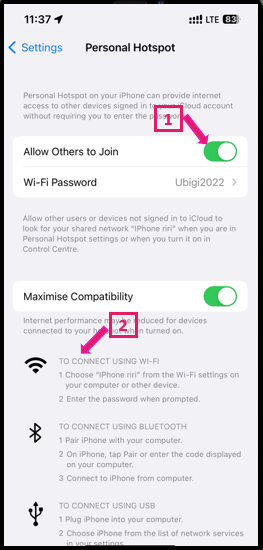


Once this option is activated, activate the Wi-Fi on the other device (the one you want to get connected), select your iPhone/iPad signal and enter the password displayed on your iPhone/iPad.

And voilà! The tethering is now working and you can connect several devices to share the Ubigi connectivity 🙂

(*) In case the Personal hotspot option is disabled (all grey), you will need to register the APN first in the Settings. To do that, please follow the instruction on section How to set the APN for Ubigi eSIM?
Once the APN set, go back to Settings > Mobile data > Personal hotspot to check if the option is now available:
– if it does, go further with the instructions above to set the option
– if it does not, double-check that you registered well the mbb APN and if the situation persists do not hesitate to contact our Customer Service for more help.


Looking for something specific?

Other frequently asked questions:

Will data latency be impacted by the IP location feature?

Why is my Ubigi connection not working?

For which countries is the IP location feature available?

In which countries is the IP location feature supported?

IP location feature: Do I need to install an additional app to benefit from this feature?

What is the difference between a Country of Residence IP address and a Regional IP address?

Is the IP location feature free?

IP location feature: which devices are supported?

Can I make phone calls with Ubigi eSIM data plans?

I am stuck on the "FINAL STEP" page, and the message "Waiting for Ubigi cellular connectivity" has been displayed for several minutes. How can I resolve this?

I restored my data on my (new) iPhone, but my eSIM profile does not work. What to do?

I am about to travel. How do I manage my Ubigi eSIM profile on my device ?

Resolve an issue with Ubigi eSIM profile on Android device

Resolve an issue with Ubigi eSIM profile on iPhone

iMessage does not work with my Ubigi eSIM profile. What to do ?

How do I know if my Ubigi eSIM profile is activated on my iPhone/iPad?

How to get and install a Ubigi eSIM profile on iPhone?

How to get and install a Ubigi eSIM profile on an Android device?

How to get and install a Ubigi eSIM profile on iPad?

How to get and install a new Ubigi eSIM profile on my Windows 10 or Windows 11 laptop or tablet?

How do I activate my Ubigi services with my Windows 10 or Windows 11 device equipped with a Ubigi physical SIM card?

How do I activate my Ubigi services with my Windows 10 or Windows 11 laptop or tablet equipped with a Ubigi eSIM?

How can I buy a data plan from the Ubigi application on iPhone or iPad?

How can I check if my Ubigi eSIM profile is installed on my iPad?

How do I know if my Ubigi eSIM profile is activated and ready to use on my Android device?

How can I check if my Ubigi eSIM profile is installed on my iPhone?

My Ubigi eSIM profile is installed and active on my iPhone/iPad but I don't have any network displayed, what can I do?

My eSIM Ubigi profile is installed and active on my iPhone/iPad, the network is displayed but I don't have access to the Internet, what should I do?

Mobile data is applied to the Ubigi eSIM profile on my iPhone/iPad but I can't access the internet, what can I do?

How do I know if my Ubigi profile is installed on my Android device?

My Ubigi eSIM profile is installed and active on my Android device but I don’t have any network displayed, what can I do?

I can not connect with my Ubigi eSIM

My Ubigi eSIM profile is installed and active on my Android device, the network is displayed but I don’t have access to the Internet, what should I do?

Mobile data is applied to the Ubigi eSIM profile on my Android device, but impossible to access the internet, what can I do?

Which mobile devices support Ubigi eSIM?

How do I know if my Ubigi eSIM profile is activated on my Windows 10 or Windows 11 device?

How do I check the APN configuration of my Ubigi eSIM on Windows 10 or Windows 11?

What is a one-off and a recurring Ubigi data plans?

My Ubigi eSIM profile is activated on my Windows 10 or Windows 11 device but I do not have a network, what should I do?

What is the best way to contact Ubigi support?

How to use Ubigi with a dual SIM device?

How to use tethering with a Windows 10 or Windows 11 device to share the Ubigi connectivity?

How to use tethering with an Android device to share the Ubigi connectivity?

I did not use my Ubigi data plan, can I get a refund?

My device does not show "Ubigi" as carrier name, is it normal?

How can I find the ICCID of my Ubigi eSIM?

How to set the APN for Ubigi eSIM?

The Ubigi antenna pictogram is not displayed in Japan, why?

How to reset my password for my Ubigi eSIM account?

How can I create my Ubigi account on iPad?

How can I create my Ubigi account on an Android device?

How can I create my Ubigi account on a Windows 10 or Windows 11 device?

How can I create my Ubigi account on iPhone?

How can I change my Ubigi password?

How can I check the remaining balance of my Ubigi eSIM?

How to delete my Ubigi account?

How can I buy a data plan from the Ubigi application on an Android device?

How can I buy a data plan from the Ubigi application by using a Windows 10 or Windows 11 device?

Do I need Wi-Fi to purchase a Ubigi data plan?

I paid for a Ubigi data plan but it does not appear in my account, what should I do?

I purchased the wrong data plan and did not use it, how can I change it?

How to get an invoice for my Ubigi data plan purchase?

I do not get the “eSIM – Mobile Data in my device” button on my iPad to install my Ubigi profile. Why and what should I do?

How to reinstall the Ubigi eSIM profile I deleted on my Windows 10 or Windows 11 device?

Does my Ubigi eSIM profile have a validity period and will expire one day?

I have a new Windows10 device. How can I reinstall my Ubigi eSIM profile on it?

How can I enable my Ubigi eSIM on my iPhone when I want to use it again?

I lost my device. How can I block my Ubigi eSIM account?

How can I disable my Ubigi eSIM on my iPhone when I travel or when I do not use it?

I have multiple  Ubigi eSIM profiles. Can I manage them all under one Ubigi account?

How can I enable my Ubigi eSIM profile on my iPad when I want to use it again?

How can I disable my Ubigi eSIM profile on my iPad when I travel or when I do not use it?

How can I disable my Ubigi eSIM on my Android device when I travel or when I do not use it?

How can I enable my Ubigi eSIM on my Android device when I want to use it again?

How to delete a Ubigi eSIM profile on iPhone/iPad?

How to delete a Ubigi eSIM profile on an Android device?

How to delete a Ubigi eSIM profile on a Windows 10 or Windows 11 device ?

How can I find PIN, PIN2 or PUK codes for my Ubigi eSIM?

Ubigi connection is not working. Should I disable any active DNS or VPN on my device?

Great Trustpilot stars Trustpilot
Trustpilot stars
Based on 37045 reviews on Trustpilot
5 stars Verified
Verified review
This user has been identified as a buyer
Easy to Use and Works Great!
Used this for my first trip to Japan and was able to seamlessly connect as soon as I landed. Will use again!
Elizabeth Kennedy, 15 May 2026
5 stars Verified
Verified review
This user has been identified as a buyer
Flawless
It started flawlessly when we reached our destination as promised and worked wonderfully well!
customer, 15 May 2026
5 stars Verified
Verified review
This user has been identified as a buyer
Great job to help me with my app
customer, 15 May 2026
4 stars Verified
Verified review
This user has been identified as a buyer
I had difficulties during the…
I had difficulties during the installation process. Otherwise it functioned very well all over I went (Seoul & Jeju).
customer, 15 May 2026
5 stars Verified
Verified review
This user has been identified as a buyer
Indonesia
I travelled to Indonesia an I had everywhere a very good connection. I can recommend Ubigi.
Stefanie, 15 May 2026
4 stars Verified
Verified review
This user has been identified as a buyer
Hooked up well when I got to Japan
Hooked up well when I got to Japan. Great connectivity.
Sam, 15 May 2026
5 stars Verified
Verified review
This user has been identified as a buyer
Great service!
Great service! Had a little difficulty to activate the eSIM. With their help everything went very smoothly. Next leg will be in Japan. Hopefully there shouldn’t be any problems.
DANIEL TAYLOR, 15 May 2026
5 stars Verified
Verified review
This user has been identified as a buyer
Great BALUE
Easy setup, very reasonable pricing, consistent connectivity in Japan.
Toni, 15 May 2026
5 stars Verified
Verified review
This user has been identified as a buyer
Ubigi was honestly one of the best…
Ubigi was honestly one of the best travel decisions for our Japan trip. Activation was seamless, connectivity across Tokyo, Kawaguchiko, Kyoto, and Osaka stayed consistently strong, and we never had to struggle with physical SIM cards or pocket Wi-Fi devices. The eSIM connected almost instantly after landing in Japan, worked flawlessly on trains and inside stations, and made navigation, translations, ticketing, and payments stress-free throughout the trip. For anyone traveling to Japan, Ubigi is extremely convenient, reliable, and absolutely worth it for a smooth travel experience.
RAHUL BADEKAR, 15 May 2026
5 stars Verified
Verified review
This user has been identified as a buyer
I’ve tried lots of different esims…
I’ve tried lots of different esims while travelling to asia Ubigi is consistently the best. I’ve travelled to Hong Kong, Taiwan, Japan, China and Philippines all of them worked really well.
Trololol, 15 May 2026
5 stars Verified
Verified review
This user has been identified as a buyer
Worked great had no issues
customer, 14 May 2026
5 stars Verified
Verified review
This user has been identified as a buyer
Best service ever
Best service ever! Never had any issues with the internet. The internet speed was so fast. Very happy with Ubigi
Stephanie, 14 May 2026
5 stars Verified
Verified review
This user has been identified as a buyer
Easy download of my eSIM plan
Easy download of my eSIM plan for my trip to Japan. It worked flawlessly when I got to Japan, especially for use in navigating, getting restaurant opinions on Yelp, and texting my wife when we got separated.
Richard Woo, 14 May 2026
5 stars Verified
Verified review
This user has been identified as a buyer
Connection was smooth
Connection was smooth. No interruption. Love it! Will buy Ubigi again for my next trip.
customer, 14 May 2026
4 stars Verified
Verified review
This user has been identified as a buyer
It was a little complicated to set up…
It was a little complicated to set up the esim, but it works very well. I am in Japan right now.
Customer, 14 May 2026

Your message has been sent.
We’ll get back to you shortly.

We have taken into account your subscription to the newsletter
