I have multiple Ubigi eSIM profiles. Can I manage them all under one Ubigi account?
No, each Ubigi eSIM profile requires its own Ubigi account linked to a unique email address.
How it works ? Every Ubigi eSIM profile is tied to a single device and a single account: 1 eSIM = 1 Ubigi account = 1 device This ensures that each eSIM’s data plan, usage, and billing are managed separately.
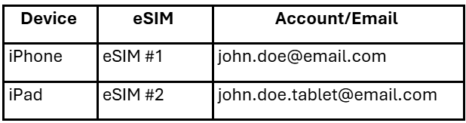
If you have multiple devices : If you need an Ubigi eSIM for another device (for example, a tablet or a second phone): You’ll need to create a new Ubigi account using a different email address. Each device will then manage its own eSIM plan separately. Example:
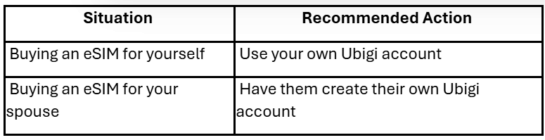
If you’re buying a plan for someone else If you want to purchase an eSIM for another person (e.g., your spouse/partner or family member,, a friend): – They must create their own Ubigi account with their own email address. – If you buy the eSIM under your account, you cannot transfer that plan later to another account. Example:
Why this is important: This setup protects your privacy and ensures that: – Your data plans are properly synchronized to the correct device. – Plan management (activation, top-up, billing) stays secure and easy to track.
Contact
You haven’t found the answers to your questions in Assistance or FAQ?
You haven’t found the answers to your questions in Assistance or FAQ?
Great
Based on 44373 reviews on
Verified
Verified review
This user has been identified as a buyer
seamless experience
seamless, does what is mention it would do, well explained. This is a no brainer.
customer, 26 Aug 2026
Verified
Verified review
This user has been identified as a buyer
efficient !!!!
efficient !!!!
Kate T, 26 Aug 2026
Verified
Verified review
This user has been identified as a buyer
Highly recommend
Never had any issues, no matter what country we hopped to it was a smooth transition.
I used ALOT of internet/apps/reels and the data was the perfect amount of "unlimited".
customer, 26 Aug 2026
Verified
Verified review
This user has been identified as a buyer
Good customer response
I did have issues connecting. They were super responsive and sent me a new QR code, then it worked fine 👍
customer, 26 Aug 2026
Verified
Verified review
This user has been identified as a buyer
Affordable and Easy Set Up / Use
The service was affordable and cell service in the cities we visited in Europe was generally good. Install and activation was fairly straight forward. Assistance from AI did help in activation but no real issues.
Chris, 26 Aug 2026
Verified
Verified review
This user has been identified as a buyer
Overall well connected
Overall well connected, there was a couple of time we went underground and could not get reception but otherwise good
Bosisto's Online Customer, 26 Aug 2026
Verified
Verified review
This user has been identified as a buyer
Great service
Great service
customer, 26 Aug 2026
Verified
Verified review
This user has been identified as a buyer
very easy to connect
very easy to connect
customer, 26 Aug 2026
Verified
Verified review
This user has been identified as a buyer
My plan was for 7 days still using it…
My plan was for 7 days still using it without any issues and Hotspot aswell . Excellent !
Alain, 25 Aug 2026
Verified
Verified review
This user has been identified as a buyer
Got connected straight away at the…
Got connected straight away at the airport! I just needed to restart my phone, and boom everything was up and running. Very happy with the service and how quick and hassle-free the whole process was. Highly recommend! ❤️
Nimkim, 25 Aug 2026
Verified
Verified review
This user has been identified as a buyer
Worked great !
Worked great despite visiting four different countries!
Laurent Lapointe, 25 Aug 2026
Verified
Verified review
This user has been identified as a buyer
The connection worked as promised
The connection worked as promised. No issues at all.
Brother, 25 Aug 2026
Verified
Verified review
This user has been identified as a buyer
Very easy to use and it worked really…
Very easy to use and it worked really well during our stay in Japan, even in rural areas.
I recommend Ubigi!
Salome WATTEAU, 25 Aug 2026
Verified
Verified review
This user has been identified as a buyer
Easy and seamless to set up and use
Easy and seamless to set up and use. Service signal was great!
customer, 25 Aug 2026
Verified
Verified review
This user has been identified as a buyer
5g service covering JAPAN
There is a lot of 5g service providers to choose from.i decided on Ubigi unlimited 30day pack.No regrets,has been flawlessly working since day one., Tokyo city centre or out and about, it's been great.Even portable hotspot gets the thumbs up.thankyou ,Ubigi 10/10 Recommended!
john pugmire, 25 Aug 2026
Thank you
Your message has been sent. We’ll get back to you shortly.
Thank you
We have taken into account your subscription to the newsletter
How to check eSIM compatibility
Smartphones / Tablets:
Dial *#06#. → If an EID number appears, your device is eSIM-compatible.
Windows 10 / 11:
Press Windows+I. Go to “Network & Internet” → If you see "Cellular", your PC is eSIM-compatible.
How to check carrier unlocking
iPhone / iPad:
Go to Settings > General > About. Scroll to Carrier Lock. → If you see “No SIM restrictions”, your device is unlocked.
Android:
Go to Settings > Network & Internet > Mobile network. Disable Automatic network selection. → If multiple networks appear, your device is unlocked.
You already have an eSIM in your cart.
Each order can only include one eSIM data plan.
If you choose to add a new one, the current plan will be removed. What would you like to do?




 How to check eSIM compatibility
 How to check carrier unlocking