After that, if you still have no access to Internet, you need to check if the Access Point Name (APN) is properly configured on your device. To do that on your iPhone/iPad, go to :
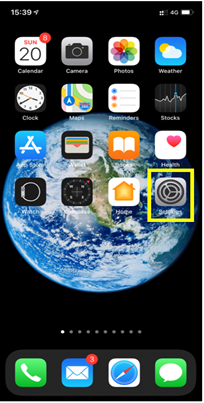
– Settings:
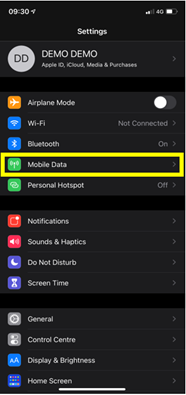
– Then select Mobile Data:
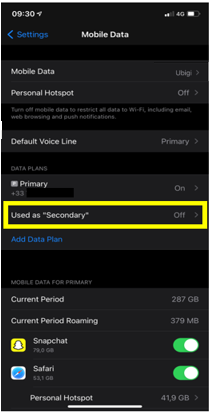
– Then, in Cellular Plan, select the Ubigi eSIM (“secondary” plan):
– After that, select Mobile data network:
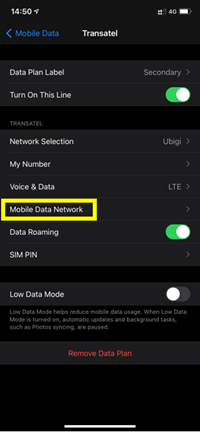
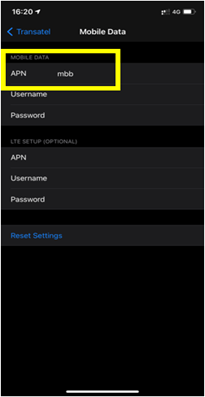
– Finally, in the APN field, make sure that mbb is specified (if not, type it in the field):
You can now connect to the Internet through the connectivity of your Ubigi eSIM.

Contact
You haven’t found the answers to your questions in Assistance or FAQ?
Great
Based on 46559 reviews on
Verified
Verified review
This user has been identified as a buyer
Easy install
Easy install. Everything worked perfectly first time. Thanks
customer, 24 Sep 2026
Verified
Verified review
This user has been identified as a buyer
The service was better than my local…
The service was better than my local provider in the US. It didn’t disappoint. Fast 5G speed. Will use again.
customer, 24 Sep 2026
Verified
Verified review
This user has been identified as a buyer
Easy to use
Easy to use, good value for money and works perfectly 👍
Sue Renforth, 24 Sep 2026
Verified
Verified review
This user has been identified as a buyer
First time user loved it…
I have never used a eSIM before and was expecting issues as is often true of first time users. However as soon as I switched on my phone when I landed in Casablanca, it worked perfectly well until I left on the ferry to Spain.
Guy, 24 Sep 2026
Verified
Verified review
This user has been identified as a buyer
I tried Ubigi after faithfully using…
I tried Ubigi after faithfully using Airalo. Ubigi was easier to use, even when I had to top-off during my trip. The price point can’t be beat. Will use again!
Ncampy, 24 Sep 2026
Verified
Verified review
This user has been identified as a buyer
easy to used work all over Italy
easy to used work all over Italy. The only problem, was that there were areas that internet didn't work.
GERVASI BRUNO, 24 Sep 2026
Verified
Verified review
This user has been identified as a buyer
Easy!!!
Easy to purchase, easy to install, easy to use. The easiest eSim I’ve tried for travel.
NordVPN Customer, 24 Sep 2026
Verified
Verified review
This user has been identified as a buyer
Easy to install and chat help is great
customer, 24 Sep 2026
Verified
Verified review
This user has been identified as a buyer
Thanks Ubigi
After activating the eSim Ubigi, everything was ok in Japan from Osaka to Tokyo, even in the mountains near Nagano. Thanks
customer, 24 Sep 2026
Verified
Verified review
This user has been identified as a buyer
Really easy setup and connection
Really easy setup and connection. Fantastic.
customer, 24 Sep 2026
Verified
Verified review
This user has been identified as a buyer
France and Italy
I used Ubigi while traveling in France and Italy, purchasing separate data plans for each country. The connection worked almost immediately in both countries, and the prices were very reasonable. The app is also easy to use and makes it simple to check my data usage and remaining balance. Overall, I’m very satisfied with the service and would definitely use Ubigi again on future trips.
Masami Y, 24 Sep 2026
Verified
Verified review
This user has been identified as a buyer
Excellent service
Very useful website, easy to buy data bundles. Fair price!
Klant, 24 Sep 2026
Verified
Verified review
This user has been identified as a buyer
Easy to use and very ship
JUAN PANTOJA ALCANTAR, 24 Sep 2026
Verified
Verified review
This user has been identified as a buyer
worked seamless
worked seamless - excellent service
customer, 24 Sep 2026
Thank you
Your message has been sent. We’ll get back to you shortly.
Thank you
We have taken into account your subscription to the newsletter
How to check eSIM compatibility
Smartphones / Tablets:
Dial *#06#. → If an EID number appears, your device is eSIM-compatible.
Windows 10 / 11:
Press Windows+I. Go to “Network & Internet” → If you see "Cellular", your PC is eSIM-compatible.
How to check carrier unlocking
iPhone / iPad:
Go to Settings > General > About. Scroll to Carrier Lock. → If you see “No SIM restrictions”, your device is unlocked.
Android:
Go to Settings > Network & Internet > Mobile network. Disable Automatic network selection. → If multiple networks appear, your device is unlocked.
You already have an eSIM in your cart.
Each order can only include one eSIM data plan.
If you choose to add a new one, the current plan will be removed. What would you like to do?
