After that, if you still have no access to Internet, you need to check if the Access Point Name (APN) is properly configured on your device. To do that on your iPhone/iPad, go to :
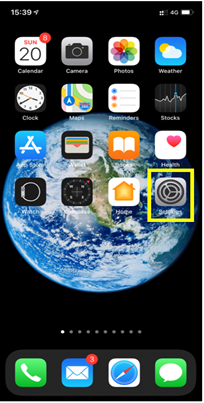
– Settings:
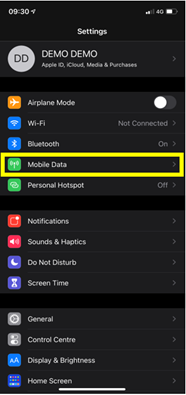
– Then select Mobile Data:
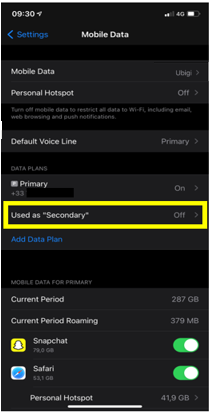
– Then, in Cellular Plan, select the Ubigi eSIM (“secondary” plan):
– After that, select Mobile data network:
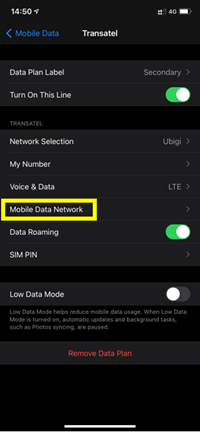
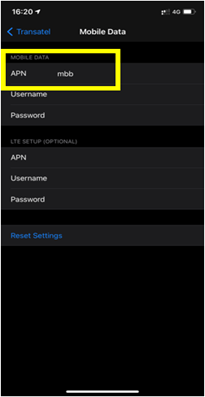
– Finally, in the APN field, make sure that mbb is specified (if not, type it in the field):
You can now connect to the Internet through the connectivity of your Ubigi eSIM.

Contact
You haven’t found the answers to your questions in Assistance or FAQ?
Verified review
This user has been identified as a buyer
Easy to use on my phone
Richard, 08 Jul 2026
Verified
Verified review
This user has been identified as a buyer
Great for Overseas
Work great when working overseas and had to attend to conferencie calls and downloading large file.
VIS, 08 Jul 2026
Verified
Verified review
This user has been identified as a buyer
Outstanding service!!!
customer, 08 Jul 2026
Verified
Verified review
This user has been identified as a buyer
It works perfectly
It works perfectly! No glitches with any of the functions it’s supposed to cover.
Carol L. Jacobson, 08 Jul 2026
Verified
Verified review
This user has been identified as a buyer
best carrier for japan
customer, 08 Jul 2026
Verified
Verified review
This user has been identified as a buyer
Easy to configure and works great!
No problems with my trip in Swisse!
DiVe, 08 Jul 2026
Verified
Verified review
This user has been identified as a buyer
So far from Paris to here Basel, good connections
So far from Paris to here Basel, Switzerland. Did not fail, connection is good. I still have about a week all of Switzerland so hopefully it will not disappoint. I have a feeling it will not :)
Nash Barr, 08 Jul 2026
Verified
Verified review
This user has been identified as a buyer
Tarif is fair
Tarif is fair, pretty simple to use.
Cédric Bapst, 08 Jul 2026
Verified
Verified review
This user has been identified as a buyer
Easy to setup
Easy to setup, flexible plans and easy to add new plan
customer, 08 Jul 2026
Verified
Verified review
This user has been identified as a buyer
I would recommend
Great service, used across multiple devices without issue and very affordable
customer, 08 Jul 2026
Verified
Verified review
This user has been identified as a buyer
It works as it should
It works as it should. Was easy to setup
MG, 08 Jul 2026
Verified
Verified review
This user has been identified as a buyer
Good experience in Canada
customer, 08 Jul 2026
Verified
Verified review
This user has been identified as a buyer
Works pretty well in southern Japan
Works pretty well in southern Japan, but towards the end, the data seems to run out really fast. It felt like it was asking for more money
D Dahlia, 08 Jul 2026
Verified
Verified review
This user has been identified as a buyer
It's so simple to use
It's so simple to use, automatic connection once you arrive to destination, great app shows the data usage and the price is fair and affordable
Sir chikipopa, 08 Jul 2026
Verified
Verified review
This user has been identified as a buyer
Porfect porfect
Porfect porfect
Ovunc, 08 Jul 2026
Thank you
Your message has been sent. We’ll get back to you shortly.
Thank you
We have taken into account your subscription to the newsletter
How to check eSIM compatibility
Smartphones / Tablets:
Dial *#06#. → If an EID number appears, your device is eSIM-compatible.
Windows 10 / 11:
Press Windows+I. Go to “Network & Internet” → If you see "Cellular", your PC is eSIM-compatible.
How to check carrier unlocking
iPhone / iPad:
Go to Settings > General > About. Scroll to Carrier Lock. → If you see “No SIM restrictions”, your device is unlocked.
Android:
Go to Settings > Network & Internet > Mobile network. Disable Automatic network selection. → If multiple networks appear, your device is unlocked.
You already have an eSIM in your cart.
Each order can only include one eSIM data plan.
If you choose to add a new one, the current plan will be removed. What would you like to do?

