After that, if you still have no access to Internet, you need to check if the Access Point Name (APN) is properly configured on your device. To do that on your iPhone/iPad, go to :
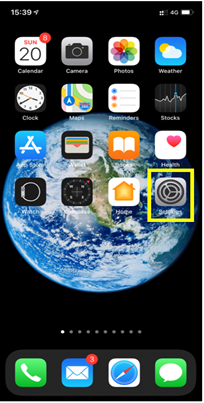
– Settings:
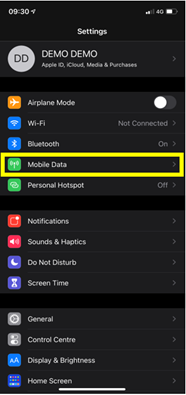
– Then select Mobile Data:
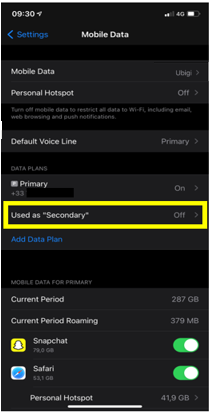
– Then, in Cellular Plan, select the Ubigi eSIM (“secondary” plan):
– After that, select Mobile data network:
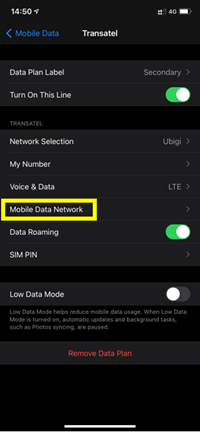
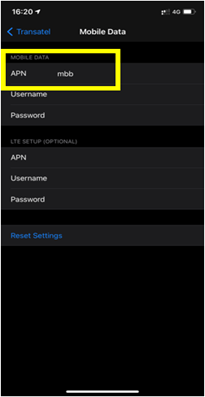
– Finally, in the APN field, make sure that mbb is specified (if not, type it in the field):
You can now connect to the Internet through the connectivity of your Ubigi eSIM.

Contact
You haven’t found the answers to your questions in Assistance or FAQ?
Verified review
This user has been identified as a buyer
The biggest praise I can give is that…
The biggest praise I can give is that once switched on I totally forgot about it on enjoyed our holiday!
Highly recommended
Ps
First time user of a eSIM !
Damon Howard, 07 Jul 2026
Verified
Verified review
This user has been identified as a buyer
amazing
great, fantastic, awesome!
customer, 07 Jul 2026
Verified
Verified review
This user has been identified as a buyer
It worked well
It worked well, but you should add more options between 7 and 14 days!
customer, 07 Jul 2026
Verified
Verified review
This user has been identified as a buyer
Very good 3 G was enough for me to…
Very good 3 G was enough for me to spend 6 days with internet .
Thank you
Ali, 07 Jul 2026
Verified
Verified review
This user has been identified as a buyer
Japan eSIM
The internet was working smoothly
customer, 07 Jul 2026
Verified
Verified review
This user has been identified as a buyer
Everything was perfect and hassle-free
I used it during our recent tour of Switzerland. The experience was very satisfactory, as everything was perfect and hassle-free. I would definitely recommend it to others.
Anit Talim, 07 Jul 2026
Verified
Verified review
This user has been identified as a buyer
Easy to purchase a data package
Easy to purchase a data package. The only negative it said it would connect automatically when we arrived in the country selected which didn’t happen. The steps I googled to instal were pretty simple
Fiona Hahn, 07 Jul 2026
Verified
Verified review
This user has been identified as a buyer
We’d swapped phones after ordering our…
We’d swapped phones after ordering our eSIM and didn’t realize you needed to delete the eSIM from the old phone before factory reset. Used Ubigi’s FAQ’s and messaged. They had it sorted out in less than 15 mins.
Been using the service for business and personal for about 5 years now. Always been seamless.
John, 07 Jul 2026
Verified
Verified review
This user has been identified as a buyer
Easy all round
Easy to set up. Easy to activate. Great value. Easy top ups. No problems.
Mark, 07 Jul 2026
Verified
Verified review
This user has been identified as a buyer
Very good connection
Very good conmection
Charmz, 07 Jul 2026
Verified
Verified review
This user has been identified as a buyer
Excellent conductor y very kin
Vincent Bury, 07 Jul 2026
Verified
Verified review
This user has been identified as a buyer
Seamless service at reasonable price
Catherine , 07 Jul 2026
Verified
Verified review
This user has been identified as a buyer
Ubigi so far has not disappointed me in…
Ubigi so far has not disappointed me in terms of speed of internet and coverage in all the countries that I have been too. You get your money’ worth of what you paid for unlike others that seems to “rob” you of the amount of data that you paid for. Also so easy to top up if u need more data anytime and anywhere
VHJ, 07 Jul 2026
Verified
Verified review
This user has been identified as a buyer
Speed 5G
5G data Awesome
HapkidoJJK, 07 Jul 2026
Verified
Verified review
This user has been identified as a buyer
10/10
Very easy to use, reliable and smooth! Good prices
customer, 07 Jul 2026
Thank you
Your message has been sent. We’ll get back to you shortly.
Thank you
We have taken into account your subscription to the newsletter
How to check eSIM compatibility
Smartphones / Tablets:
Dial *#06#. → If an EID number appears, your device is eSIM-compatible.
Windows 10 / 11:
Press Windows+I. Go to “Network & Internet” → If you see "Cellular", your PC is eSIM-compatible.
How to check carrier unlocking
iPhone / iPad:
Go to Settings > General > About. Scroll to Carrier Lock. → If you see “No SIM restrictions”, your device is unlocked.
Android:
Go to Settings > Network & Internet > Mobile network. Disable Automatic network selection. → If multiple networks appear, your device is unlocked.
You already have an eSIM in your cart.
Each order can only include one eSIM data plan.
If you choose to add a new one, the current plan will be removed. What would you like to do?

