How can I enable my Ubigi eSIM profile on my Android device when I want to use it again?
If you want to reactivate your Ubigi eSIM profile (even temporarily) on your Android device :
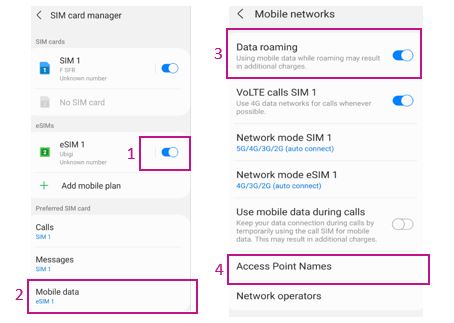
1 – Go to Settings > Connections > then SIM card manager and activate the Ubigi eSIM profile (NB: if you have not renamed it yet, the name “secondary” will appear):
2 – For Mobile Data, select the eSIM profile corresponding to Ubigi
3 – Then go to Settings > Connections > Mobile Networks and activate “Data Roaming”
4 – Finally go to Access points name > in there select the Ubigi eSIM (at the bottom right of the screen) > add an APN > fill in the name= Ubigi and APN= mbb then SAVE.
You can now use your Ubigi eSIM connection!
(NB: These settings are stored if you simply activate/deactivate the profile. Everything will be erased if you delete the profile)
You can also find those instructions on the video below.
We recommend you to never delete your Ubigi eSIM profile when you travel or when you do not use it as you can simply deactivate it as described above, until you need it again.
Contact
You haven’t found the answers to your questions in Assistance or FAQ?
You haven’t found the answers to your questions in Assistance or FAQ?
Great
Based on 32713 reviews on
Verified
Verified review
This user has been identified as a buyer
It was excellent!
It worked perfectly well upon entry in Japan. I experienced no connection issues and I was with internet connection throughout my entire trip.
customer, 13 Mar 2026
Verified
Verified review
This user has been identified as a buyer
It worked
It worked, can’t say much more than that.
John Davidson, 13 Mar 2026
Verified
Verified review
This user has been identified as a buyer
Expected better connectivity
For me, installation and activation worked fine and I was able to use the internet upon arrival in the destination country. However, speed and connectivity was nit always that good.
customer, 13 Mar 2026
Verified
Verified review
This user has been identified as a buyer
Easy to use
Easy to use, we had internet the whole trip with no issue! I totally recommend using Ubigi for holidays in Japan.
Gwen, 13 Mar 2026
Verified
Verified review
This user has been identified as a buyer
Traveled to Japan
Traveled to Japan, sim worked immediately and very well for the whole trip. No problems at all, and easy to setup before traveling.
customer, 13 Mar 2026
Verified
Verified review
This user has been identified as a buyer
Service top
Service top
Luan Nguyen, 13 Mar 2026
Verified
Verified review
This user has been identified as a buyer
This was so easy to use and convenient
This was so easy to use and convenient! Used it all over Japan without any issues. I think this has just made traveling so much easier
customer, 13 Mar 2026
Verified
Verified review
This user has been identified as a buyer
Everything went well
Everything went well, immediately connected when landing in Manila. Good signal, even in the mountains.
customer, 13 Mar 2026
Verified
Verified review
This user has been identified as a buyer
Straight up rel
Straight up reliable, fast and connected quickly to network. Price was decent too
customer, 13 Mar 2026
Verified
Verified review
This user has been identified as a buyer
Very good service
Had great service everywhere I went, I highly recommended using this type of cell services!
customer, 13 Mar 2026
Verified
Verified review
This user has been identified as a buyer
Glad that I was able to use service…
Glad that I was able to use service whenever needed.
customer, 13 Mar 2026
Verified
Verified review
This user has been identified as a buyer
Amazing coverage within Japan
Amazing coverage within Japan
customer, 13 Mar 2026
Verified
Verified review
This user has been identified as a buyer
I usually use my mobile off-line
I usually use my mobile off-line. the experience I had this time in Spain was great. I could use translator anywhere, communicate with family any time.
Yasu, 13 Mar 2026
Verified
Verified review
This user has been identified as a buyer
This service was excellent from…
This service was excellent from beginning to end. I would definitely recommend them and will use them again in the future.
Paul Ashton, 13 Mar 2026
Verified
Verified review
This user has been identified as a buyer
Very good
Very good, but in Tohoku sometimes it did not work.
customer, 13 Mar 2026
Thank you
Your message has been sent. We’ll get back to you shortly.
Thank you
We have taken into account your subscription to the newsletter
How to check eSIM compatibility
Smartphones / Tablets:
Dial *#06#. → If an EID number appears, your device is eSIM-compatible.
Windows 10 / 11:
Press Windows+I. Go to “Network & Internet” → If you see "Cellular", your PC is eSIM-compatible.
How to check carrier unlocking
iPhone / iPad:
Go to Settings > General > About. Scroll to Carrier Lock. → If you see “No SIM restrictions”, your device is unlocked.
Android:
Go to Settings > Network & Internet > Mobile network. Disable Automatic network selection. → If multiple networks appear, your device is unlocked.
You already have an eSIM in your cart.
Each order can only include one eSIM data plan.
If you choose to add a new one, the current plan will be removed. What would you like to do?





 How to check eSIM compatibility
 How to check carrier unlocking