How can I enable my Ubigi eSIM profile on my Android device when I want to use it again?
If you want to reactivate your Ubigi eSIM profile (even temporarily) on your Android device :
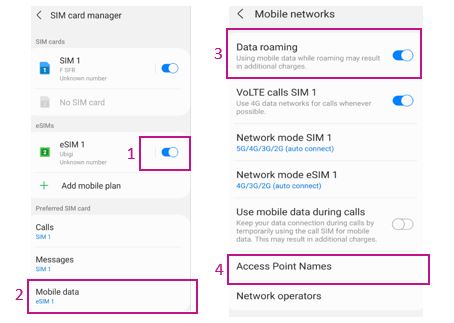
1 – Go to Settings > Connections > then SIM card manager and activate the Ubigi eSIM profile (NB: if you have not renamed it yet, the name “secondary” will appear):
2 – For Mobile Data, select the eSIM profile corresponding to Ubigi
3 – Then go to Settings > Connections > Mobile Networks and activate “Data Roaming”
4 – Finally go to Access points name > in there select the Ubigi eSIM (at the bottom right of the screen) > add an APN > fill in the name= Ubigi and APN= mbb then SAVE.
You can now use your Ubigi eSIM connection!
(NB: These settings are stored if you simply activate/deactivate the profile. Everything will be erased if you delete the profile)
You can also find those instructions on the video below.
We recommend you to never delete your Ubigi eSIM profile when you travel or when you do not use it as you can simply deactivate it as described above, until you need it again.
Contact
You haven’t found the answers to your questions in Assistance or FAQ?
You haven’t found the answers to your questions in Assistance or FAQ?
Great
Based on 30252 reviews on
Verified
Verified review
This user has been identified as a buyer
Promotion code
The app was easy to use but I got a login issue with discount code through manual. It was a bit hard to find how to put the promotion code "NTT20" with NTT account
Masa, 12 Jan 2026
Verified
Verified review
This user has been identified as a buyer
Japan on Samsung's S24 Ultra
On Samsung's S24 this app installed the esim easily. The data was activated when we got to Japan, not before. The coverage has been good so far. I did have to update the access point name on the esim, that didn't auto select, but maybe a side effect of having other esims previously.
Aussie Traveller, 12 Jan 2026
Verified
Verified review
This user has been identified as a buyer
Hello,
Hello,
I would like to thank you for the professionalism and efficiency of your service.
My experience with Ubigi is very positive, and everything is working smoothly.
Kind Regards .
Mes DiB
Thank you for the quality and reliability of your application.
Ghizlane, 12 Jan 2026
Verified
Verified review
This user has been identified as a buyer
Excellent services
Great facilities while travelling overseas.
Utpal, 12 Jan 2026
Verified
Verified review
This user has been identified as a buyer
What made my experience good was being able to commit majority of the time
What made my experience good was being able to communicate with loved ones majorly of the time.
It so great- network was better not as I expected because there were times when Ubigi was not able to connect to internet.
Generally, it was a better experience.
Victorine Takam, 12 Jan 2026
Verified
Verified review
This user has been identified as a buyer
Great internet when on land.
Great internet when on land.
Pierre, 12 Jan 2026
Verified
Verified review
This user has been identified as a buyer
The UBIGI eSIM Words perfectly in…
The UBIGI eSIM Words perfectly in Panama . Very easy to use.
nadege, 12 Jan 2026
Verified
Verified review
This user has been identified as a buyer
It just works
It just works. What's on the box is what's inside which was perfect for what I needed. Thanks Ubigi
Mark Goudie, 12 Jan 2026
Verified
Verified review
This user has been identified as a buyer
This has worked very well for me
This has worked very well for me. I highly recommend you try it.
John Fannon, 12 Jan 2026
Verified
Verified review
This user has been identified as a buyer
Easy to use.
Easy to use.
Mave, 12 Jan 2026
Verified
Verified review
This user has been identified as a buyer
Ahamazing!
Ahamazing!
customer, 11 Jan 2026
Verified
Verified review
This user has been identified as a buyer
During my trip when I turned on my phone to get the signal is the most important !
I have been using ubigi for 3 monhts on & off
when I turnonthe phone it is there the Signal *
Easy to access.
customer gaye zorlu, 11 Jan 2026
Verified
Verified review
This user has been identified as a buyer
Great app and service but quite…
Great app and service but quite expensive in Africa.
customer, 11 Jan 2026
Verified
Verified review
This user has been identified as a buyer
Travelling to multiple European cities…
Travelling to multiple European cities and was able to purchase a 30 Day Data plan for coverage over the UK and Spain. Reasonable pricing, very happy with the service.
customer, 11 Jan 2026
Verified
Verified review
This user has been identified as a buyer
Very good experience
Very easy to use. I can always check how much data is still available. Overall a very good experience, would highly recommend!
Jorick, 11 Jan 2026
Thank you
Your message has been sent. We’ll get back to you shortly.
Thank you
We have taken into account your subscription to the newsletter
How to check eSIM compatibility
Smartphones / Tablets:
Dial *#06#. → If an EID number appears, your device is eSIM-compatible.
Windows 10 / 11:
Press Windows+I. Go to “Network & Internet” → If you see "Cellular", your PC is eSIM-compatible.
How to check carrier unlocking
iPhone / iPad:
Go to Settings > General > About. Scroll to Carrier Lock. → If you see “No SIM restrictions”, your device is unlocked.
Android:
Go to Settings > Network & Internet > Mobile network. Disable Automatic network selection. → If multiple networks appear, your device is unlocked.
You already have an eSIM in your cart.
Each order can only include one eSIM data plan.
If you choose to add a new one, the current plan will be removed. What would you like to do?





 How to check eSIM compatibility
 How to check carrier unlocking