Skip to content
← Back to questions
How do I know if my Ubigi eSIM profile is installed on my Android device?

Note: if you have a physical SIM already inserted, then it appears clearly in the ‘SIM card’ section.

To check if your Ubigi eSIM profile is activated and ready for use on your Android device, go to :

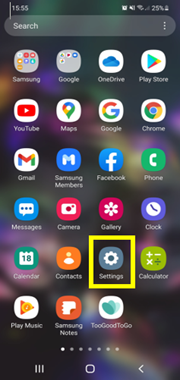
– Settings:

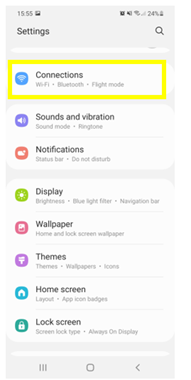
– Then select Connections:

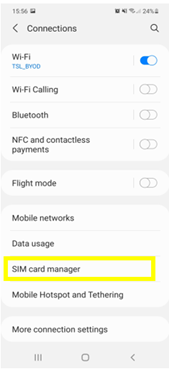
– Then, choose SIM card manager:
– Finally, in the “e-SIM” section, if an eSIM profile (Ubigi) is installed, then it will appear as follows :
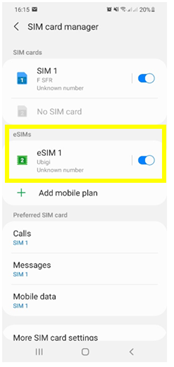


Also, as soon as your eSIM profile is activated, a double network signal appears at the top of your screen:

– a network signal representing your main SIM (on the left)
– a second network signal representing your eSIM profile (right)

Looking for something specific?

Other frequently asked questions:

Will data latency be impacted by the IP location feature?

Why is my Ubigi connection not working?

For which countries is the IP location feature available?

In which countries is the IP location feature supported?

IP location feature: Do I need to install an additional app to benefit from this feature?

What is the difference between a Country of Residence IP address and a Regional IP address?

Is the IP location feature free?

IP location feature: which devices are supported?

Can I make phone calls with Ubigi eSIM data plans?

I am stuck on the "FINAL STEP" page, and the message "Waiting for Ubigi cellular connectivity" has been displayed for several minutes. How can I resolve this?

I restored my data on my (new) iPhone, but my eSIM profile does not work. What to do?

I am about to travel. How do I manage my Ubigi eSIM profile on my device ?

Resolve an issue with Ubigi eSIM profile on Android device

Resolve an issue with Ubigi eSIM profile on iPhone

iMessage does not work with my Ubigi eSIM profile. What to do ?

How do I know if my Ubigi eSIM profile is activated on my iPhone/iPad?

How to get and install a Ubigi eSIM profile on iPhone?

How to get and install a Ubigi eSIM profile on an Android device?

How to get and install a Ubigi eSIM profile on iPad?

How to get and install a new Ubigi eSIM profile on my Windows 10 or Windows 11 laptop or tablet?

How do I activate my Ubigi services with my Windows 10 or Windows 11 device equipped with a Ubigi physical SIM card?

How do I activate my Ubigi services with my Windows 10 or Windows 11 laptop or tablet equipped with a Ubigi eSIM?

How can I buy a data plan from the Ubigi application on iPhone or iPad?

How can I check if my Ubigi eSIM profile is installed on my iPad?

How do I know if my Ubigi eSIM profile is activated and ready to use on my Android device?

How can I check if my Ubigi eSIM profile is installed on my iPhone?

My Ubigi eSIM profile is installed and active on my iPhone/iPad but I don't have any network displayed, what can I do?

My eSIM Ubigi profile is installed and active on my iPhone/iPad, the network is displayed but I don't have access to the Internet, what should I do?

Mobile data is applied to the Ubigi eSIM profile on my iPhone/iPad but I can't access the internet, what can I do?

My Ubigi eSIM profile is installed and active on my Android device but I don’t have any network displayed, what can I do?

I can not connect with my Ubigi eSIM

My Ubigi eSIM profile is installed and active on my Android device, the network is displayed but I don’t have access to the Internet, what should I do?

Mobile data is applied to the Ubigi eSIM profile on my Android device, but impossible to access the internet, what can I do?

Which mobile devices support Ubigi eSIM?

How do I know if my Ubigi eSIM profile is activated on my Windows 10 or Windows 11 device?

How do I check the APN configuration of my Ubigi eSIM on Windows 10 or Windows 11?

What is a one-off and a recurring Ubigi data plans?

My Ubigi eSIM profile is activated on my Windows 10 or Windows 11 device but I do not have a network, what should I do?

What is the best way to contact Ubigi support?

How to use Ubigi with a dual SIM device?

How to use tethering with a Windows 10 or Windows 11 device to share the Ubigi connectivity?

How to use tethering with an iPhone/iPad to share the Ubigi connectivity?

How to use tethering with an Android device to share the Ubigi connectivity?

I did not use my Ubigi data plan, can I get a refund?

My device does not show "Ubigi" as carrier name, is it normal?

How can I find the ICCID of my Ubigi eSIM?

How to set the APN for Ubigi eSIM?

The Ubigi antenna pictogram is not displayed in Japan, why?

How to reset my password for my Ubigi eSIM account?

How can I create my Ubigi account on iPad?

How can I create my Ubigi account on an Android device?

How can I create my Ubigi account on a Windows 10 or Windows 11 device?

How can I create my Ubigi account on iPhone?

How can I change my Ubigi password?

How can I check the remaining balance of my Ubigi eSIM?

How to delete my Ubigi account?

How can I buy a data plan from the Ubigi application on an Android device?

How can I buy a data plan from the Ubigi application by using a Windows 10 or Windows 11 device?

Do I need Wi-Fi to purchase a Ubigi data plan?

I paid for a Ubigi data plan but it does not appear in my account, what should I do?

I purchased the wrong data plan and did not use it, how can I change it?

How to get an invoice for my Ubigi data plan purchase?

I do not get the “eSIM – Mobile Data in my device” button on my iPad to install my Ubigi profile. Why and what should I do?

How to reinstall the Ubigi eSIM profile I deleted on my Windows 10 or Windows 11 device?

Does my Ubigi eSIM profile have a validity period and will expire one day?

I have a new Windows10 device. How can I reinstall my Ubigi eSIM profile on it?

How can I enable my Ubigi eSIM on my iPhone when I want to use it again?

I lost my device. How can I block my Ubigi eSIM account?

How can I disable my Ubigi eSIM on my iPhone when I travel or when I do not use it?

I have multiple  Ubigi eSIM profiles. Can I manage them all under one Ubigi account?

How can I enable my Ubigi eSIM profile on my iPad when I want to use it again?

How can I disable my Ubigi eSIM profile on my iPad when I travel or when I do not use it?

How can I disable my Ubigi eSIM on my Android device when I travel or when I do not use it?

How can I enable my Ubigi eSIM on my Android device when I want to use it again?

How to delete a Ubigi eSIM profile on iPhone/iPad?

How to delete a Ubigi eSIM profile on an Android device?

How to delete a Ubigi eSIM profile on a Windows 10 or Windows 11 device ?

How can I find PIN, PIN2 or PUK codes for my Ubigi eSIM?

Ubigi connection is not working. Should I disable any active DNS or VPN on my device?

Great Trustpilot stars Trustpilot
Trustpilot stars
Based on 38910 reviews on Trustpilot
4 stars Verified
Verified review
This user has been identified as a buyer
Overall good but there was a 10-14 hour…
Overall good but there was a 10-14 hour period where the service was down. Thankfully I could find wifi to supplement, but it would have been bad if I wasn’t able to.
LL, 06 Jun 2026
5 stars Verified
Verified review
This user has been identified as a buyer
A good ESIM
I had to change eSim providers whilst in Japan as the one I was using was very troublesome. Many Ubigi reviews were positive, so I downloaded it. Found it easy to set up and it worked very well. There was one small outage, but Ubigi have corrected it and offered compensation, great integrity.
RJc, 06 Jun 2026
5 stars Verified
Verified review
This user has been identified as a buyer
Perfect Experience
I used an Ubigi eSim for my two weeks in Japan. It was my first time using an eSim and the process was very simple. The app explained it well and I had no issue with activation. I purchased an eSim with unlimited data for peace of mind. I used it frequently and daily, mainly for social media, communicating with family and navigating Japan. I had no issues with connectivity in Tokyo and Osaka. I would absolutely recommend Ubigi and will definitely use it again later this year for my next travels!
Maja, 06 Jun 2026
4 stars Verified
Verified review
This user has been identified as a buyer
have a good conection and fast services in atenction recuarement
xcelente services, for my needes
customer, 06 Jun 2026
5 stars Verified
Verified review
This user has been identified as a buyer
It’s a must-have when travelling…
It’s a must-have when travelling abroad. The eSIM was easy to install and came with clear instructions on how to change the mobile settings upon arrival. I experienced some downtime for a few hours, but the follow-up service was excellent. I would recommend Ubigi to all travellers!
Erling, 06 Jun 2026
4 stars Verified
Verified review
This user has been identified as a buyer
The eSIM was great
The eSIM was great. Worked As soon as I landed. It did take a bit of time following instructions to load the eSIM as QR code did not automatically work from email. Would definitely use again,
customer, 06 Jun 2026
4 stars Verified
Verified review
This user has been identified as a buyer
I couldn’t get connectivity for…
At the I couldn’t get connectivity for a while. I thought it was to connect as soon as I landed in Japan but I couldn’t . I waited about half a day before it worked. Today I read an email saying there was a service interruption .
Averil Rayward, 06 Jun 2026
5 stars Verified
Verified review
This user has been identified as a buyer
Effortless to arrange
Effortless to arrange. Good mobile internet coverage.
Bob, 06 Jun 2026
4 stars Verified
Verified review
This user has been identified as a buyer
Worked fine…but
Worked fine in Osaka, Kyoto and Hiroshima but in Tokyo lost connection alot during the Day even let me without network or mobile signal a full Day
- Tiago Maia, 06 Jun 2026
4 stars Verified
Verified review
This user has been identified as a buyer
Works pretty good
Working pretty well had just few times that it had some issues. But altogether so far have been quite smooth sailing with this internet service. Funny that it works so well when we stayed in Okinawa but the connection issues what I have experienced have been in Tokyo. Just short issue not anything major. So altogether great service.
Heli, 05 Jun 2026
5 stars Verified
Verified review
This user has been identified as a buyer
Japan from Australia
Arrived in Japan from Australia and had no issues with internet connection for the 8 days. I visited Kyoto, Osaka and some outer regions ~2 hours from the cities. Thank you
Rosanne Freak-Poli, 05 Jun 2026
5 stars Verified
Verified review
This user has been identified as a buyer
Smart Purchase for Overseas Travel
I had a great internet connection while on my vacation overseas. Using Ubigi eSIM was a smart purchase!
PBurwell, 05 Jun 2026
5 stars Verified
Verified review
This user has been identified as a buyer
Work well
Work well. Very satisfied!
Brian St-Pierre, 05 Jun 2026
5 stars Verified
Verified review
This user has been identified as a buyer
Excellent !
Excellent !
customer, 05 Jun 2026
5 stars Verified
Verified review
This user has been identified as a buyer
It’s very easy to use.
It’s very easy to use. Amazing signal.
Susan, 05 Jun 2026

Your message has been sent.
We’ll get back to you shortly.

We have taken into account your subscription to the newsletter


