How do I know if my Ubigi eSIM profile is installed on my Android device?
Note: if you have a physical SIM already inserted, then it appears clearly in the ‘SIM card’ section.
To check if your Ubigi eSIM profile is activated and ready for use on your Android device, go to :
– Settings:
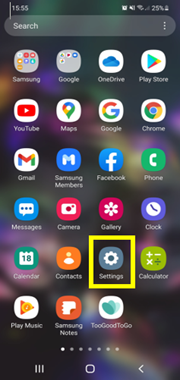
– Then select Connections:
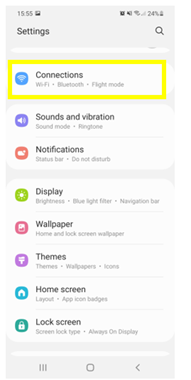
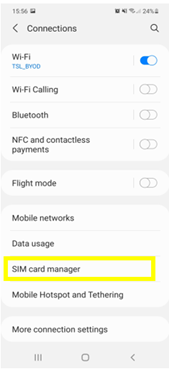
– Then, choose SIM card manager: – Finally, in the “e-SIM” section, if an eSIM profile (Ubigi) is installed, then it will appear as follows :
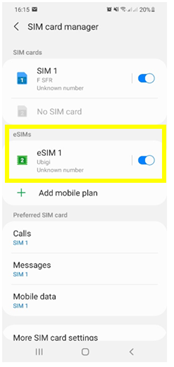
Also, as soon as your eSIM profile is activated, a double network signal appears at the top of your screen: – a network signal representing your main SIM (on the left) – a second network signal representing your eSIM profile (right)


Contact
You haven’t found the answers to your questions in Assistance or FAQ?
Great
Based on 35504 reviews on
Verified
Verified review
This user has been identified as a buyer
Ubigi works.
Ubigi works.
Rick Koerner, 23 Apr 2026
Verified
Verified review
This user has been identified as a buyer
Early days we have only been in Japan…
Early days we have only been in Japan for four days but so far so good, everything went smoothly and is working fine. Long may it last.
Warren Dunn, 23 Apr 2026
Verified
Verified review
This user has been identified as a buyer
User friendliness
There are too many changes in the settings that has to be made and at times hard to understand whether e-sim is used to not. A feeling of uncertainty and unease as to which sim is used.
FJ, 23 Apr 2026
Verified
Verified review
This user has been identified as a buyer
Wonderful
e-SIM is wonderful and great connectivity for entire duration at Jaoan
Kumar Gauraw, 23 Apr 2026
Verified
Verified review
This user has been identified as a buyer
Bar None …
I initially had a little difficulty connecting to the service when I arrived in the country, but I easily figured it out and from there, everything was a breeze. I instantly get service when I’m out of the house and I can text, call, watch videos and do everything as if I’m home. I’ve used other eSIMs in the past but I think this is the Ultimate. Bar none
Samuel Mintah boamah, 23 Apr 2026
Verified
Verified review
This user has been identified as a buyer
the best esim in Italy.
customer, 23 Apr 2026
Verified
Verified review
This user has been identified as a buyer
Worked perfectly
Worked perfectly
customer, 23 Apr 2026
Verified
Verified review
This user has been identified as a buyer
Amazing network
Amazing network
MR BAJRANG SETHIA, 23 Apr 2026
Verified
Verified review
This user has been identified as a buyer
The signal is strong.
Ada, 23 Apr 2026
Verified
Verified review
This user has been identified as a buyer
Perfect and very easy to use
Perfect and very easy to use! so convenient and has lot of offers!
I've tried a different esim provider but it was so complicated. Ubigi is not that! It just a simple few taps away then it will automatically configure your device.
customer, 23 Apr 2026
Verified
Verified review
This user has been identified as a buyer
Very fast connection
Che, 23 Apr 2026
Verified
Verified review
This user has been identified as a buyer
Worth every penny
Easy to follow installation process and worked immediately upon arrival to Tokyo. Very affordable and reliable connection in both Tokyo and Kyoto. I purchased the 5GB on out 5 days trip and it was more than what we needed.
customer, 23 Apr 2026
Verified
Verified review
This user has been identified as a buyer
ease of use and strength of wifi…
ease of use and strength of wifi connection excellent!
Lillian Montoya, 23 Apr 2026
Verified
Verified review
This user has been identified as a buyer
So far good coverage in Tokyo and out…
So far good coverage in Tokyo and out to Mt Fuji.
Mark M, 23 Apr 2026
Verified
Verified review
This user has been identified as a buyer
Easy to load and had no issues when…
Easy to load and had no issues when travelling.
customer, 23 Apr 2026
Thank you
Your message has been sent. We’ll get back to you shortly.
Thank you
We have taken into account your subscription to the newsletter
How to check eSIM compatibility
Smartphones / Tablets:
Dial *#06#. → If an EID number appears, your device is eSIM-compatible.
Windows 10 / 11:
Press Windows+I. Go to “Network & Internet” → If you see "Cellular", your PC is eSIM-compatible.
How to check carrier unlocking
iPhone / iPad:
Go to Settings > General > About. Scroll to Carrier Lock. → If you see “No SIM restrictions”, your device is unlocked.
Android:
Go to Settings > Network & Internet > Mobile network. Disable Automatic network selection. → If multiple networks appear, your device is unlocked.
You already have an eSIM in your cart.
Each order can only include one eSIM data plan.
If you choose to add a new one, the current plan will be removed. What would you like to do?

