How can I check if my Ubigi eSIM profile is installed on my iPad?
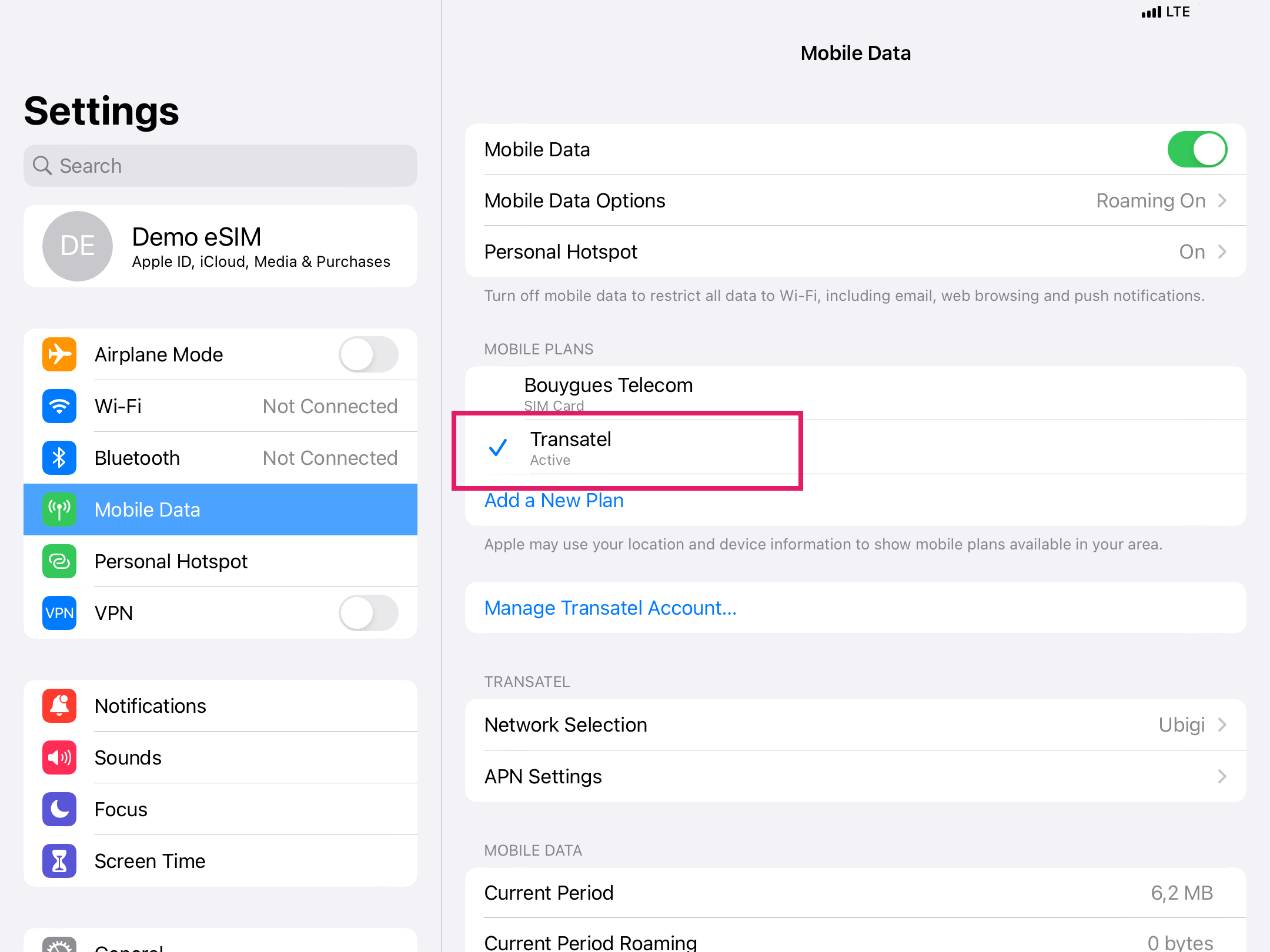
To check if your eSIM profile is installed on your iPad, follow the instructions below on your device: – Go to Settings – Then select Mobile Data – On the right under MOBILE PLANS, check to see if any plans are displayed (in addition to your physical SIM card if you have one).
On the image below, you can see that a Ubigi eSIM profile (technical name displayed : ” Transatel ” – Ubigi is a Transatel service) is installed on the iPad.
When the blue check appears in front of the eSIM profile, it means that it is activated (you just need to tap on it to activate/deactivate it).
Contact
You haven’t found the answers to your questions in Assistance or FAQ?
Great
Based on 32669 reviews on
Verified
Verified review
This user has been identified as a buyer
Used it for my trip to Japan
Used it for my trip to Japan. Was cheaper than competitors. Was 5G pretty much everywhere i went.
Alex, 12 Mar 2026
Verified
Verified review
This user has been identified as a buyer
Would’ve liked more plan options
Would’ve liked more plan options. Such as 7,11,15 day options because I needed 8 days of unlimited data but had to pay for 15.
Had trouble making phone calls with the data plan.
Anonymous, 12 Mar 2026
Verified
Verified review
This user has been identified as a buyer
Good price and service. Highly recommended
Good price, prompt and appropriate support, reliable service, I recommended to my brother and he was also very happy and became a repeat customer
Yasushi Shiba, 12 Mar 2026
Verified
Verified review
This user has been identified as a buyer
Easy sign up & reliable coverage
Robert Burke, 12 Mar 2026
Verified
Verified review
This user has been identified as a buyer
Very easy to use.
Very easy to use.
customer, 12 Mar 2026
Verified
Verified review
This user has been identified as a buyer
Worked perfectly!
The eSIM worked great and lasted basically until I needed to leave Japan. I got the 5 or 10 GB plan for an 8 day trip and was able to get coverage everywhere I went. The plan literally ran out as I was boarding my flight home so it was perfectly timed.
customer, 12 Mar 2026
Verified
Verified review
This user has been identified as a buyer
Exactly what you need
Works great, everywhere in Japan according to my experience !
Jory, 12 Mar 2026
Verified
Verified review
This user has been identified as a buyer
Just perfection when traveling
Just perfection when traveling. No issues what so ever. Love it!!!
Demetrio Guerrero, 12 Mar 2026
Verified
Verified review
This user has been identified as a buyer
Everything worked perfect sim plush…
Everything worked perfect sim plush kept my own number
customer, 12 Mar 2026
Verified
Verified review
This user has been identified as a buyer
Easy to use
Easy to use , good coverage.
Ron, 12 Mar 2026
Verified
Verified review
This user has been identified as a buyer
Easy setup
Easy setup, easy access
Anna Melone, 12 Mar 2026
Verified
Verified review
This user has been identified as a buyer
I have service everywhere!
I have service everywhere, even when I ride the subway! So so worth it!
N.M., 12 Mar 2026
Verified
Verified review
This user has been identified as a buyer
Worked well in Korea and Japan
Worked well for data
customer, 12 Mar 2026
Verified
Verified review
This user has been identified as a buyer
It just worked
It just worked. Just what you want when you land late at night in Japan.
Very happy user.
Scott K, 12 Mar 2026
Verified
Verified review
This user has been identified as a buyer
Ubigi is fast
Ubigi is fast, doesnt stall and easy to ise
customerlu, 12 Mar 2026
Thank you
Your message has been sent. We’ll get back to you shortly.
Thank you
We have taken into account your subscription to the newsletter
How to check eSIM compatibility
Smartphones / Tablets:
Dial *#06#. → If an EID number appears, your device is eSIM-compatible.
Windows 10 / 11:
Press Windows+I. Go to “Network & Internet” → If you see "Cellular", your PC is eSIM-compatible.
How to check carrier unlocking
iPhone / iPad:
Go to Settings > General > About. Scroll to Carrier Lock. → If you see “No SIM restrictions”, your device is unlocked.
Android:
Go to Settings > Network & Internet > Mobile network. Disable Automatic network selection. → If multiple networks appear, your device is unlocked.
You already have an eSIM in your cart.
Each order can only include one eSIM data plan.
If you choose to add a new one, the current plan will be removed. What would you like to do?


