How can I disable my Ubigi eSIM profile on my iPhone when I travel or when I am not using it?
To temporarily disable your Ubigi eSIM:
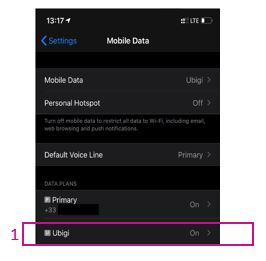
1 – Go to Settings > Mobile Data, then select your Ubigi eSIM profile (or “Secondary” if you have not renamed the profile yet).
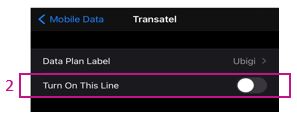
2 – Turn off the switch next to “Turn on this line” to deactivate the profile (the switch will then appear grayed out). Your eSIM profile is now disabled.
You can also find these instructions in the video below.
We recommend not deleting your Ubigi eSIM when you travel or when you are not using it. You can simply deactivate and reactivate it as described above whenever you need it again.
For more information on how to manage your eSIM profiles, please visit our support page.
Contact
You haven’t found the answers to your questions in Assistance or FAQ?
You haven’t found the answers to your questions in Assistance or FAQ?
Great
Based on 39934 reviews on
Verified
Verified review
This user has been identified as a buyer
So fare after two weeks experience 👍
So fare after two weeks experience 👍
Martin, 21 Jun 2026
Verified
Verified review
This user has been identified as a buyer
Good experience, except for calls unavailability
I used my plan in Japan - Yokohama. The experience overall is great; the network automatically activated once I arrived to Haneda airport, and coverage in Yokohama and Tokyo was great. My only take is the lack of calls in the plan. I needed to make some emergency calls due problems with the flight, and the plan didn't help much then. So, in the future, I might reconsider other options solely due to the calls availability. Other than that, I'd keep using Ubigi.
E. Aly, 21 Jun 2026
Verified
Verified review
This user has been identified as a buyer
Setup was easy and straight forward
Setup was easy and straight forward. Connection was easy as well with Samsung Ultra phone. Soon as we landed at new destination, went to esim and turned on, good to go. Have had no real problems sinc using the esim up to this point.
customer, 21 Jun 2026
Verified
Verified review
This user has been identified as a buyer
Overall good connection
Overall good connection. Even with 5G it can be a bit spotty.
Kevin, 21 Jun 2026
Verified
Verified review
This user has been identified as a buyer
I order a Ubigi esim card before my…
I order a Ubigi esim card before my japan trip start and activated when i arrive. It is easy to install and use. I used the esim card in Tokyo and kyoto and nearby areas, mostly for google map and ranslate etc. find the speed is quick enough for my use and siglnals are sufficient. I would buy it again next time
Yu, 21 Jun 2026
Verified
Verified review
This user has been identified as a buyer
Easy to install & use
Easy to install & use. Highly recommend!
customer, 21 Jun 2026
Verified
Verified review
This user has been identified as a buyer
works without an issue
works without an issue
Debbie Tam, 21 Jun 2026
Verified
Verified review
This user has been identified as a buyer
Excellent Service
Everything worked well on our trip to Japan. Excellent service
Kelli, 21 Jun 2026
Verified
Verified review
This user has been identified as a buyer
Worked all over Jersey
Worked all over Jersey. Instant connection when we arrived.
Vic, 21 Jun 2026
Verified
Verified review
This user has been identified as a buyer
Fast internet
Fast internet
customer, 21 Jun 2026
Verified
Verified review
This user has been identified as a buyer
Was easy to use and worked well.
Was easy to use and worked well.
Annie, 21 Jun 2026
Verified
Verified review
This user has been identified as a buyer
Everywhere we could use applications…
Everywhere we could use applications like Google map, plan, city mapper
Marie-Helene, 21 Jun 2026
Verified
Verified review
This user has been identified as a buyer
The installation was super easy and good network
The installation was super easy. Just click the button. As I reached at airport, automatically connected and good speed. Highly recommend.
Satnam Singh, 21 Jun 2026
Verified
Verified review
This user has been identified as a buyer
Osaka & Seoul
I used the eSIM during my trip to Osaka and Seoul without any issues. Easy to use and will recommend to friends!
domoluv, 21 Jun 2026
Verified
Verified review
This user has been identified as a buyer
Above all
Above all, it's cheap. It's easy to set up and I found it very useful.
customer, 21 Jun 2026
Thank you
Your message has been sent. We’ll get back to you shortly.
Thank you
We have taken into account your subscription to the newsletter
How to check eSIM compatibility
Smartphones / Tablets:
Dial *#06#. → If an EID number appears, your device is eSIM-compatible.
Windows 10 / 11:
Press Windows+I. Go to “Network & Internet” → If you see "Cellular", your PC is eSIM-compatible.
How to check carrier unlocking
iPhone / iPad:
Go to Settings > General > About. Scroll to Carrier Lock. → If you see “No SIM restrictions”, your device is unlocked.
Android:
Go to Settings > Network & Internet > Mobile network. Disable Automatic network selection. → If multiple networks appear, your device is unlocked.
You already have an eSIM in your cart.
Each order can only include one eSIM data plan.
If you choose to add a new one, the current plan will be removed. What would you like to do?





 How to check eSIM compatibility
 How to check carrier unlocking