Skip to content
← Back to questions
My Ubigi eSIM profile is installed and active on my Android device but I don’t have any network displayed, what can I do?

When your eSIM profile is activated, two network signals appear at the top of your screen:

– a network signal representing your main SIM card (on the left)
– a second network signal representing your eSIM profile (on the right)

You need first to verify that following steps are checked:
– the Ubigi eSIM profile is installed on your device
– the Mobile data is applied on theUbigi eSIM profile
– the APN is registered on your device

After that, if the network is still not displayed on your Android device (network bars on the right are still all grayed out), you have to perform a manual network search. To do that:

– First go to Settings:
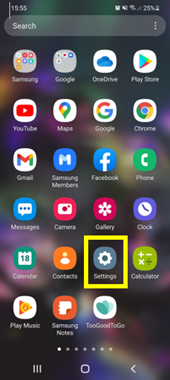

– Then select Connections:
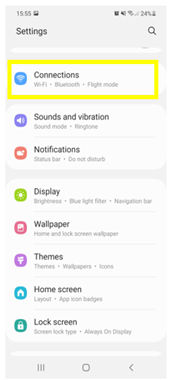

– Select Mobile networks:
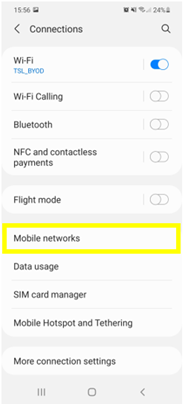

– And select Network operators:
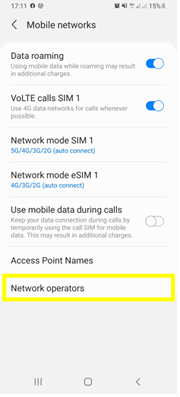

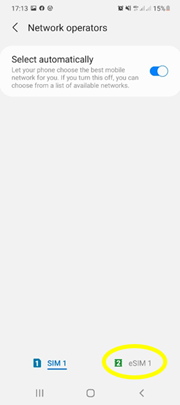
– Click on Ubigi (or eSIM…) at the bottom to access the network functions for the Ubigi e-SIM :

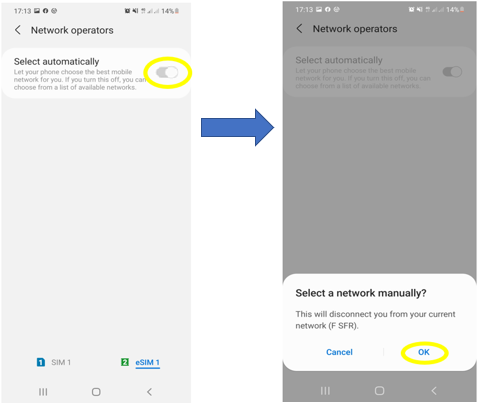
– Then, disable automatic mode and click OK to start a network search:

– After that, the list of available networks will be displayed after a few seconds:
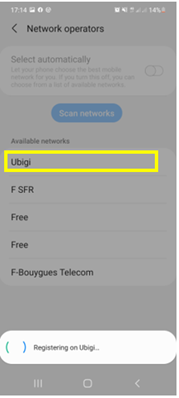

– Finally select the Ubigi network (If Ubigi does not appear in the list, you must select the name of our network partner in the country you are in – Consult the list of our network partners here).

Once you have selected the network, the network bars will appear at the top of your screen (they will no longer be all greyed out).

Looking for something specific?

Other frequently asked questions:

Will data latency be impacted by the IP location feature?

Why is my Ubigi connection not working?

For which countries is the IP location feature available?

In which countries is the IP location feature supported?

IP location feature: Do I need to install an additional app to benefit from this feature?

What is the difference between a Country of Residence IP address and a Regional IP address?

Is the IP location feature free?

IP location feature: which devices are supported?

Can I make phone calls with Ubigi eSIM data plans?

I am stuck on the "FINAL STEP" page, and the message "Waiting for Ubigi cellular connectivity" has been displayed for several minutes. How can I resolve this?

I restored my data on my (new) iPhone, but my eSIM profile does not work. What to do?

I am about to travel. How do I manage my Ubigi eSIM profile on my device ?

Resolve an issue with Ubigi eSIM profile on Android device

Resolve an issue with Ubigi eSIM profile on iPhone

iMessage does not work with my Ubigi eSIM profile. What to do ?

How do I know if my Ubigi eSIM profile is activated on my iPhone/iPad?

How to get and install a Ubigi eSIM profile on iPhone?

How to get and install a Ubigi eSIM profile on an Android device?

How to get and install a Ubigi eSIM profile on iPad?

How to get and install a new Ubigi eSIM profile on my Windows 10 or Windows 11 laptop or tablet?

How do I activate my Ubigi services with my Windows 10 or Windows 11 device equipped with a Ubigi physical SIM card?

How do I activate my Ubigi services with my Windows 10 or Windows 11 laptop or tablet equipped with a Ubigi eSIM?

How can I buy a data plan from the Ubigi application on iPhone or iPad?

How can I check if my Ubigi eSIM profile is installed on my iPad?

How do I know if my Ubigi eSIM profile is activated and ready to use on my Android device?

How can I check if my Ubigi eSIM profile is installed on my iPhone?

My Ubigi eSIM profile is installed and active on my iPhone/iPad but I don't have any network displayed, what can I do?

My eSIM Ubigi profile is installed and active on my iPhone/iPad, the network is displayed but I don't have access to the Internet, what should I do?

Mobile data is applied to the Ubigi eSIM profile on my iPhone/iPad but I can't access the internet, what can I do?

How do I know if my Ubigi profile is installed on my Android device?

I can not connect with my Ubigi eSIM

My Ubigi eSIM profile is installed and active on my Android device, the network is displayed but I don’t have access to the Internet, what should I do?

Mobile data is applied to the Ubigi eSIM profile on my Android device, but impossible to access the internet, what can I do?

Which mobile devices support Ubigi eSIM?

What is a one-off and a recurring Ubigi data plans?

How do I know if my Ubigi eSIM profile is activated on my Windows 10 or Windows 11 device?

How do I check the APN configuration of my Ubigi eSIM on Windows 10 or Windows 11?

My Ubigi eSIM profile is activated on my Windows 10 or Windows 11 device but I do not have a network, what should I do?

What is the best way to contact Ubigi support?

How to use Ubigi with a dual SIM device?

How to use tethering with a Windows 10 or Windows 11 device to share the Ubigi connectivity?

How to use tethering with an Android device to share the Ubigi connectivity?

How to use tethering with an iPhone/iPad to share the Ubigi connectivity?

I did not use my Ubigi data plan, can I get a refund?

My device does not show "Ubigi" as carrier name, is it normal?

How can I find the ICCID of my Ubigi eSIM?

The Ubigi antenna pictogram is not displayed in Japan, why?

How to set the APN for Ubigi eSIM?

How to reset my password for my Ubigi eSIM account?

How can I create my Ubigi account on iPad?

How can I create my Ubigi account on a Windows 10 or Windows 11 device?

How can I create my Ubigi account on an Android device?

How can I create my Ubigi account on iPhone?

How can I change my Ubigi password?

How can I check the remaining balance of my Ubigi eSIM?

How to delete my Ubigi account?

How can I buy a data plan from the Ubigi application on an Android device?

How can I buy a data plan from the Ubigi application by using a Windows 10 or Windows 11 device?

Do I need Wi-Fi to purchase a Ubigi data plan?

I paid for a Ubigi data plan but it does not appear in my account, what should I do?

I purchased the wrong data plan and did not use it, how can I change it?

How to get an invoice for my Ubigi data plan purchase?

I do not get the “eSIM – Mobile Data in my device” button on my iPad to install my Ubigi profile. Why and what should I do?

How to reinstall the Ubigi eSIM profile I deleted on my Windows 10 or Windows 11 device?

Does my Ubigi eSIM profile have a validity period and will expire one day?

I have a new Windows10 device. How can I reinstall my Ubigi eSIM profile on it?

How can I enable my Ubigi eSIM on my iPhone when I want to use it again?

I lost my device. How can I block my Ubigi eSIM account?

How can I disable my Ubigi eSIM on my iPhone when I travel or when I do not use it?

I have multiple  Ubigi eSIM profiles. Can I manage them all under one Ubigi account?

How can I enable my Ubigi eSIM profile on my iPad when I want to use it again?

How can I disable my Ubigi eSIM profile on my iPad when I travel or when I do not use it?

How can I disable my Ubigi eSIM on my Android device when I travel or when I do not use it?

How can I enable my Ubigi eSIM on my Android device when I want to use it again?

How to delete a Ubigi eSIM profile on an Android device?

How to delete a Ubigi eSIM profile on iPhone/iPad?

How to delete a Ubigi eSIM profile on a Windows 10 or Windows 11 device ?

How can I find PIN, PIN2 or PUK codes for my Ubigi eSIM?

Ubigi connection is not working. Should I disable any active DNS or VPN on my device?

Great Trustpilot stars Trustpilot
Trustpilot stars
Based on 46542 reviews on Trustpilot
5 stars Verified
Verified review
This user has been identified as a buyer
Really easy setup and connection
Really easy setup and connection. Fantastic.
customer, 24 Sep 2026
5 stars Verified
Verified review
This user has been identified as a buyer
France and Italy
I used Ubigi while traveling in France and Italy, purchasing separate data plans for each country. The connection worked almost immediately in both countries, and the prices were very reasonable. The app is also easy to use and makes it simple to check my data usage and remaining balance. Overall, I’m very satisfied with the service and would definitely use Ubigi again on future trips.
Masami Y, 24 Sep 2026
5 stars Verified
Verified review
This user has been identified as a buyer
Excellent service
Very useful website, easy to buy data bundles. Fair price!
Klant, 24 Sep 2026
5 stars Verified
Verified review
This user has been identified as a buyer
Easy to use and very ship
JUAN PANTOJA ALCANTAR, 24 Sep 2026
5 stars Verified
Verified review
This user has been identified as a buyer
worked seamless
worked seamless - excellent service
customer, 24 Sep 2026
5 stars Verified
Verified review
This user has been identified as a buyer
very good deal and internet coverage (I…
very good deal and internet coverage (I was in Zürich and Grindelwald).
Noor Adilah Redzuan, 24 Sep 2026
5 stars Verified
Verified review
This user has been identified as a buyer
Great coverage
Great coverage
customer, 24 Sep 2026
5 stars Verified
Verified review
This user has been identified as a buyer
Set up in UK
Set up in UK. As soon as I landed in Japan it asked me to make it primary and I was away. Makes airport arrivals much less stressful
leon aquilina, 24 Sep 2026
5 stars Verified
Verified review
This user has been identified as a buyer
Fast and stable connection for Korea…
Fast and stable connection for Korea and Japan.
customer, 24 Sep 2026
5 stars Verified
Verified review
This user has been identified as a buyer
Easy to make connections
Easy to make connection with the poviders. Constant and smook connections. Happy customer👍
peeters, 24 Sep 2026
5 stars Verified
Verified review
This user has been identified as a buyer
Great service
Great service. Be careful about apps though, especially ones that run in background, and news apps, with videos, they hog a lot of the allotted capacity.
Paul, 24 Sep 2026
4 stars Verified
Verified review
This user has been identified as a buyer
I used it in Rome and Naples
I used it in Rome and Naples. It worked in the city very well but out of cities not so well.
Gigi, 24 Sep 2026
5 stars Verified
Verified review
This user has been identified as a buyer
Will always recommend
This is my second eSIM purchase with Ubigi and I was more than satisfied! We traveled in 3 countries in Asia ( Japan, HK and Bali) and had more than enough data for the 3 weeks of our trip :) I didn't have any issues with the internet and the signal was always good. Definitely recommend!
Diana T., 24 Sep 2026
5 stars Verified
Verified review
This user has been identified as a buyer
Straightforward and easy to use
Straightforward and easy to use, well priced!
Jacob, 24 Sep 2026
5 stars Verified
Verified review
This user has been identified as a buyer
We had a great trip to Japan
We had a great trip to Japan. Ubigi. Worked very well. Loved it!
customer, 24 Sep 2026

Your message has been sent.
We’ll get back to you shortly.

We have taken into account your subscription to the newsletter


