How can I disable my Ubigi eSIM profile on my iPhone when I travel or when I am not using it?
To temporarily disable your Ubigi eSIM:
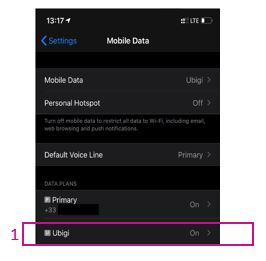
1 – Go to Settings > Mobile Data, then select your Ubigi eSIM profile (or “Secondary” if you have not renamed the profile yet).
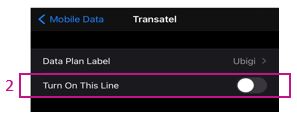
2 – Turn off the switch next to “Turn on this line” to deactivate the profile (the switch will then appear grayed out). Your eSIM profile is now disabled.
You can also find these instructions in the video below.
We recommend not deleting your Ubigi eSIM when you travel or when you are not using it. You can simply deactivate and reactivate it as described above whenever you need it again.
For more information on how to manage your eSIM profiles, please visit our support page.
Contact
You haven’t found the answers to your questions in Assistance or FAQ?
You haven’t found the answers to your questions in Assistance or FAQ?
Great
Based on 39831 reviews on
Verified
Verified review
This user has been identified as a buyer
Good service
Good service, although there were some areas where I couldn't get a signal.
customer, 19 Jun 2026
Verified
Verified review
This user has been identified as a buyer
Doesn’t Work/Stuck in China Because of you
After paying $44, the service doesn’t work in China and I had to call me service carrier in my homeland to activate the roaming because I was completely stuck in China because of you…I followed all your instructions and nothing happened and I need my money back.
Emad Helmy, 19 Jun 2026
Verified
Verified review
This user has been identified as a buyer
Reliable and easy to use.
Reliable and easy to use.
Sylvia, 19 Jun 2026
Verified
Verified review
This user has been identified as a buyer
It was easy and fast
It was easy, and i did it twice. Everything was great
Stoyan Dzhevelekov, 19 Jun 2026
Verified
Verified review
This user has been identified as a buyer
Smooth purchase
Smooth purchase, good quality connection.
Laz, 19 Jun 2026
Verified
Verified review
This user has been identified as a buyer
good
very good, that Gorgia and Armenia worked both in the same period; in Georgia works MAGTI better
Brigitte, 19 Jun 2026
Verified
Verified review
This user has been identified as a buyer
Great experience and fast network!!
Great experience and fast network!!
Jackson Manichanh, 19 Jun 2026
Verified
Verified review
This user has been identified as a buyer
issue resolved
issue resolved, fast response
Helena, 19 Jun 2026
Verified
Verified review
This user has been identified as a buyer
Used for 2 weeks in Japan without a…
Used for 2 weeks in Japan without a glitch Ubigi has been amazing, would use it again for my next travels 100%
Dee Palma, 19 Jun 2026
Verified
Verified review
This user has been identified as a buyer
Very cheap and connection is stable.
Very cheap and connection is stable.
customer, 19 Jun 2026
Verified
Verified review
This user has been identified as a buyer
Excelent wifi signal
Excelent wifi signal, fast and working very good
customer, 19 Jun 2026
Verified
Verified review
This user has been identified as a buyer
Ubigi is a fantastic eSIM company
Ubigi is a fantastic eSIM company. Easy to use and install for use when arriving at international destinations. Technical support was very efficient and helpful.
customer, 19 Jun 2026
Verified
Verified review
This user has been identified as a buyer
There were times when the internet…
There were times when the internet connection was a little slow, but overall I was satisfied. Thank you very much.
customer, 19 Jun 2026
Verified
Verified review
This user has been identified as a buyer
Easy to use
Easy to use! Does the job seamlessly
Marie-Pierre, 19 Jun 2026
Verified
Verified review
This user has been identified as a buyer
It is very convenient to use
It is very convenient to use. I had no difficulty at all.
Naoko, 19 Jun 2026
Thank you
Your message has been sent. We’ll get back to you shortly.
Thank you
We have taken into account your subscription to the newsletter
How to check eSIM compatibility
Smartphones / Tablets:
Dial *#06#. → If an EID number appears, your device is eSIM-compatible.
Windows 10 / 11:
Press Windows+I. Go to “Network & Internet” → If you see "Cellular", your PC is eSIM-compatible.
How to check carrier unlocking
iPhone / iPad:
Go to Settings > General > About. Scroll to Carrier Lock. → If you see “No SIM restrictions”, your device is unlocked.
Android:
Go to Settings > Network & Internet > Mobile network. Disable Automatic network selection. → If multiple networks appear, your device is unlocked.
You already have an eSIM in your cart.
Each order can only include one eSIM data plan.
If you choose to add a new one, the current plan will be removed. What would you like to do?





 How to check eSIM compatibility
 How to check carrier unlocking