How can I find the ICCID (serial number) of my Ubigi eSIM?
The ICCID is the reference used to identity your eSIM. It consists in 19 digits, starting with “8988247…” .
It can be found in the original email we sent you with the Ubigi eSIM QR code.
It can also be found in the emails we sent you when you purchased a data plan.
But if needed, you can always retrieve it in your device’s settings:
On iOS Go to Settings > General > Information, and scroll all the way down to the “ICCID” field. (Only ICCID for active eSIMs are displayed).
On Android Go to Settings, then “About phone”, and tap “SIM Status”. The ICCID will then be displayed.
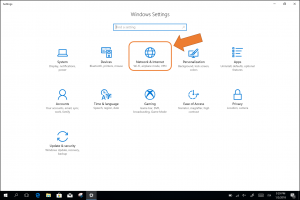
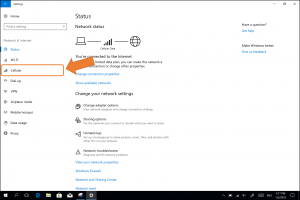
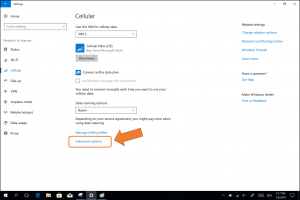
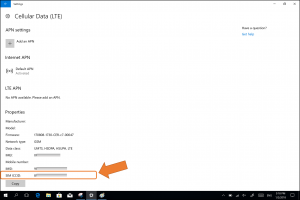
On Windows 10 (NB: instructions for Windows 11 at the bottom of the page) To find your eSIM’s ICCID: – Go to “Settings”, then “Networks & Internet”: – Select “Cellular” in the left menu – Click on “advanced options”: The ICCID will appear at the bottom (SIM ICCID):
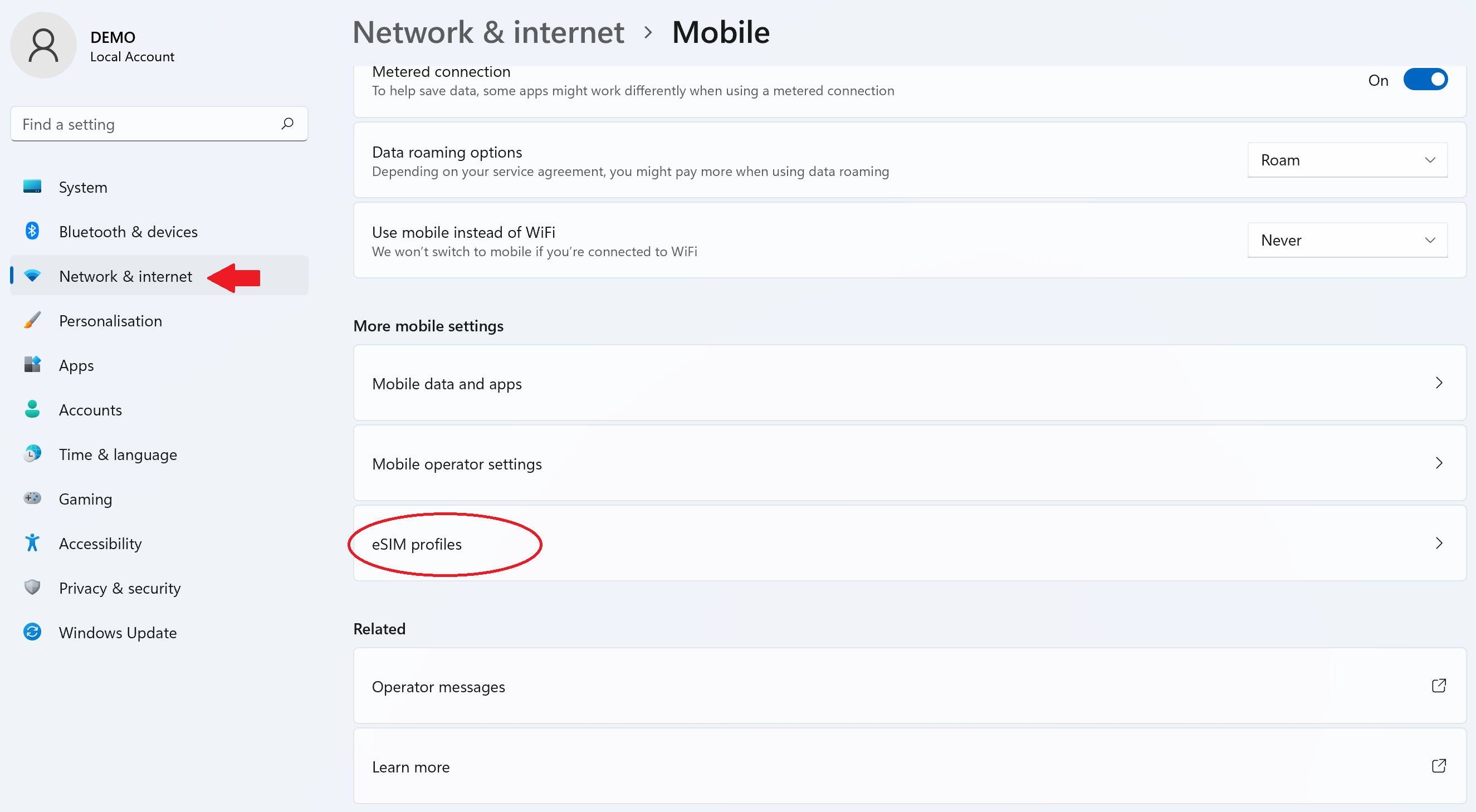
On Windows 11: – Go to Settings > Network and Internet > Cellular then select “eSIM Profiles”:
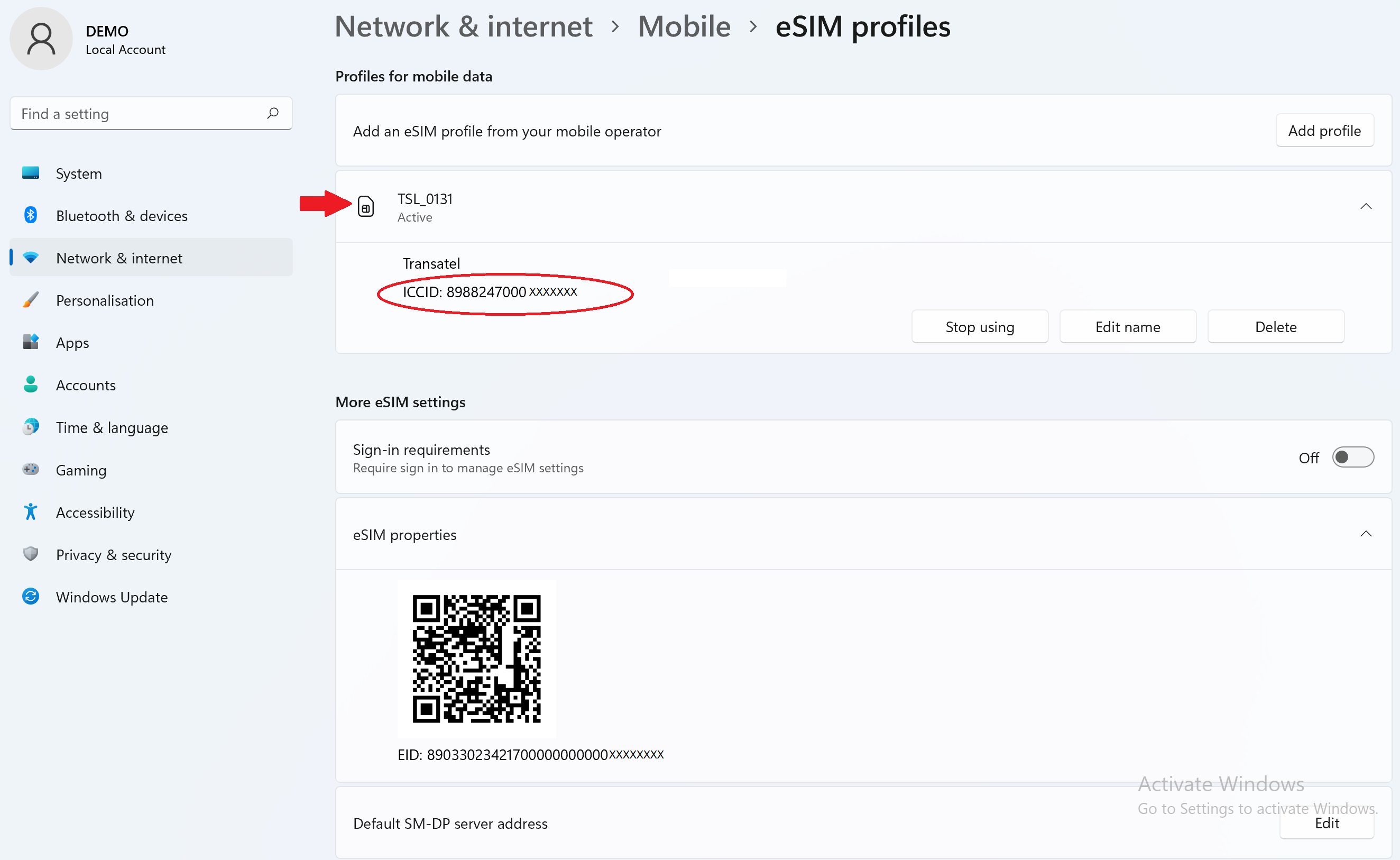
– Click on the profile to display the ICCID:
Contact
You haven’t found the answers to your questions in Assistance or FAQ?
You haven’t found the answers to your questions in Assistance or FAQ?
Great
Based on 42078 reviews on
Verified
Verified review
This user has been identified as a buyer
East download on the go
East download on the go. Strong connectivity.
Masa, 24 Jul 2026
Verified
Verified review
This user has been identified as a buyer
Easy to install and it worked
Easy to install and it worked. Have had two failures using Airalo on my iPhone 11. So stopped using them. This one I installed sitting on Elisabeth Line going to LHR in London and worked perfectly in Italy.
Richard Scoular, 24 Jul 2026
Verified
Verified review
This user has been identified as a buyer
Works perfectly.
Strong connection, easy install.
customer, 24 Jul 2026
Verified
Verified review
This user has been identified as a buyer
Great esim with unlimited data and quick speed for a lot of travel in a short time!
Purchasing the SIM and activitaing it were super easy.
We bought the unlimited package and did not need nearly that much data in spite of travelling over 2200 KM around Morocco. The fact that Ubigi chose the best network for whatever region we were in was extremely helpful. We used google maps the whole time, chatted, uploaded pictures to chats, etc. and were not even close to using the unlimited data after 13 days. Definately would purchase again. It gave us peace of mind during our travels.
One feedback: It would be great if Ubigi would offer more tips for how to turn of your original roaming data and limit it only to Ubigi when in the country you bought the esim for. Otherwise, it was a great experience!
Kristina Musil, 24 Jul 2026
Verified
Verified review
This user has been identified as a buyer
Roaming is ok!
Roaming is ok!
Chuan-Shin, 24 Jul 2026
Verified
Verified review
This user has been identified as a buyer
Cheap and good signal
Cheap and good signal
Anar, 24 Jul 2026
Verified
Verified review
This user has been identified as a buyer
Satisfied overall
Installation was easy, internet speeds were fast, and the cost was low; I was able to use it without any issues everywhere I visited—Warsaw and Copenhagen.
Ichiro, 24 Jul 2026
Verified
Verified review
This user has been identified as a buyer
Easy to use
Easy to use. Good coverage and strong signal
Prapat, 24 Jul 2026
Verified
Verified review
This user has been identified as a buyer
Very successful
I was used in greece and greece island. This app very successful. I didnt have any problems at all.
customer, 24 Jul 2026
Verified
Verified review
This user has been identified as a buyer
Great coverage no issue connecting and…
Great coverage no issue connecting and staying on line
customer, 24 Jul 2026
Verified
Verified review
This user has been identified as a buyer
I went to Algeria in July 2026
I went to Algeria in July 2026. I took a data pack (10Go) from Ubigi and it works wonderfuly. I installed the Esim at home one day before departure and as soon as we landed, I had the data working. Thanks to the ability yo use both Ooredo and Mobilis réseau, I had very good connexion even in thé Mountains in Djebala, above Nedroma, which is a quite remote location ! So I'm very satisfied for the service I hot from Ubigi ! Very simple to use and very efficient !
Carel SAÏDI, 24 Jul 2026
Verified
Verified review
This user has been identified as a buyer
Wanted an eSim, got an eSim
Good process, Good Network provider
customer, 24 Jul 2026
Verified
Verified review
This user has been identified as a buyer
very good net speed
I have excellent signal coverage and the internet works without problems even on the beach.
Sloba, 24 Jul 2026
Verified
Verified review
This user has been identified as a buyer
lifesaving
very easy to install and to use! works really well anywhere.
livia, 24 Jul 2026
Verified
Verified review
This user has been identified as a buyer
Easy to set up and use
Easy to set up and use. No issues
Jennifer Stephenson, 24 Jul 2026
Thank you
Your message has been sent. We’ll get back to you shortly.
Thank you
We have taken into account your subscription to the newsletter
How to check eSIM compatibility
Smartphones / Tablets:
Dial *#06#. → If an EID number appears, your device is eSIM-compatible.
Windows 10 / 11:
Press Windows+I. Go to “Network & Internet” → If you see "Cellular", your PC is eSIM-compatible.
How to check carrier unlocking
iPhone / iPad:
Go to Settings > General > About. Scroll to Carrier Lock. → If you see “No SIM restrictions”, your device is unlocked.
Android:
Go to Settings > Network & Internet > Mobile network. Disable Automatic network selection. → If multiple networks appear, your device is unlocked.
You already have an eSIM in your cart.
Each order can only include one eSIM data plan.
If you choose to add a new one, the current plan will be removed. What would you like to do?





 How to check eSIM compatibility
 How to check carrier unlocking