Skip to content
← Back to questions
How to delete my Ubigi account?

WARNING: After deleting your Ubigi account, you will not be able anymore to follow your Ubigi eSIM data consumption, top up your Ubigi eSIM account, nor receive any notifications from Ubigi.
In case you have active data plans on your Ubigi account , they will all be deleted. Data plans refund, retrieval, replacement, or transfer to other Ubigi account(s) are not possible after an account deletion. All requests of this kind after an account deletion will be systematically declined.

To delete your Ubigi account, please follow the steps below:
– first, connect to your Ubigi account from your Ubigi app or on Ubigi.me
– then, under the Settings tab, click on the “Delete my account” button:
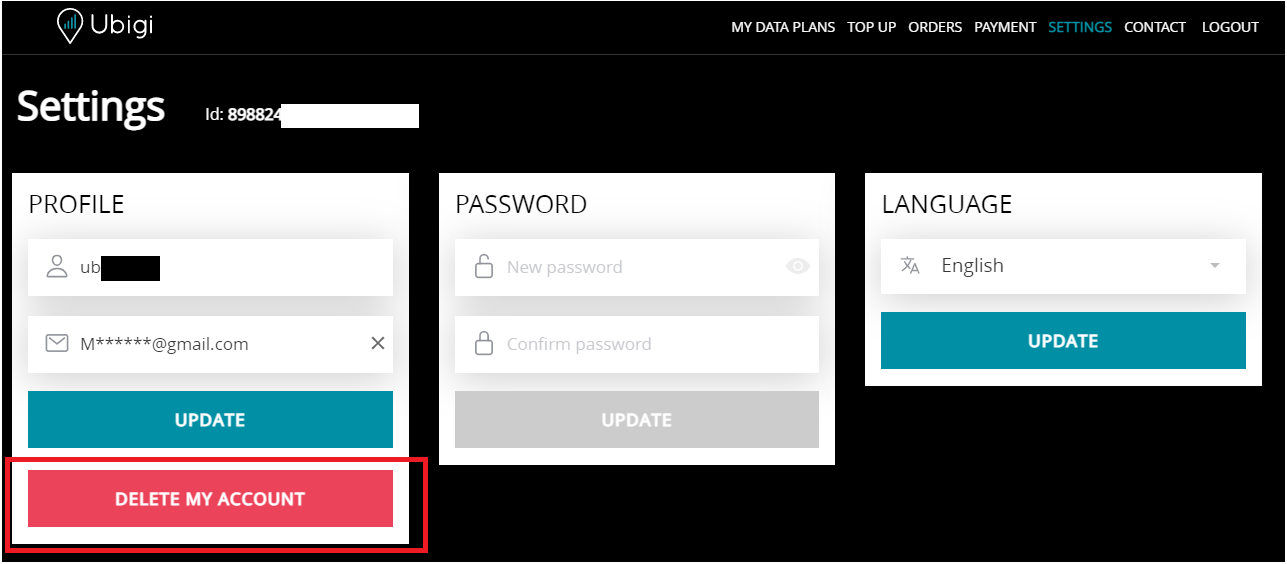

– finally, click on “Confirm” to delete your Ubigi account.

Once done, your remaining data plans and credentials will be deleted automatically, and you will be logged out from the Ubigi app or from Ubigi.me at the same moment.

You can also contact our Customer Service on this contact form directly to request the deletion of your Ubigi account. Your request will be processed within 24 working hours, and you will receive a confirmation email.

Note that the Ubigi account deletion do not delete the Ubigi eSIM profile installed on your device. To delete your eSIM profile, follow the instructions on sections below depending on your device:
How to delete an Ubigi eSIM profile on iPhone/iPad?
How to delete an Ubigi eSIM profile on an Android device?

Was this article helpful?
YesNo

Looking for something specific?

Other frequently asked questions:

Will data latency be impacted by the IP location feature?

Why is my Ubigi connection not working?

For which countries is the IP location feature available?

In which countries is the IP location feature supported?

IP location feature: Do I need to install an additional app to benefit from this feature?

What is the difference between a Country of Residence IP address and a Regional IP address?

Is the IP location feature free?

IP location feature: which devices are supported?

Can I make phone calls with Ubigi eSIM data plans?

I am stuck on the "FINAL STEP" page, and the message "Waiting for Ubigi cellular connectivity" has been displayed for several minutes. How can I resolve this?

I restored my data on my (new) iPhone, but my eSIM profile does not work. What to do?

I am about to travel. How do I manage my Ubigi eSIM profile on my device ?

Resolve an issue with Ubigi eSIM profile on Android device

Resolve an issue with Ubigi eSIM profile on iPhone

iMessage does not work with my Ubigi eSIM profile. What to do ?

How do I know if my Ubigi eSIM profile is activated on my iPhone/iPad?

How to get and install a Ubigi eSIM profile on iPhone?

How to get and install a Ubigi eSIM profile on an Android device?

How to get and install a Ubigi eSIM profile on iPad?

How to get and install a new Ubigi eSIM profile on my Windows 10 or Windows 11 laptop or tablet?

How do I activate my Ubigi services with my Windows 10 or Windows 11 device equipped with a Ubigi physical SIM card?

How do I activate my Ubigi services with my Windows 10 or Windows 11 laptop or tablet equipped with a Ubigi eSIM?

How can I buy a data plan from the Ubigi application on iPhone or iPad?

How can I check if my Ubigi eSIM profile is installed on my iPad?

How do I know if my Ubigi eSIM profile is activated and ready to use on my Android device?

How can I check if my Ubigi eSIM profile is installed on my iPhone?

My Ubigi eSIM profile is installed and active on my iPhone/iPad but I don't have any network displayed, what can I do?

My eSIM Ubigi profile is installed and active on my iPhone/iPad, the network is displayed but I don't have access to the Internet, what should I do?

Mobile data is applied to the Ubigi eSIM profile on my iPhone/iPad but I can't access the internet, what can I do?

How do I know if my Ubigi profile is installed on my Android device?

My Ubigi eSIM profile is installed and active on my Android device but I don’t have any network displayed, what can I do?

I can not connect with my Ubigi eSIM

My Ubigi eSIM profile is installed and active on my Android device, the network is displayed but I don’t have access to the Internet, what should I do?

Mobile data is applied to the Ubigi eSIM profile on my Android device, but impossible to access the internet, what can I do?

Which mobile devices support Ubigi eSIM?

How do I know if my Ubigi eSIM profile is activated on my Windows 10 or Windows 11 device?

How do I check the APN configuration of my Ubigi eSIM on Windows 10 or Windows 11?

What is a one-off and a recurring Ubigi data plans?

My Ubigi eSIM profile is activated on my Windows 10 or Windows 11 device but I do not have a network, what should I do?

What is the best way to contact Ubigi support?

How to use Ubigi with a dual SIM device?

How to use tethering with a Windows 10 or Windows 11 device to share the Ubigi connectivity?

How to use tethering with an iPhone/iPad to share the Ubigi connectivity?

How to use tethering with an Android device to share the Ubigi connectivity?

I did not use my Ubigi data plan, can I get a refund?

My device does not show "Ubigi" as carrier name, is it normal?

How can I find the ICCID of my Ubigi eSIM?

How to set the APN for Ubigi eSIM?

The Ubigi antenna pictogram is not displayed in Japan, why?

How to reset my password for my Ubigi eSIM account?

How can I create my Ubigi account on iPad?

How can I create my Ubigi account on an Android device?

How can I create my Ubigi account on a Windows 10 or Windows 11 device?

How can I create my Ubigi account on iPhone?

How can I change my Ubigi password?

How can I check the remaining balance of my Ubigi eSIM?

How can I buy a data plan from the Ubigi application on an Android device?

How can I buy a data plan from the Ubigi application by using a Windows 10 or Windows 11 device?

Do I need Wi-Fi to purchase a Ubigi data plan?

I paid for a Ubigi data plan but it does not appear in my account, what should I do?

I purchased the wrong data plan and did not use it, how can I change it?

How to get an invoice for my Ubigi data plan purchase?

I do not get the “eSIM – Mobile Data in my device” button on my iPad to install my Ubigi profile. Why and what should I do?

How to reinstall the Ubigi eSIM profile I deleted on my Windows 10 or Windows 11 device?

I have a new Android device. How can I reinstall my Ubigi eSIM profile on it?

Does my Ubigi eSIM profile have a validity period and will expire one day?

I have a new Windows10 device. How can I reinstall my Ubigi eSIM profile on it?

How can I enable my Ubigi eSIM on my iPhone when I want to use it again?

I lost my device. How can I block my Ubigi eSIM account?

How can I disable my Ubigi eSIM on my iPhone when I travel or when I do not use it?

I have multiple  Ubigi eSIM profiles. Can I manage them all under one Ubigi account?

How can I enable my Ubigi eSIM profile on my iPad when I want to use it again?

How can I disable my Ubigi eSIM profile on my iPad when I travel or when I do not use it?

How can I disable my Ubigi eSIM on my Android device when I travel or when I do not use it?

How can I enable my Ubigi eSIM on my Android device when I want to use it again?

How to delete a Ubigi eSIM profile on iPhone/iPad?

How to delete a Ubigi eSIM profile on an Android device?

How to delete a Ubigi eSIM profile on a Windows 10 or Windows 11 device ?

How can I find PIN, PIN2 or PUK codes for my Ubigi eSIM?

Ubigi connection is not working. Should I disable any active DNS or VPN on my device?

Great Trustpilot stars Trustpilot
Trustpilot stars
Based on 29737 reviews on Trustpilot
5 stars Verified
Verified review
This user has been identified as a buyer
Easy to set up
Easy to set up. Good value. Works every time
Gerard Breisliln, 13 Dec 2025
5 stars Verified
Verified review
This user has been identified as a buyer
Ordering a new service was easy
Ordering a new service was easy, and the service was immediately available on the phone.
Whitehat, 13 Dec 2025
5 stars Verified
Verified review
This user has been identified as a buyer
I travel to Scandinavia for 14 days in…
I travel to Scandinavia for 14 days in December 2025.I bought a package for Scandinavian countries. I visited Norway, Finland, Denmark and Sweden. I didn't have any problems with signal strength or interruptions. The price is OK, the signal is excellent. Based on my experience during my stay in Scandinavia, I can only give it a 5 star rating.
Rezac Doo Dragan Rezac, 13 Dec 2025
5 stars Verified
Verified review
This user has been identified as a buyer
A friend recommended this and it worked…
A friend recommended this and it worked perfectly for a trip abroad. Very cost effective and easy to step up. Will use again when traveling.
Mike Hamrah, 13 Dec 2025
5 stars Verified
Verified review
This user has been identified as a buyer
Very smooth and easy to use
Very smooth and easy to use. It worked well everywhere we went in Japan, even remote places like Kayabuki No Sato!
Stanley Black, 13 Dec 2025
5 stars Verified
Verified review
This user has been identified as a buyer
Impressed
So far, the addition of French eSIMs in our Verizon iPhones has been seamless. Instant local French calling and great data.
Mark W., 13 Dec 2025
5 stars Verified
Verified review
This user has been identified as a buyer
easy to install
easy to install
Gladys Dyo, 13 Dec 2025
4 stars Verified
Verified review
This user has been identified as a buyer
Visiting Naples Italy
Visiting Naples Italy got flawless connection in old city! But the application itself shows error in several attempts to check the plan status , so, one star less.
Eduard Barsky, 13 Dec 2025
4 stars Verified
Verified review
This user has been identified as a buyer
Simple
Simple, just a touch confusing, but trusted the process and it worked perfectly as it should.
customer, 13 Dec 2025
5 stars Verified
Verified review
This user has been identified as a buyer
Just difficult for me to start at the…
Just difficult for me to start at the airport (so my belgian fee costed), after, easy and illimited
Cecile Wegria, 13 Dec 2025
5 stars Verified
Verified review
This user has been identified as a buyer
stress free
Efficient and no problems
Khshj, 13 Dec 2025
5 stars Verified
Verified review
This user has been identified as a buyer
Easy to use
Easy to use. Great experience and good price.
Patti Atwood, 13 Dec 2025
5 stars Verified
Verified review
This user has been identified as a buyer
Good Value , Good Coverage
So far for my Japan trip, I have had great internet for my stay. No dropouts, good coverage, reliable!
BILLY, 13 Dec 2025
5 stars Verified
Verified review
This user has been identified as a buyer
Old person here...took a while to sort…
Old person here...took a while to sort it out as I had never used an esim before. Once I had it going properly it has been great.
Kris Kowitz, 13 Dec 2025
5 stars Verified
Verified review
This user has been identified as a buyer
It’s easy to use and it works the…
It’s easy to use and it works the moment I land wherever I am
customer, 13 Dec 2025

Your message has been sent.
We’ll get back to you shortly.

We have taken into account your subscription to the newsletter