My eSIM Ubigi profile is installed and active on my iPhone/iPad, the network is displayed but I don’t have access to the Internet, what should I do?
Important: When you have multiple SIM cards/eSIMs (“plans”) on your iPhone/iPad, it is not possible to activate cellular data on two plans at the same time. You can only apply it to one of them.
You need to verify that Cellular Data is applied to the Ubigi eSIM profile for you to access the Internet. To do that, go to:
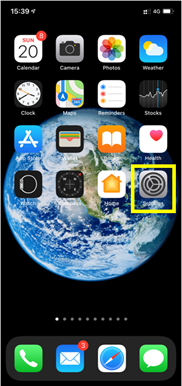
– Settings:
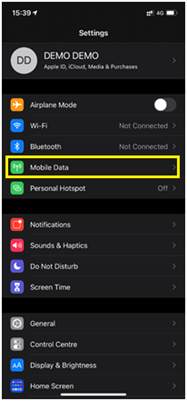
– Then, select Mobile Data:
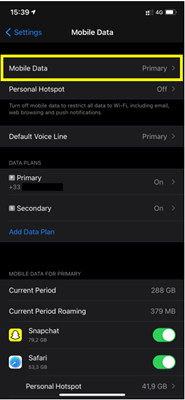
– Then, select Mobile data again:
– Finally enter Cellular Data and select “secondary”:
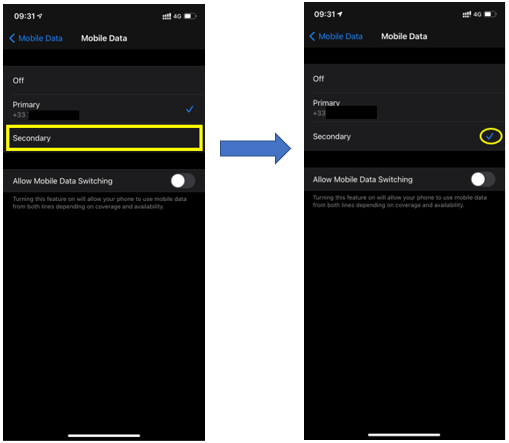
Your iPhone/iPad will now use the cellular data connection from your Ubigi eSIM profile and you will be able to access the Internet with it.

Contact
You haven’t found the answers to your questions in Assistance or FAQ?
Great
Based on 34010 reviews on
Verified
Verified review
This user has been identified as a buyer
Good basic plan choices and Easy to setup
Great setup experience and good range of general plans. One big gripe however is the lack of big data plans as most seem geared up for low use travellers and not data consumers. There are some unlimited packs if you dig deep, but they seem rare.
The Gaffer, 09 Apr 2026
Verified
Verified review
This user has been identified as a buyer
Reliable
Reliable. Amazing. I went to 3 different counties and used only this e-sim service. Very convenient.
Chibi, 09 Apr 2026
Verified
Verified review
This user has been identified as a buyer
Easy installation
Easy installation. No problem with using it in various places in Japan.
Franc, 09 Apr 2026
Verified
Verified review
This user has been identified as a buyer
Hat alles Super funktioniert.
Carsten Radke, 09 Apr 2026
Verified
Verified review
This user has been identified as a buyer
Best Travel ESim by far!
Absolutely brilliant! My husband and I have used other esims for trips before but they have been difficult to enable. Ubigo is so easy to use, easy to purchase and load, connecting automatically when we swapped countries, great value and great reception everywhere. Now we have the app we will definitely use for all future vacations. Highly recommend.
Deborah Sutton, 09 Apr 2026
Verified
Verified review
This user has been identified as a buyer
Smooth process and good connection for…
Smooth process and good connection for 14 days in Japan. (Nakasendo trail, Tokyo, Mt. Fuji area and Kyoto/Osaka)
customer, 09 Apr 2026
Verified
Verified review
This user has been identified as a buyer
Great connectivity
The ease of connecting to people and getting information on shops and places to go.
Gloria, 09 Apr 2026
Verified
Verified review
This user has been identified as a buyer
Was skeptical of the reviews but…
Was skeptical of the reviews but everyone recommended this and it’s awesome! High quality service with bars everywhere in Japan even Koyasan! Got 25gb for 3 weeks and was enough if I downloaded maps before leaving!
customer, 09 Apr 2026
Verified
Verified review
This user has been identified as a buyer
Works great everywhere in Japan
US customer, 09 Apr 2026
Verified
Verified review
This user has been identified as a buyer
Works very well in japan
Fabrice, 09 Apr 2026
Verified
Verified review
This user has been identified as a buyer
Consistent connection and was very…
Consistent connection and was very useful
In Japan using Google Maps. Reasonably priced too.
Maria, 09 Apr 2026
Verified
Verified review
This user has been identified as a buyer
Perfect
Perfect. Good chouce
Monica customer, 09 Apr 2026
Verified
Verified review
This user has been identified as a buyer
On certain places ubigi didn't work
ReinhardSchneider, 09 Apr 2026
Verified
Verified review
This user has been identified as a buyer
Nice and easy handling all the way…
Nice and easy handling all the way thanks
Akash, 09 Apr 2026
Verified
Verified review
This user has been identified as a buyer
Sometimes lost signal
customer, 09 Apr 2026
Thank you
Your message has been sent. We’ll get back to you shortly.
Thank you
We have taken into account your subscription to the newsletter
How to check eSIM compatibility
Smartphones / Tablets:
Dial *#06#. → If an EID number appears, your device is eSIM-compatible.
Windows 10 / 11:
Press Windows+I. Go to “Network & Internet” → If you see "Cellular", your PC is eSIM-compatible.
How to check carrier unlocking
iPhone / iPad:
Go to Settings > General > About. Scroll to Carrier Lock. → If you see “No SIM restrictions”, your device is unlocked.
Android:
Go to Settings > Network & Internet > Mobile network. Disable Automatic network selection. → If multiple networks appear, your device is unlocked.
You already have an eSIM in your cart.
Each order can only include one eSIM data plan.
If you choose to add a new one, the current plan will be removed. What would you like to do?

