My Ubigi eSIM profile is installed and active on my iPhone/iPad but I don’t have any network displayed, what can I do?
When your Ubigi eSIM profile (“secondary” Plan) does not attach any network, it will be displayed as follows on your iPhone/iPad: – the stepped network represents the signal status of your main line – the dotted network just below represents the signal status of your Ubigi eSIM (“secondary” plan) When the dots are all greyed out, it means that there is no connection to the network with the active eSIM profile.
To get a network, you must perform a manual network search. To do that, in your iPhone/iPad go to :
– Settings:
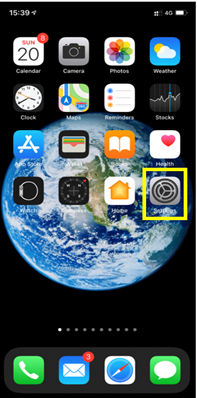
– Then select Mobile Data:
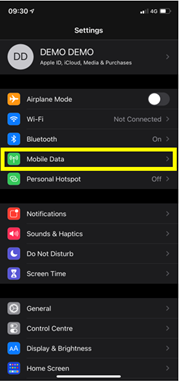
– Then in DATA PLANS, select your eSIM profile (“Secondary”/”Ubigi”):
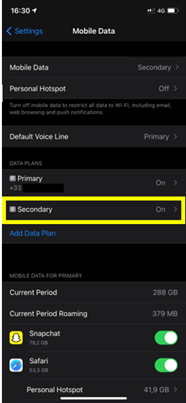
– Choose Network selection
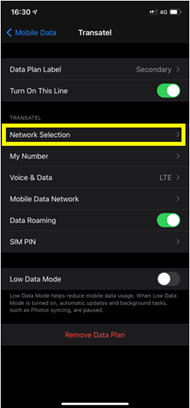
– After that, deactivate the automatic mode in order to perform a manual search:
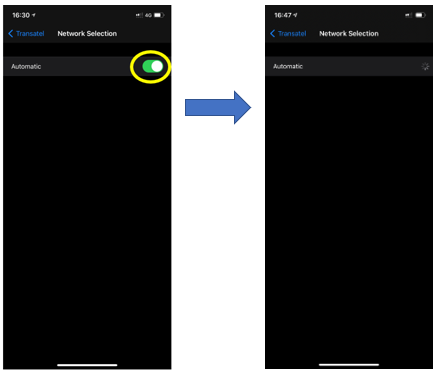
– Finally, when the list of available networks is displayed, select the Ubigi network:
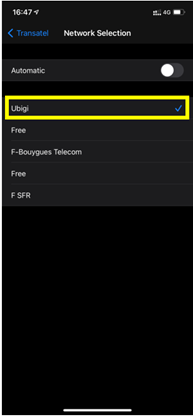
Note : You will see Ubigi appear or the name of our telecom partner in the country in which you are located (see here the list of our telecom partners by country in order to select the correct network).
Contact
You haven’t found the answers to your questions in Assistance or FAQ?
Great
Based on 44999 reviews on
Verified
Verified review
This user has been identified as a buyer
Very pleased
Very easy to install and use, great price, used the Sri Lanka SIM and it switched between their two strongest networks to maximise good coverage. Would use again.
customer, 04 Sep 2026
Verified
Verified review
This user has been identified as a buyer
Very satisfied with Ubigi during my…
Very satisfied with Ubigi during my trip to Marrakech. The connection was solid throughout, thanks to their partnerships with multiple providers, and the eSIM was very easy to install. Great experience overall!
Omer Ahmed, 04 Sep 2026
Verified
Verified review
This user has been identified as a buyer
Didn’t experience any problems yet!
Miriam Ovadia, 04 Sep 2026
Verified
Verified review
This user has been identified as a buyer
Didn't know anything about them and…
Didn't know anything about them and found through a search needing an esim whilst abroad. Easy to use, fair pricing and blazing speeds! Very impressed, hope they don't lose to corporate greed.
customer, 04 Sep 2026
Verified
Verified review
This user has been identified as a buyer
from buying data till using ,everything…
from buying data till using ,everything is great. I did not exeperience any kind of connection problem.
customer, 04 Sep 2026
Verified
Verified review
This user has been identified as a buyer
So far so good
So far so good
customer, 04 Sep 2026
Verified
Verified review
This user has been identified as a buyer
First time user
First time user. Easy to use, worked well. Top ups easy too. Good value.
customer, 04 Sep 2026
Verified
Verified review
This user has been identified as a buyer
Highly recommended
Very easy to install. A cost effective solution to stay connected for our trip to Japan. We installed at home and it activated when we landed in Tokyo. Highly recommended.
Karen, 04 Sep 2026
Verified
Verified review
This user has been identified as a buyer
Excellent Service
The service is great however the signal drops intermittently in Hollywood Florida. Fix that and you are perfect.
Reay Donawa, 04 Sep 2026
Verified
Verified review
This user has been identified as a buyer
Easy setup
Easy setup, good price, overall very happy. Speed and connection quality both good.
customer, 04 Sep 2026
Verified
Verified review
This user has been identified as a buyer
Fine service
Fine service
customer, 04 Sep 2026
Verified
Verified review
This user has been identified as a buyer
Easy and fast
Easy and fast, perfect!
Wolfgang Krieg, 04 Sep 2026
Verified
Verified review
This user has been identified as a buyer
Awesome in all aspects
Awesome in all aspects! I recommend for anyone
Augusto Araújo, 04 Sep 2026
Verified
Verified review
This user has been identified as a buyer
Great service!
Great service!
Elena González González, 04 Sep 2026
Verified
Verified review
This user has been identified as a buyer
Great connexion speed
Yasmina, 04 Sep 2026
Thank you
Your message has been sent. We’ll get back to you shortly.
Thank you
We have taken into account your subscription to the newsletter
How to check eSIM compatibility
Smartphones / Tablets:
Dial *#06#. → If an EID number appears, your device is eSIM-compatible.
Windows 10 / 11:
Press Windows+I. Go to “Network & Internet” → If you see "Cellular", your PC is eSIM-compatible.
How to check carrier unlocking
iPhone / iPad:
Go to Settings > General > About. Scroll to Carrier Lock. → If you see “No SIM restrictions”, your device is unlocked.
Android:
Go to Settings > Network & Internet > Mobile network. Disable Automatic network selection. → If multiple networks appear, your device is unlocked.
You already have an eSIM in your cart.
Each order can only include one eSIM data plan.
If you choose to add a new one, the current plan will be removed. What would you like to do?


